1. Overview
In this tutorial, we’ll show how to merge cells in Excel with Apache POI.
2. Apache POI
To begin with, we first need to add the poi dependency to our project pom.xml file:
<dependency>
    <groupId>org.apache.poi</groupId>
    <artifactId>poi</artifactId>
    <version>5.3.0</version>
</dependency>
Apache POI uses the Workbook interface to represent an Excel file. It also uses Sheet, Row, and Cell interfaces to model different levels of elements in an Excel file.
3. Merge Cells
In Excel, we sometimes want to display a string across two or more cells. For example, we can merge several cells horizontally to create a table title that spans several columns:
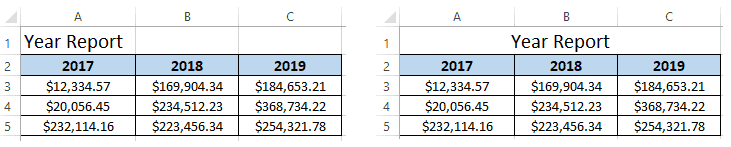
To achieve this, we can use addMergedRegion to merge several cells defined by CellRangeAddress. There are two ways to set the cell range. Firstly, we can use four zero-based indexes to define the top-left cell location and the bottom-right cell location:
sheet = // existing Sheet setup
int firstRow = 0;
int lastRow = 0;
int firstCol = 0;
int lastCol = 2
sheet.addMergedRegion(new CellRangeAddress(firstRow, lastRow, firstCol, lastCol));
We can also use a cell range reference string to provide the merged region:
sheet = // existing Sheet setup
sheet.addMergedRegion(CellRangeAddress.valueOf("A1:C1"));
If cells have data before we merge them, Excel will use the top-left cell value as the merged region value. For the other cells, Excel will discard their data.
When we add multiple merged regions on an Excel file, we should not create any overlaps. Otherwise, Apache POI will throw an exception at runtime.
4. Aligning the Merged Cell
After merging cells, we often need to align the content within the merged cell to ensure it looks well-organized. To align the content, we can use the CellStyle class to set various alignment properties.
Here’s how to create a cell style and apply alignment to the merged cell:
CellStyle cellStyle = workbook.createCellStyle();
cellStyle.setAlignment(HorizontalAlignment.CENTER);
cellStyle.setVerticalAlignment(VerticalAlignment.CENTER);

Row row = sheet.getRow(firstRow);
Cell cell = row.getCell(firstCol);
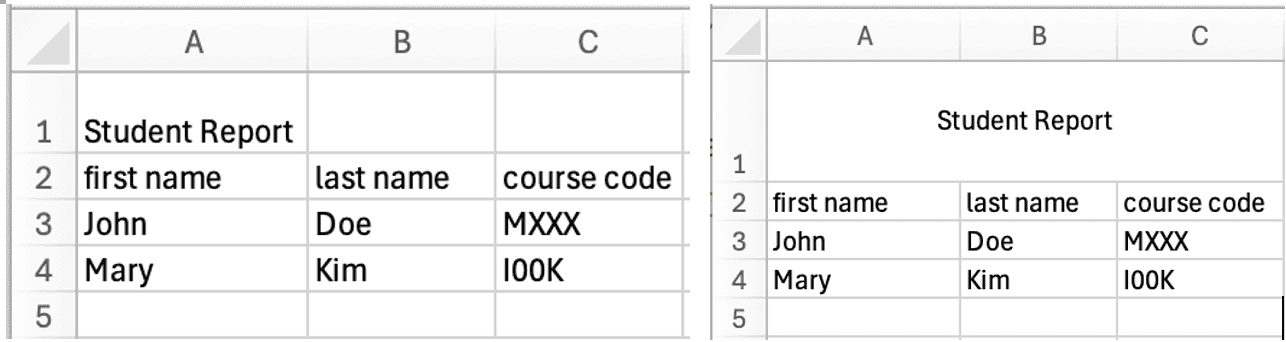
In this example, we set the horizontal and vertical alignment of the merged cell to center. This ensures that the text in the merged cell is centered both horizontally and vertically:
5. Conclusion
In this quick article, we saw how to merge several cells with Apache POI. We also discussed two ways to define the merged region.
The code backing this article is available on GitHub. Once you're
logged in as a Baeldung Pro Member, start learning and coding on the project.


