
Angular PrimeNG is an open-source framework with a rich set of native Angular UI components that are used for great styling and this framework is used to make responsive websites with very much ease. In this article, we are going to learn Angular PrimeNG ContextMenu Properties.
The ContextMenu component displays a menu when right-clicking over any component. Many components provide a special integration with the ContextMenu component. The ContextMenu component appears similar to the menu that appears when we right-click over any application or desktop screen on a PC.
Angular PrimeNG ContextMenu Properties: The properties of the component allow us to customize the component and display it accordingly and suit the website design. ContextMenu properties are described below:
- model: This is used to provide an array of menu items.
- global: This is used to attach the menu to a document instead of a particular item.
- target: This is used as a Local template variable name of the element to attach the context menu.
- style: Inline style of the component.
- styleClass: Style class of the component.
- appendTo: Target element to attach the overlay
- baseZIndex: This is used for the zIndex value to use in layering.
- autoZIndex: This is used to decide Whether to automatically manage to layer.
- triggerEvent: Event for which the menu must be displayed.
Syntax:
<p-contextMenu
    [target]="..."
    [model]="...">
</p-contextMenu>

<img #gfglogo src="..." alt="...">
Creating Angular application & module installation:
Step 1: Create an Angular application using the following command.
ng new appname
Step 2: After creating your project folder i.e. appname, move to it using the following command.
cd appname
Step 3: Install PrimeNG in your given directory.
npm install primeng --save
npm install primeicons --save
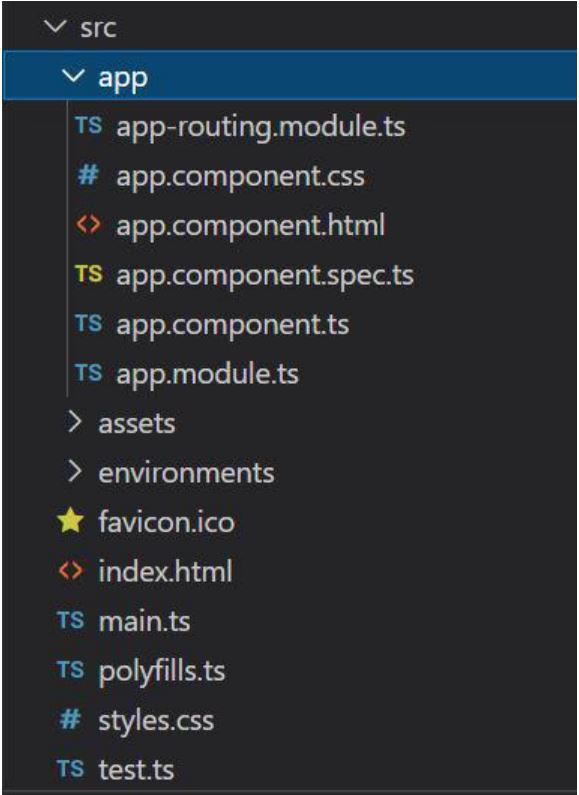
Project Structure: It will look like the following:
Steps to run the application: Run the below command to see the output:
ng serve --save
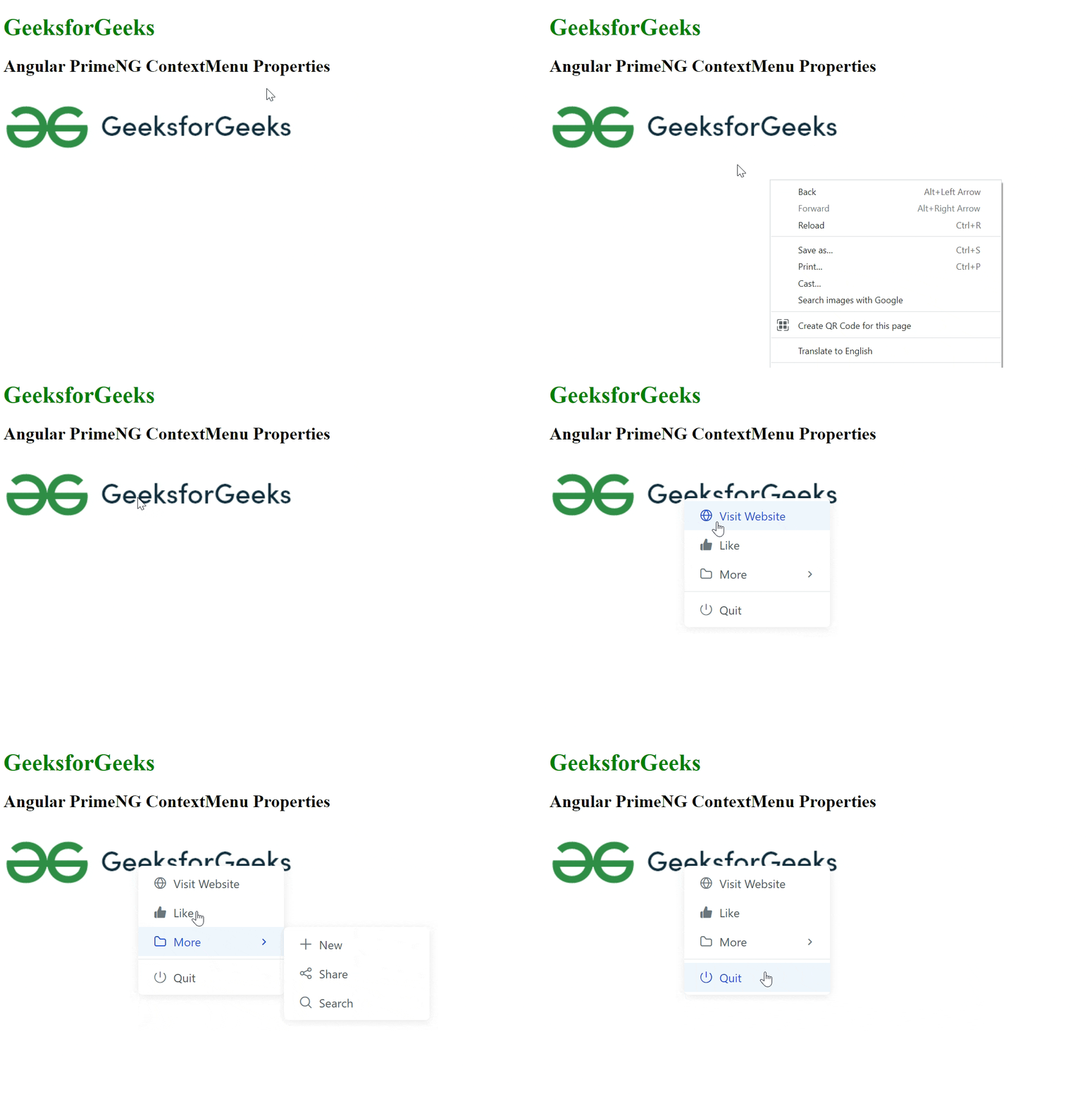
Example 1: In this example, we will learn about the model and target.
- app.component.html:
<div style="width:80%">
    <h1 style="color: green;">
        GeeksforGeeks
    </h1>
    <h2>
        Angular PrimeNG ContextMenu Properties
    </h2>
    <img #img src=
"https://media.geeksforgeeks.org/wp-content/cdn-uploads/20210419113249/gfg-new-logo-min.png"
        alt="Logo"
    />
    <p-contextMenu [target]="img" [model]="items"></p-contextMenu>
</div>
- app.component.ts:
import { Component } from "@angular/core";
import { MenuItem } from "primeng/api";

@Component({
    selector: "app-root",
    templateUrl: "./app.component.html"
})

export class AppComponent {
    items: MenuItem[]=[];

    ngOnInit() {
        this.items = [
            {
                label: "Visit Website",
                icon: "pi pi-fw pi-globe"
            },
            {
                label: "Like",
                icon: "pi pi-fw pi-thumbs-up-fill"
            },
            {
                label: "More",
                icon: "pi pi-fw pi-folder",
                items: [
                    {
                        label: "New",
                        icon: "pi pi-fw pi-plus"
                    },
                    {
                        label: "Share",
                        icon: "pi pi-fw pi-share-alt"
                    },
                    {
                        label: "Search",
                        icon: "pi pi-fw pi-search"
                    }
                ]
            },

            {
                separator: true
            },
            {
                label: "Quit",
                icon: "pi pi-fw pi-power-off"
            }
        ];
    }
}
- app.module.ts:
import { NgModule } from "@angular/core";
import { BrowserModule } from "@angular/platform-browser";
import { RouterModule } from "@angular/router";
import { BrowserAnimationsModule }
    from "@angular/platform-browser/animations";
import { AppComponent } from "./app.component";
import { ContextMenuModule } from "primeng/contextmenu";

@NgModule({
    imports: [
        BrowserModule,
        BrowserAnimationsModule,
        ContextMenuModule
    ],
    declarations: [AppComponent],
    bootstrap: [AppComponent]
})

export class AppModule {}
Output:
Example 2: In this article, we will learn about the global property. We will be able to see context menu options when we click anywhere on the screen irrespective of the target.
- app.component.html:
<div style="width:80%">
    <h1 style="color: green;">
        GeeksforGeeks
    </h1>
    <h2>
        Angular PrimeNG ContextMenu Properties
    </h2>
    <p #p>
      Right Click anywhere on this screen.
      You will see the Context Menu Options
      </p>
    <p-contextMenu [target]="p"
        [model]="items" [global]="true">
      </p-contextMenu>
</div>
- app.component.ts:
import { Component } from "@angular/core";
import { MenuItem } from "primeng/api";

@Component({
    selector: "app-root",
    templateUrl: "./app.component.html"
})

export class AppComponent {
    items: MenuItem[]=[];

    ngOnInit() {
        this.items = [
            {
                label: "Visit Website",
                icon: "pi pi-fw pi-globe"
            },
            {
                label: "Like",
                icon: "pi pi-fw pi-thumbs-up-fill"
            },
            {
                label: "More",
                icon: "pi pi-fw pi-folder",
                items: [
                    {
                        label: "New",
                        icon: "pi pi-fw pi-plus"
                    },
                    {
                        label: "Share",
                        icon: "pi pi-fw pi-share-alt"
                    },
                    {
                        label: "Search",
                        icon: "pi pi-fw pi-search"
                    }
                ]
            },

            {
                separator: true
            },
            {
                label: "Quit",
                icon: "pi pi-fw pi-power-off"
            }
        ];
    }
}
- app.module.ts:
import { NgModule } from "@angular/core";
import { BrowserModule } from "@angular/platform-browser";
import { RouterModule } from "@angular/router";
import { BrowserAnimationsModule }
    from "@angular/platform-browser/animations";
import { AppComponent } from "./app.component";
import { ContextMenuModule } from "primeng/contextmenu";

@NgModule({
    imports: [
        BrowserModule,
        BrowserAnimationsModule,
        ContextMenuModule
    ],
    declarations: [AppComponent],
    bootstrap: [AppComponent]
})

export class AppModule {}
Output:

