
Angular PrimeNG is an open-source framework with a rich set of native Angular UI components that are used for great styling and this framework is used to make responsive websites with very much ease. This article will show us how to use the calendar component in angular ngx bootstrap.
CascadeSelect Templating Component: It is used to display the content of an item that can be customized with the option template.
Syntax:
<p-cascadeSelect >
    <ng-template>
        ...
       </ng-template>
</p-cascadeSelect>
Creating Angular Application & Module Installation:
Step 1: Create an Angular application using the following command.
ng new appname
Step 2: After creating your project folder i.e. appname, move to it using the following command.
cd appname
Step 3: Install PrimeNG in your given directory.
npm install primeng --save
npm install primeicons --save
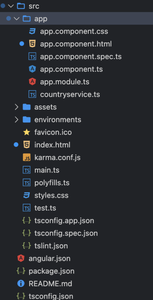
Project Structure:
Example 1: In the below code, we will use the above syntax to demonstrate the use of the Form CascadeSelect Templating Component.
app.component.html
<div style="text-align:center;">
    <h1 style="color:green;">
        GeeksforGeeks
    </h1>

    <h3>A computer science portal for geeks</h3>

    <h4>
        Angular PrimeNG Form CascadeSelect
        Templating Component
    </h4>

    <h4>Templating</h4>

    <p-cascadeSelect p-cascadeselect-label
        [(ngModel)]="selectedCity2"
        [options]="countries"
        optionLabel="cname"
        optionGroupLabel="name"
        [optionGroupChildren]="['states', 'cities']"
        [style]="{'minWidth': '14rem'}"
        placeholder="Select a City">
        <ng-template pTemplate="option" let-option>
            <div class="country-item">
                <i class="pi pi-compass p-mr-2"
                    *ngIf="option.cities"></i>
                <i class="pi pi-map-marker p-mr-2"
                    *ngIf="option.cname"></i>
                <span>{{option.cname || option.name}}</span>
            </div>
        </ng-template>
    </p-cascadeSelect>
</div>
app.component.ts
import { Component } from '@angular/core';

@Component({
    selector: 'app-root',
    templateUrl: './app.component.html',
})
export class AppComponent {
    countries: any[];
    selectedCity1: any;
    selectedCity2: any;

    ngOnInit() {
        this.countries = [
            {
                name: 'INDIA',
                code: 'IND',
                states: [{
                    name: 'UP',
                    cities: [
                        { cname: 'Varanasi', code: 'A-SY' },
                        { cname: 'Kanpur', code: 'A-NE' },
                        { cname: 'Ayodhya', code: 'A-WO' },
                    ],
                },
                {
                    name: 'Maharashtra',
                    cities: [
                        { cname: 'Mumbai', code: 'MUM' },
                        { cname: 'Pune', code: 'Pune' },
                    ],
                },
                ],
            },
        ];
    }
}
app.module.ts
import { NgModule } from "@angular/core";
import { BrowserModule } from "@angular/platform-browser";
import { FormsModule } from "@angular/forms";
import { BrowserAnimationsModule } from
    "@angular/platform-browser/animations";
import { AppComponent } from "./app.component";
import { CascadeSelectModule } from "primeng/cascadeselect";

@NgModule({
    imports: [
        BrowserModule,
        BrowserAnimationsModule,
        CascadeSelectModule,
        FormsModule
    ],
    declarations: [AppComponent],
    bootstrap: [AppComponent]
})
export class AppModule { }
Output:

Example 2: In the below code, we will use the above syntax to demonstrate the use of the Form CascadeSelect Templating Component.
app.component.html
<div style="text-align:center;">
    <h1 style="color:green;">
        GeeksforGeeks
    </h1>

    <h3>A computer science portal for geeks</h3>

    <h4>
        Angular PrimeNG Form CascadeSelect
        Templating Component
    </h4>

    <h5>Without Templating</h5>

    <p-cascadeSelect [(ngModel)]="selectedCity1"
        [options]="countries"
        optionLabel="cname"
        optionGroupLabel="name"
        [optionGroupChildren]="['states', 'cities']"
        [style]="{'minWidth': '14rem'}"
        placeholder="Select a City">
    </p-cascadeSelect>
</div>
app.component.ts
import { Component } from '@angular/core';

@Component({
    selector: 'app-root',
    templateUrl: './app.component.html',
})
export class AppComponent {
    countries: any[];
    selectedCity1: any;
    selectedCity2: any;

    ngOnInit() {
        this.countries = [
            {
                name: 'INDIA',
                code: 'IND',
                states: [
                    {
                        name: 'UP',
                        cities: [
                            { cname: 'Varanasi', code: 'A-SY' },
                            { cname: 'Kanpur', code: 'A-NE' },
                            { cname: 'Ayodhya', code: 'A-WO' },
                        ],
                    },
                    {
                        name: 'Maharashtra',
                        cities: [
                            { cname: 'Mumbai', code: 'MUM' },
                            { cname: 'Pune', code: 'Pune' },
                        ],
                    },
                ],
            },
        ];
    }
}
app.module.ts
import { NgModule } from "@angular/core";
import { BrowserModule } from "@angular/platform-browser";
import { FormsModule } from "@angular/forms";
import { BrowserAnimationsModule } from
    "@angular/platform-browser/animations";
import { AppComponent } from "./app.component";
import { CascadeSelectModule } from "primeng/cascadeselect";

@NgModule({
    imports: [
        BrowserModule,
        BrowserAnimationsModule,
        CascadeSelectModule,
        FormsModule
    ],
    declarations: [AppComponent],
    bootstrap: [AppComponent]
})
export class AppModule { }
Output:

