
Lodash is an open-source library that helps in performing operations on various data structures like arrays, or objects, seamlessly and efficiently. When used with javascript frameworks, like angular, it can ease the life of developers while writing functions to manipulate arrays or objects. In this article, we will learn how to use Lodash in angular applications.
Why Use Lodash in Angular?
Angular has many built-in features for handling data binding, services, and directives, but it lacks a comprehensive utility library for tasks such as array manipulation, deep object inspection, or throttling. Lodash helps fill this gap by providing:
- Efficient Data Handling: Lodash simplifies complex data operations such as filtering, mapping, and grouping arrays.
- Object Utilities: It offers deep cloning, object comparison, and other utilities to manage large data structures.
- Functional Programming: Lodash provides functional utilities like compose, curry, and partial to improve code reusability and readability.
Steps To Use Loadash in Angular Application
Step 1: Create an angular app, and install Lodash
First, create an angular app using the below command:
ng new angular-lodoash
cd angular-lodoash
Next, install the lodash library, and its types:
npm install lodash
npm install @types/lodash --save-dev
Project Structure
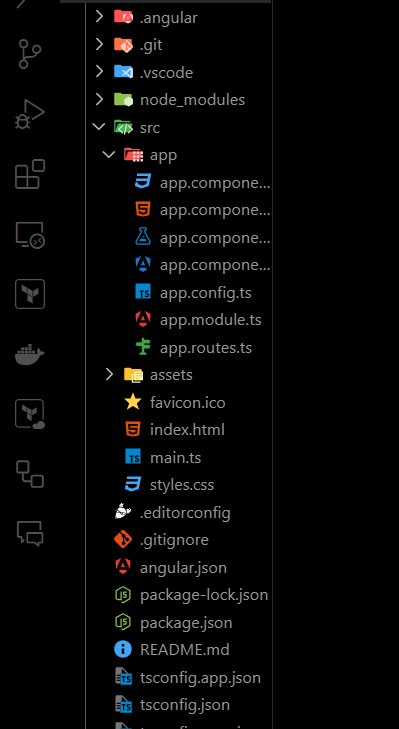
Dependencies
"dependencies": {
    "@angular/animations": "^16.2.0",
    "@angular/common": "^16.2.0",
    "@angular/compiler": "^16.2.0",
    "@angular/core": "^16.2.0",
    "@angular/forms": "^16.2.0",
    "@angular/platform-browser": "^16.2.0",
    "@angular/platform-browser-dynamic": "^16.2.0",
    "@angular/router": "^16.2.0",
    "lodash": "^4.17.21",
    "rxjs": "~7.8.0",
    "tslib": "^2.3.0",
    "zone.js": "~0.13.0"
  }
Step 2: Use lodash in an angular component
In this step, we will use the lodash filter method to filter even number, and then display it in the UI.
// app.component.ts

import { Component } from '@angular/core';
import _ from 'lodash';

@Component({
    selector: 'app-root',
    templateUrl: './app.component.html',
    styleUrls: ['./app.component.css'],
    standalone: true
})
export class AppComponent {
    title = 'Lodash with Angular';
    items = [1, 2, 3, 4, 5];
    filteredItems: number[];

    constructor() {
        this.filteredItems = _.filter(this.items, item => item % 2 === 0);
    }
}
Step 3: Update template code to show changes in the UI
Now, update the template code to display the chunked array in the UI
<!--app.component.html-->

<p>Original Items: {{ items }}</p>
<p>Filtered Items (Even Numbers): {{ filteredItems }}</p>
Step 4: Run the application
Run the application using the below command, and go to http://localhost:4200/
ng serveOutput
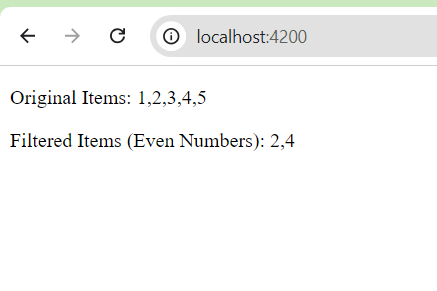
Best Practices for Using Lodash with AngularJS
- Use Lodash in Controllers and Services: Avoid using Lodash directly in templates to keep logic in your controllers and services. This improves performance and keeps templates clean.
- Inject Lodash Using a Factory or Service: This ensures that Lodash is easily available throughout your application and promotes better dependency management.
- Optimize with Lodash Functions: Lodash functions like _.debounce(), _.throttle(), and _.groupBy() can help optimize performance and improve code readability.
