
CatBoost is a gradient boosting library that naturally handles sparse data as it has many zero or missing values without extra preprocessing. It supports sparse matrix formats (CSR/CSC), treats missing values smartly and uses efficient encoding for categorical variables. This makes training fast and memory efficient even for huge sparse datasets.

CatBoost with Sparse Data
- Native Support for Missing Values: CatBoost automatically treats missing values as a separate category. You don’t need to impute or drop them the algorithm learns the optimal splits for them during training.
- Efficient Encoding of Categorical Features: High cardinality categorical features can lead to sparse representations when one hot encoded. CatBoost uses ordered target statistics instead, which avoids huge sparse matrices.
- CSR / CSC Matrices: CatBoost supports sparse matrix formats like Compressed Sparse Row (CSR) or Compressed Sparse Column (CSC). This reduces memory usage and speeds up training on sparse data.
- Optimized Data Structures: CatBoost uses optimized data structures and gradient calculation techniques that are friendly for sparse inputs avoiding unnecessary computation for zero entries.
Implementation
Step 1: Install Libraries
This command installs the required Python libraries:
- catboost for gradient boosting on categorical and sparse data,
- scikit learn for machine learning tools,
- scipy for handling sparse matrix formats efficiently.
pip install catboost scikit-learn scipy
Step 2: Load the Dataset
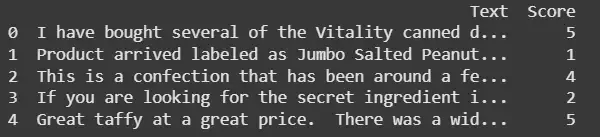
- This code loads the Amazon Fine Food Reviews dataset from a SQLite database.
- It filters the data to keep only reviews with scores 1 or 5 for binary sentiment analysis and prepares the text and target labels for modeling.
import pandas as pd
import sqlite3
from sklearn.feature_extraction.text import TfidfVectorizer
from sklearn.model_selection import train_test_split
from catboost import CatBoostClassifier, Pool

import zipfile
with zipfile.ZipFile("database.sqlite.zip", 'r') as zip_ref:
    zip_ref.extractall(".")

con = sqlite3.connect("database.sqlite")

df = pd.read_sql_query("SELECT * FROM Reviews", con)

con.close()

print(df[['Text', 'Score']].head())
df = df[df['Score'].isin([1, 5])]
df = df.dropna(subset=['Text'])

X_text = df['Text']
y = (df['Score'] == 5).astype(int)
Output:
Step 3: Perform Vectorization
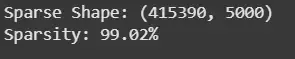
This block converts the review texts into a sparse TF-IDF matrix with up to 5,000 features, creating a high dimensional representation and then prints the shape of the matrix and its sparsity percentage to show how many values are zeros.
vectorizer = TfidfVectorizer(max_features=5000)
X_sparse = vectorizer.fit_transform(X_text)

print(f"Sparse Shape: {X_sparse.shape}")
print(f"Sparsity: {100 * (1.0 - X_sparse.count_nonzero() / (X_sparse.shape[0] * X_sparse.shape[1])):.2f}%")
Output:
Step 4: Train Test Split
- This splits the sparse TF-IDF data and labels into training and test sets using an 80-20 split.
- The stratify=y ensures both sets keep the same class distribution balanced positive and negative reviews.
X_train, X_test, y_train, y_test = train_test_split(
    X_sparse, y, test_size=0.2, random_state=42, stratify=y
)
Step 5: Train the model
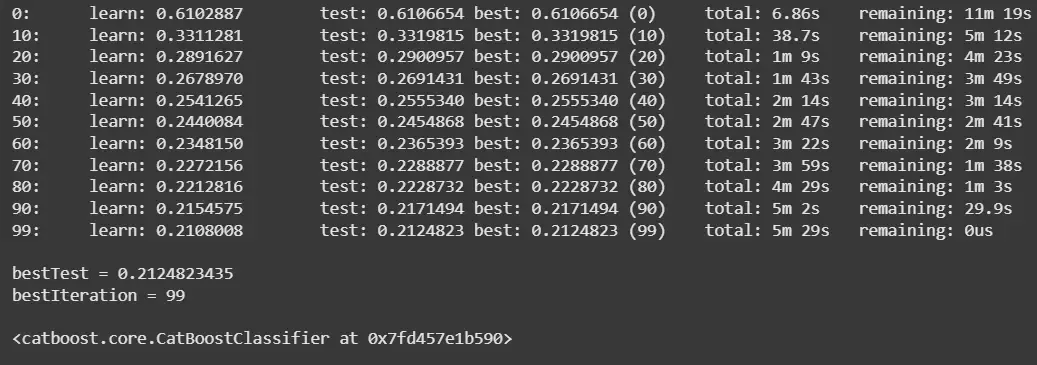
This creates CatBoost Pool objects to handle the sparse training and test data. Then it initializes and trains a CatBoostClassifier for 100 iterations with specified hyperparameters, evaluating its performance on the test set during training.
train_pool = Pool(X_train, y_train)
test_pool = Pool(X_test, y_test)

model = CatBoostClassifier(iterations=100, learning_rate=0.1, depth=6, verbose=10)
model.fit(train_pool, eval_set=test_pool)
Output:
Step 6: Evaluate the model
This calculates and prints the model’s accuracy on the test data, showing how well the CatBoost model predicts the review sentiment.
accuracy = model.score(test_pool)
print(f"Accuracy: {accuracy:.4f}")
Output:

You can download the source from here - CatBoost with Sparse Data
