
Knowledge graphs provide a structured way to represent entities and their relationships making data easier to query and reason over. They are used to capture and organize insights extracted by language models enabling smarter retrieval and analysis for real world applications.
It can transform raw text into structured, connected data that improves retrieval and reasoning.
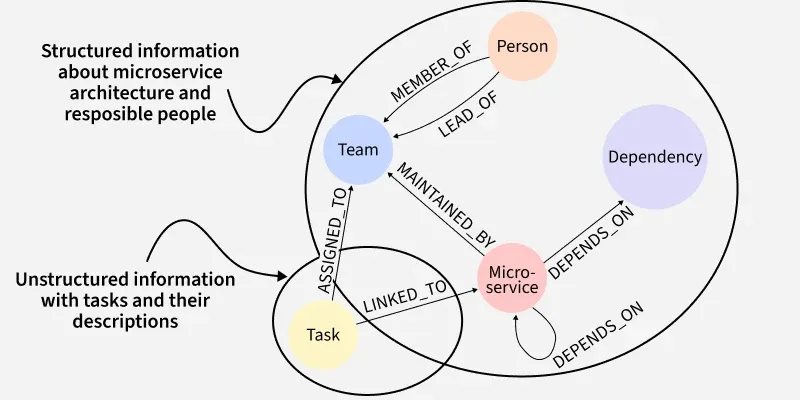
A knowledge graph is a network of nodes consisting of entities like people, places or concepts connected by edges which are relationships between them.
- Construction: In LangChain, knowledge graphs are built from unstructured text by extracting entities and linking them with meaningful relationships.
- Structured Data: This process converts raw text into structured, searchable data instead of leaving it as plain unstructured documents.
- Enhanced Reasoning: Knowledge graphs enable multi hop reasoning, where the system can connect multiple facts across entities to answer complex questions.
- Explainability: Since answers are tied to specific nodes and relationships, users can trace the reasoning process for verification.
Integrating Knowledge Graphs into RAG with LangChain
Knowledge graphs enhance RAG by enabling multi hop reasoning, relationship aware retrieval and better explainability.
- Improvement over Vectors: Knowledge graphs enhance traditional RAG by adding relationship aware retrieval, multi hop reasoning and greater transparency.
- Query Routing: LangChain can route queries to either a semantic vector search or a graph based search depending on the type of question.
- Graph Based QA: For relationship focused queries, LangChain’s GraphCypherQAChain generates database specific queries like Cypher queries for Neo4j.
- Retrieval and Generation: The graph query retrieves connected entities and relationships which are passed to the LLM to create a natural language response.
- Hybrid Search: For semantic or similarity based queries, the system falls back to a traditional vector database. Some setups combine both by embedding graph structures within the vector store for unified search.
How Does Knowledge Graph Work?
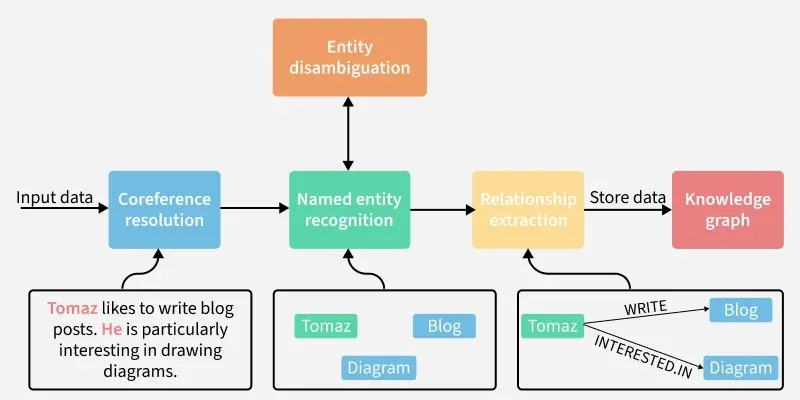
It extracts entities and relations from text, stores them in a graph and uses them with LLMs to generate accurate answers.
1. Extraction
Here we are turning text into Graph data.
- LLMGraphTransformer: Uses an LLM to extract entities and relationships from text.
- Schema Definition: Defines what types of nodes and relationships are allowed to ensure consistency.
- Pydantic Models: Provides a structured format for nodes and edges, guiding the LLM on what to extract.
- Property Extraction: The LLM can also attach properties like dates, attributes, etc to enrich nodes and relationships.
2. Storage
Here we are building the Graph.
- Graph Database Integration: LangChain supports Neo4j, Memgraph and Apache AGE for persistent storage.
- Wrapper Classes: For example, Neo4jGraph provides a simplified interface to interact with Neo4j.
- Adding Data: Extracted graph documents are stored in the database using methods like add_graph_documents().
3. Querying and Generation
Here we are using the Graph for Answer Generation.
- GraphCypherQAChain: Handles question-answering over the graph database.
- Query Translation: Converts a natural language question into a graph query like Cypher for Neo4j.
- Execution: Runs the query against the graph to retrieve structured facts and relationships.
- Response Generation: The retrieved context is combined with the original question and passed to an LLM which produces a clear natural language answer.
Implementation of Knowledge Graphs using LangChain
Steps to implement Knowledge Graphs using LangChain are:
Step 1: Install Dependencies
Installing dependencies like:
1. pip install langchain langchain-openai networkx tiktoken python-dotenv:
- Installing LangChain core and OpenAI integration.
- Adding NetworkX for graphs, tiktoken for tokenization and dotenv for env vars.
2. pip install -U langchain-community: Installing community supported integrations like databases, loaders, retrievers.
3. pip install langchain-experimental: Installing experimental LangChain features like graph transformers and advanced tools.
!pip install langchain langchain-openai networkx tiktoken python-dotenv
pip install -U langchain-community
pip install langchain-experimental
Step 2: Import Libraries
Importing LangChain's libraries and NetworkxEntityGraph library for graph data structures.
import os
from langchain_openai import ChatOpenAI
from langchain.graphs import NetworkxEntityGraph
from langchain_experimental.graph_transformers import LLMGraphTransformer
from langchain_core.documents import Document
Step 3: Environment Setup
Setting up environment using OpenAI API, we can use Gemini's API Key also.
os.environ["OPENAI_API_KEY"] = "your-api-key"
Refer to this article for using OpenAI API Key: Fetching OpenAI API Key
Step 4: Initialize LLM and Graph Transformer
Initializing LLM and Graph Transformer.
llm = ChatOpenAI(model="gpt-4o-mini", temperature=0)

graph_transformer = LLMGraphTransformer(llm=llm)
Step 5: Sample Documents
Defining our sample list of documents.
documents = [
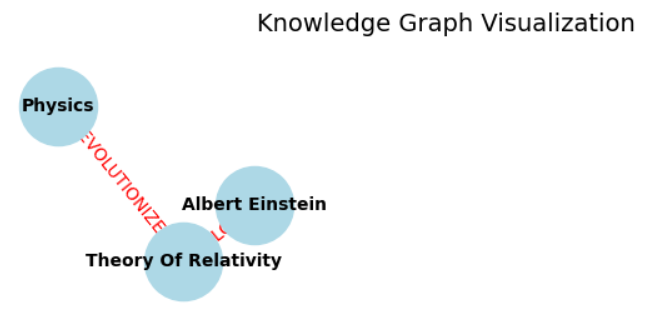
    "Albert Einstein developed the Theory of Relativity.",
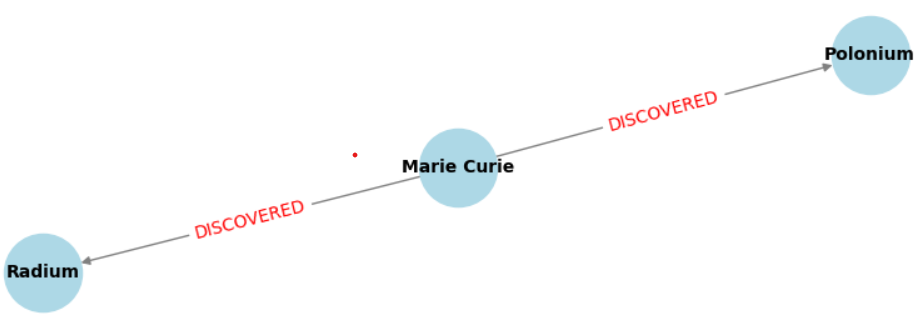
    "Marie Curie discovered Radium and Polonium.",
    "The Theory of Relativity revolutionized physics."
]
Step 6: Convert Strings to Document Objects
Here we are converting strings to document objects.
docs = [Document(page_content=doc) for doc in documents]
Step 7: Create in-memory Graph
Creating Graph and adding nodes and relationships.
graph = NetworkxEntityGraph()
nx_g = graph._graph

for gdoc in graph_docs:
    for node in gdoc.nodes:
        nx_g.add_node(node.id, **getattr(node, "properties", {}))
    for rel in gdoc.relationships:
        nx_g.add_edge(rel.source.id, rel.target.id, type=rel.type, **getattr(rel, "properties", {}))
Step 8: Visualize the Knowledge Graph
Using Matplotlib library to visualize the Knowledge Graph.
import matplotlib.pyplot as plt
import networkx as nx

plt.figure(figsize=(8, 6))

pos = nx.spring_layout(nx_g, seed=42)
nx.draw(nx_g, pos, with_labels=True, node_size=2000, node_color="lightblue", font_size=10, font_weight="bold", edge_color="gray")

edge_labels = nx.get_edge_attributes(nx_g, "type")
nx.draw_networkx_edge_labels(nx_g, pos, edge_labels=edge_labels, font_color="red")

plt.title("Knowledge Graph Visualization", fontsize=14)
plt.show()
Output:
Applications
Knowledge Graphs are used in several areas like:
- Enterprise Knowledge Management: Organizing company policies, training manuals and project data into connected graphs.
- Healthcare: Mapping relationships between diseases, symptoms, treatments and drugs to support clinicians.
- Research Assistance: Linking authors, topics and citations across academic papers for discovery and analysis.
- Legal and Compliance: Connecting laws, regulations and case precedents for legal research and auditing.
- E-learning Platforms: Building graphs of concepts, lessons and quizzes to guide adaptive learning paths.
Advantages
Some of the advantages of Knowledge Graphs are:
- Structured Insights: Converts unstructured text into a clear, organized graph of entities and relationships.
- Better Reasoning: LLMs perform more logical reasoning when given structured data instead of plain text.
- Query Power: Supports complex and multi hop queries across relationships which plain search cannot handle.
- Integration with Databases: Works well with scalable graph databases like Neo4j enabling large scale knowledge storage.
- Explainability: Answers can be traced back to specific entities and relationships improving user trust.
Disadvantages
Some of the disadvantages of Knowledge Graphs are:
- Setup Complexity: Requires installing and configuring a graph database along with schema planning.
- Extraction Accuracy: Entity and relationship extraction may produce errors due to LLM limitations.
- Maintenance Overhead: Graphs need regular updates as new data is added or old data changes.
- Performance Costs: Large graphs with complex queries can increase computation and response time.
