
LangChain is a modular framework designed to build applications powered by large language models (LLMs). Its architecture allows developers to integrate LLMs with external data, prompt engineering, retrieval-augmented generation (RAG), semantic search, and agent workflows. Below is a detailed walkthrough of LangChain’s main modules, their roles, and code examples, following the latest practices and your provided context.
LangChain’s modularity enables:
- Flexible prompt creation and chaining.
- Integration with various LLMs (OpenAI, Anthropic, Gemini etc).
- Parsing and structuring LLM outputs.
- Retrieval-augmented generation (RAG) for grounding responses in external data.
- Semantic search using embeddings and vector databases.
- Agentic workflows for multi-step reasoning and tool use.
1. Prompt Module
Purpose : Structure and format user input into prompts that LLMs can interpret, supporting both plain text and chat-based roles.
Types:
- PromptTemplate: For single-turn, string-based prompts.
- ChatPromptTemplate: For multi-turn, role-based conversations.
from langchain_core.prompts import PromptTemplate, ChatPromptTemplate

# String-based prompt
prompt = PromptTemplate.from_template("What is the capital of {country}?")
filled_prompt = prompt.format(country="Germany")
print(filled_prompt)

# Chat-based prompt
chat_prompt = ChatPromptTemplate.from_messages([
    ("system", "You are a helpful assistant."),
    ("human", "{input}")
])
chat_filled = chat_prompt.invoke({"input": "Translate 'hello' to French."})
print(chat_filled.to_messages())
Output

2. Chat Model and LLM Module
Purpose : Interface with LLMs for text or chat completion. Supports providers like OpenAI, Anthropic, Gemini, etc.
Example (Gemini 2.0 Flash):
from langchain_google_genai import ChatGoogleGenerativeAI

llm = ChatGoogleGenerativeAI(model="gemini-2.0-flash", temperature=0)
response = llm.invoke("What is the capital of Germany?")
print(response.content)
Output

3. Output Parser Module
Purpose : Parse and structure the raw output from LLMs into usable formats (e.g., extracting values, JSON, or structured text).
from langchain_core.output_parsers import StrOutputParser

parser = StrOutputParser()
parsed_output = parser.parse(response.content)
print(parsed_output)
Output

4. Retrieval-Augmented Generation (RAG) Module
Purpose : Augment LLM outputs by retrieving relevant data from external sources (HTML, DOC, S3, web buckets, etc.) and injecting it into prompts.
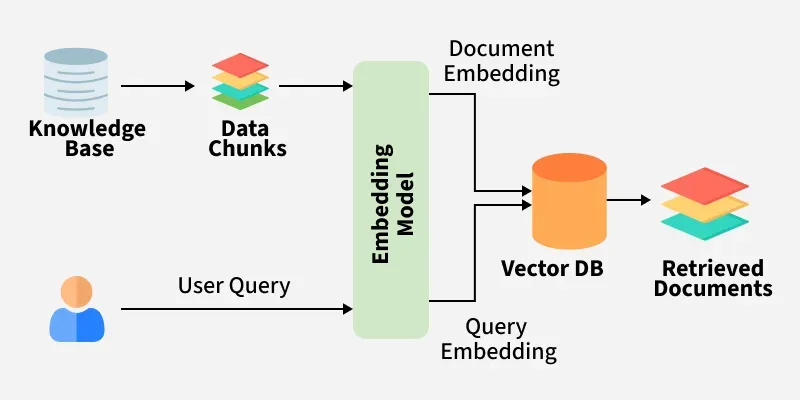
Components:
- Document loaders: Ingest data from HTML, DOC, S3, etc.
- Embeddings: Convert documents to semantic vectors.
- Vector database: Store vectors for similarity search (e.g., FAISS, Pinecone).
- Retriever: Finds relevant docs for a query.
- LLM Integration: Supplies retrieved content as context.
from langchain_core.documents import Document
from langchain_google_genai import GoogleGenerativeAIEmbeddings
from langchain.vectorstores import FAISS
from langchain.chains import RetrievalQA

docs = [
    Document(page_content="Berlin is the capital of Germany."),
    Document(page_content="Paris is the capital of France."),
]
embeddings = GoogleGenerativeAIEmbeddings(model="models/embedding-001")
vectorstore = FAISS.from_documents(docs, embeddings)
retriever = vectorstore.as_retriever()
qa_chain = RetrievalQA.from_chain_type(llm=llm, retriever=retriever)
rag_result = qa_chain.run("What is the capital of Germany?")
print(rag_result)
Output

5. Embedding & Vector Database Module
Purpose:
- Embeddings: Capture semantic meaning of text for similarity search.
- Vector DB: Store and index embeddings for fast retrieval.
6. Data Storage (HTML, DOC, S3, Web Buckets)
Purpose : Store and manage unstructured data for retrieval. LangChain supports loading documents from HTML, DOC, S3, and web buckets, which are then embedded and stored in a vector DB(database) for RAG.
from langchain.document_loaders import S3DirectoryLoader

loader = S3DirectoryLoader(bucket="your-bucket", prefix="docs/")
docs = loader.load()
7. Agent Module
Purpose : Enable autonomous, multi-step reasoning by chaining LLM calls with tool use (calculators, web search, database queries, etc).
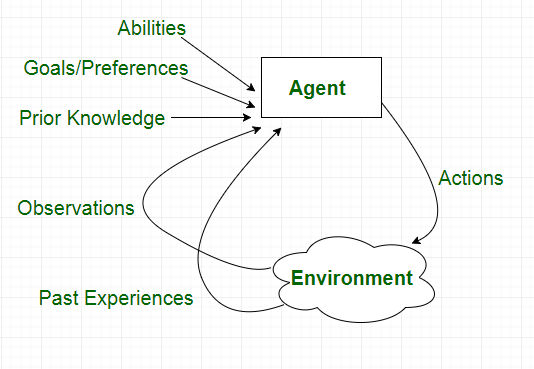
Example:
from langchain.agents import initialize_agent, Tool

def calc_tool(input_str):
    try:
        return str(eval(input_str))
    except Exception as e:
        return str(e)

tools = [Tool(name="Calculator", func=calc_tool, description="Performs calculations.")]
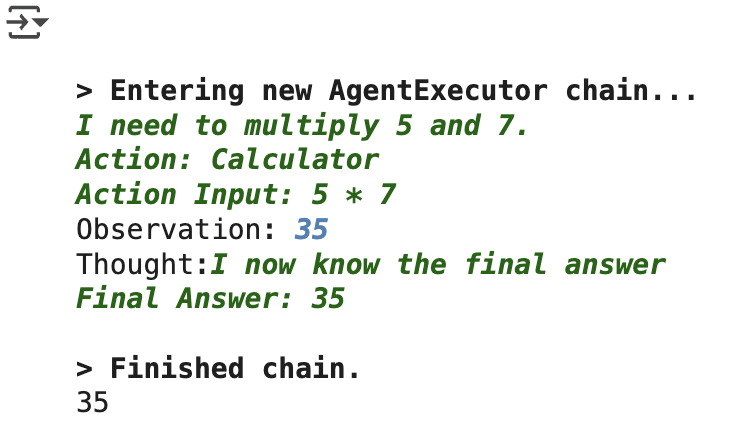
agent = initialize_agent(tools, llm, agent="zero-shot-react-description", verbose=True)
agent_response = agent.run("What is 5 * 7?")
print(agent_response)
Output
Colab link: Modules of LangChain
