
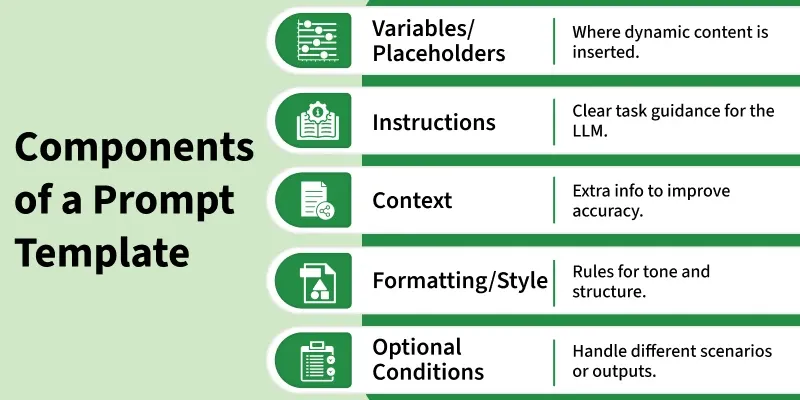
Prompt templates are reusable formats for instructing LLMs using placeholders to insert variable information. They are essential for consistency, efficiency and scalability in AI workflows allowing structured, error-free interactions and easy optimization.
Purpose of Prompt Templates
Reasons for using prompt templates are:
- Standardize Instructions: Templates provide a consistent way to instruct LLMs, reducing ambiguity in responses.
- Enable Reuse Across Tasks: Once created, templates can be reused for similar tasks, saving time and effort.
- Ensure Consistent Outputs: Using templates helps maintain uniformity in LLM responses, improving reliability.
- Reduce Errors and Improve Efficiency: Structured prompts minimize mistakes and streamline workflow processes for better productivity.
Types of Prompt Templates
Various types of Prompt Templates are:
- StringPromptTemplate: Simple text based templates with placeholders for variables.
- ChatPromptTemplate: Designed for chat style interactions, supporting multiple roles and messages.
- FewShotPromptTemplate: Includes example inputs and outputs to guide the LLM’s behavior for better accuracy.
Using Variables, Rendering and Advanced Customization
Some of the ways to enhance prompt templates are:
- Defining and Using Variables: Specify placeholders in templates and substitute them with dynamic values for flexible prompts.
- Formatting and Rendering: Fill in variables and structure the prompt correctly before sending it to the LLM to ensure consistent outputs.
- Custom Templates: Create templates tailored to specific tasks or domains for higher accuracy.
- Logic Based Templates: Add conditional statements or branching to handle different scenarios dynamically.
- Enhanced Control: Combining variables, rendering and custom logic gives fine grained control over LLM outputs and workflows.
Implementation
Step by step implementation of prompt template:
Step 1: Install Required Libraries
Installing the necessary packages:
- LangChain for creating and managing prompt templates and LLM chains.
- OpenAI for accessing GPT models such as GPT-4.
%pip install langchain-community openai
Step 2: Import Modules
Importing required modules.
- PromptTemplate: To create reusable prompt structures with variables.
- ChatOpenAI: To connect and interact with GPT models.
- LLMChain: To link the prompt and the model into one executable chain.
- JsonOutputParser: To parse model output safely into structured JSON.
- os and re: For handling environment variables and text extraction respectively.
from langchain.prompts import PromptTemplate
from langchain.chat_models import ChatOpenAI
from langchain.chains import LLMChain
from langchain_core.output_parsers import JsonOutputParser
import os
import re
Step 3: Setup Environment
Setting the OpenAI API key for authentication. We can also use environment variables or secret storage for secure access.
os.environ["OPENAI_API_KEY"] = "your_openai_api_key_here"
Refer to article: Fetching OpenAI API Key
Step 4: Define Prompt Template
Creating a reusable PromptTemplate with a variable {topic}.
The model is instructed to generate a JSON output with defined keys:
- summary: a short explanation
- key_points: a list of 3 main points
- difficulty: difficulty level like “easy”, “medium” or “hard”
prompt = PromptTemplate(
    input_variables=["topic"],
    template="""
Generate a JSON object with the following keys for the topic '{topic}':
- summary: short summary
- key_points: list of 3 key points
- difficulty: "easy", "medium", or "hard"

Output only valid JSON (no explanations outside JSON).
JSON:
"""
)
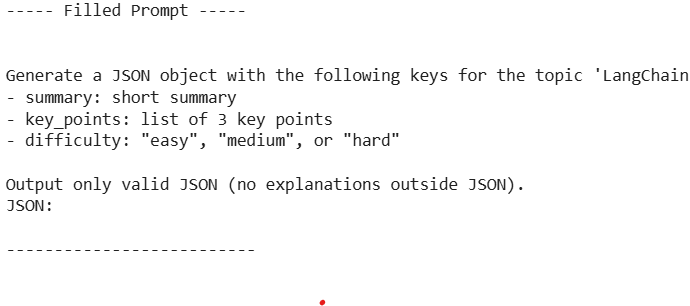
Step 5: Inspect the Filled Prompt
Testing the prompt by filling {topic} manually helps verify formatting before sending it to the model.
filled_prompt = prompt.format(topic="LangChain ChatPromptTemplate")
print(filled_prompt)
Output:
Step 6: Initialize the LLM
Setting up GPT-4 using LangChain’s ChatOpenAI.
- model_name: “gpt-4”
- temperature: 0 for consistent and structured output
llm = ChatOpenAI(model_name="gpt-4", temperature=0)
Step 7: Create an LLMChain
- Combining the prompt template and LLM into one executable chain.
- This ensures input to formatted prompt to model to output flow.
chain = LLMChain(llm=llm, prompt=prompt)
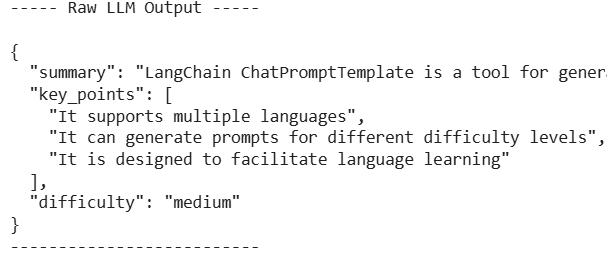
Step 8: Run the Chain
- Passing a real topic to the chain.
- This replaces {topic} in the template and queries GPT-4 for a structured response.
raw_output = chain.run({"topic": "LangChain ChatPromptTemplate"})
print(raw_output)
Output:
Step 9: Extract and Parse JSON
Using regex to extract only the JSON portion and JsonOutputParser() to convert it into Python dictionary format.
json_match = re.search(r'\{.*\}', raw_output, re.DOTALL)

if json_match:
    json_string = json_match.group(0)
    parser = JsonOutputParser()
    parsed_output = parser.parse(json_string)
    print(parsed_output)
else:
    print("Could not extract JSON from the output.")
Output:

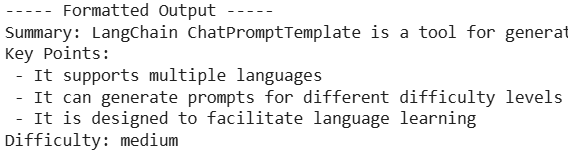
Step 10: Display Parsed Results
Accessing and printing individual JSON fields for clarity.
print("Summary:", parsed_output.get("summary"))
print("Key Points:")
for point in parsed_output.get("key_points", []):
    print("-", point)
print("Difficulty:", parsed_output.get("difficulty"))
Output:
Applications
Some of the applications of prompt templates are:
- Summarization: Templates help LLMs consistently condense long texts into clear and coherent summaries.
- Question Answering: Structured prompts guide the model to provide accurate and context-aware answers.
- Content Generation: Templates ensure consistent tone and style when generating articles, blogs or marketing copy.
- AI Agents and Workflows: They allow agents to execute multi-step tasks reliably with predefined instructions.
- Translation and Localization: Templates can standardize input-output patterns for translating or adapting content across languages.
- Data Extraction: Prompt templates guide LLMs to extract structured information from unstructured text efficiently.
Benefits
Some of the benefits of prompt templates are:
- Reusability: Templates can be applied to multiple tasks, saving time and reducing repetitive work.
- Maintainability: Structured prompts are easier to update and manage as workflows evolve.
- Reduced Errors: Consistent use of templates minimizes mistakes like variable mismatches or ambiguous instructions.
- Efficiency: Templates streamline workflows by reducing manual effort and improving output consistency.
- Scalability: They make it easier to scale AI applications across multiple tasks or teams without losing quality.
- Better Control: Templates provide predictable behavior, giving developers more control over LLM outputs.
Challenges
Some of the challenges of prompt templates are:
- Variable Mismatches: Incorrect or inconsistent placeholders can lead to errors or unexpected outputs.
- Overfitting to Examples: Few-shot templates may bias the model if the examples are too specific or narrow.
- Clarity of Instructions: Vague prompts can produce inconsistent or irrelevant outputs.
- Complexity Management: Overly complex templates can confuse the LLM and reduce performance.
