
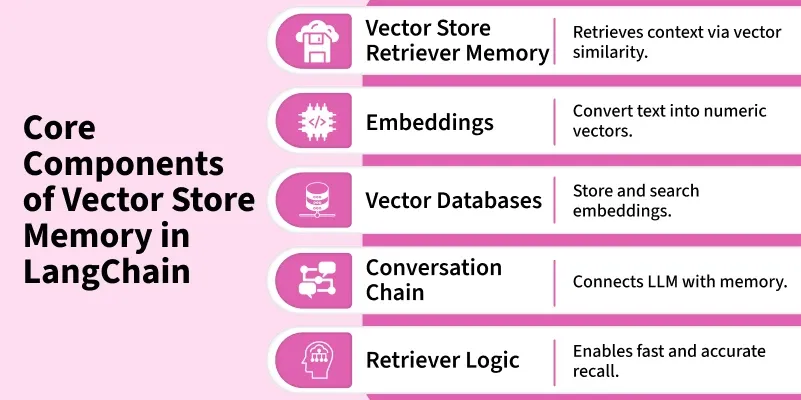
Vector Store Memory in LangChain is a mechanism that stores conversation history as vector embeddings instead of plain text. This allows the model to retrieve relevant past information based on semantic meaning rather than just recent messages. It helps maintain long term context efficiently especially for large or ongoing conversations.
Need for Vector Based Memory in LLMs
Reasons for using vector based memory in LLMs are:
- Limited Recall in Traditional Memory: Buffer and summary memories store plain text, making it difficult for models to remember older or distant context.
- Information Loss in Summarization: Important details or user-specific facts may be lost when older conversations are summarized.
- Increased Token Usage: Passing large conversation histories to the model consumes more tokens and slows down processing.
- Lack of Semantic Understanding: Traditional memory relies on keyword matching instead of semantic meaning, reducing relevance.
- Semantic Retrieval in Vector Memory: Vector memory retrieves information using embedding similarity, enabling meaning-based recall.
- Better Long-Term Context Retention: Allows LLMs to recall relevant information and user preferences even after many conversation turns.
Features
Some of the features of Vector Store Memory are:
- Semantic Retrieval: Fetches past conversation snippets based on meaning not just keywords.
- Efficient Context Management: Handles large conversations without exceeding token limits.
- Integration with Vector Databases: Works with stores like FAISS, Chroma, Pinecone or Milvus.
- Embedding Based Matching: Finds relevant context using similarity search on embeddings.
- Scalable Memory Storage: Can retain and retrieve large histories for enterprise applications.
Working of Vector Store Memory
Vector Store Memory operates through a few key steps:
- Embedding Generation: Each message in the conversation is converted into a numerical vector using an embedding model.
- Storage: These embeddings are stored in a vector database such as FAISS, Chroma or Pinecone.
- Retrieval: When a new query is received, the system searches for embeddings that are most similar to the current input.
- Context Injection: Retrieved messages are added to the model’s context allowing it to generate more relevant responses.
Internal Working Mechanism
The internal working process of Vector Store Memory involves the following steps:
- Receive Input: A new user message enters the system, initiating the memory retrieval process.
- Generate Embeddings: The input text is converted into numerical vectors using an embedding model which captures the semantic meaning of the message.
- Similarity Search: The memory system searches for the most semantically similar embeddings stored in the vector database retrieving relevant past context to inform the model’s response.
- Inject Context: Retrieved embeddings are added to the model’s input prompt to provide context aware and coherent responses.
- Generate Response: The LLM produces a response that incorporates both the new query and the relevant past context from memory.
Implementation
Step-wise Implementation of Vector Store Memory in LangChain:
Step 1: Install Required Libraries
Installing LangChain and FAISS to manage vector storage.
!pip install langchain openai faiss-cpu
Step 2: Import Modules
Importing necessary components for embeddings, memory and chains.
from langchain.memory import VectorStoreRetrieverMemory
from langchain.chains import ConversationChain
from langchain.chat_models import ChatOpenAI
from langchain.embeddings import OpenAIEmbeddings
from langchain.vectorstores import FAISS
import os
Step 3: Setup Environment
Setting our OpenAI API key or other model access credentials.
os.environ["OPENAI_API_KEY"] = "your_api_key"
Refer to this article: Fetching OpenAI API Key
Step 4: Initialize Embeddings and Vector Store
Creating an embedding model and initialize a FAISS vector store.
embedding_model = OpenAIEmbeddings()
vectorstore = FAISS.from_texts(["Hello! This is initial memory."], embedding_model)
Step 5: Create Vector Store Retriever Memory
Linking the vector store to the memory retriever.
memory = VectorStoreRetrieverMemory(retriever=vectorstore.as_retriever())
Step 6: Initialize LLM and Conversation Chain
Combining LLM and memory to form a complete conversation pipeline.
llm = ChatOpenAI(model_name="gpt-4", temperature=0)
conversation = ConversationChain(llm=llm, memory=memory)
Step 7: Interact with the Model
Sending queries to the chain, memory retrieves and updates context automatically.
conversation.predict(input="My favorite color is blue.")
conversation.predict(input="What’s my favorite color?")
Output:
Response 1: That's great! Blue is a very popular color. It's often associated with depth and stability, symbolizing trust, loyalty, wisdom, confidence and intelligence. Is there a particular shade of blue you prefer?
Response 2: Based on our previous conversation, your favorite color is blue.
Applications
Some of the applications for Vector Store Memory are:
- Conversational Chatbots: Helps maintain context and recall relevant facts over multiple user sessions improving the quality of ongoing conversations.
- Customer Support Systems: Can remember previous customer interactions, issues and preferences allowing support agents or AI systems to provide faster and more personalized assistance.
- Personal AI Assistants: Retains long-term user information and preferences enabling assistants to provide more helpful and context-aware responses over time.
- Knowledge Retrieval Agents: Can fetch semantically relevant content from large knowledge bases helping AI agents provide accurate answers even from vast amounts of data.
Benefits
Some of the major benefits of Vector Store Memory are:
- Enhanced Recall: It can retrieve the most relevant context from past conversations even after long interactions ensuring the model maintains continuity in the dialogue.
- Reduced Token Usage: By storing embeddings instead of raw text, it avoids sending the entire chat history to the model every time which saves on token costs and improves efficiency.
- Improved Contextual Accuracy: Responses remain meaningful and on topic because the memory system provides semantically relevant information rather than relying solely on recent text.
- Long-Term Memory: The system can remember important facts, user-specific details and preferences across multiple sessions enabling more personalized interactions.
- Scalability: Vector Store Memory can handle large datasets or multi-session memories efficiently making it suitable for enterprise-level applications or chatbots with extensive histories.
Limitations
Some limitations to keep in mind when using Vector Store Memory are:
- Storage Growth: As conversations accumulate, vector stores can grow significantly in size which may require additional storage management or database optimization.
- Embedding Cost: Creating embeddings for each message consumes computational resources and tokens which can increase costs for large scale deployments.
- Latency: Retrieving vectors from large databases may slightly slow down response times particularly when handling high volume or complex queries.
- Relevance Drift: Over time, older context may become less relevant or accurate if not regularly reviewed or updated, potentially affecting the quality of responses.
Comparison with Other Memory Types
Comparison table of different memory types:
Memory Type | Storage Method | Retrieval Method | Best For | Limitations |
|---|---|---|---|---|
Buffer Memory | Stores raw text sequentially | Returns recent messages | Short conversations | Token overflow in long chats |
Conversation Summary Memory | Summarized text | Uses condensed summaries | Medium-length conversations | May lose important details |
Vector Store Memory | Embedding vectors | Semantic similarity search | Long-term context and semantic recall | Higher compute cost for embeddings |
