
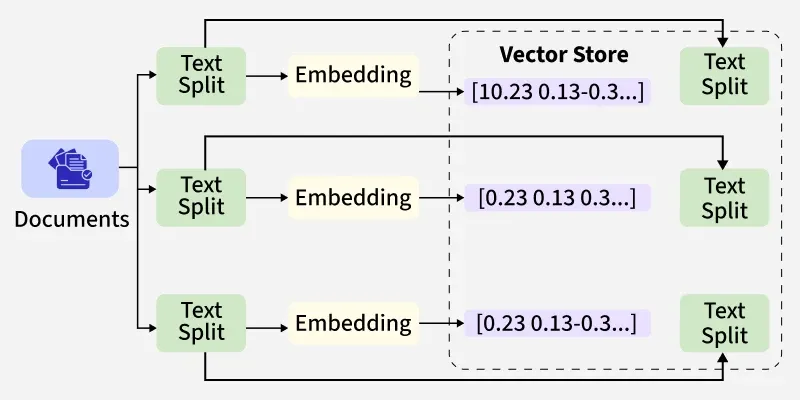
Vector stores are specialized databases that store embeddings (numeric vectors that capture semantic meaning) and provide fast similarity search. In LangChain, vector stores are the backbone of Retrieval-Augmented Generation (RAG) workflows where we embed our documents, store them in a vector store, then retrieve semantically relevant chunks at query time and feed them to an LLM.
Key Terms
- Embedding: A fixed-length numeric vector representing the semantic content of a text (or image/audio).
- Vector store (vector DB / index): A system that stores vectors + metadata (document id original text, any tags) and supports similarity search (k-NN, ANN).
- Retriever: LangChain abstraction that wraps a vector store and returns the top-k similar documents for a query.
- ANN vs exact search: Exact search checks all vectors (very accurate but slow on large data), while Approximate Nearest Neighbor (ANN) uses shortcuts (much faster and lighter, with only a tiny accuracy loss).
Importance of Vector Stores
Vector stores have a key role,
- Semantic Search: They find information based on meaning, not just exact keywords, so even if we phrase a question differently, we still get the right answer.
- RAG (Retrieval-Augmented Generation): They supply the LLM with the most relevant context, helping it give accurate, fact-based answers instead of guesses.
- Scalability and Speed: With indexing and ANN algorithms, vector stores can handle millions of records while keeping searches quick and efficient.
Working of LangChain
LangChain makes it easy to connect our data with large language models (LLMs). The process usually goes like this:
- Embeddings Model: Turns text into numeric vectors (embeddings) so the meaning of the text can be compared. LangChain supports many providers like OpenAI, Hugging Face, Cohere and Google.
- Document Loader and Chunking: Loads our data (PDFs, text, websites, etc.) and breaks it into smaller chunks (usually 500–1,000 tokens) so it can be processed efficiently.
- Vector Store: Stores these embeddings along with metadata. LangChain can connect to different vector stores like Chroma, FAISS, Pinecone, Weaviate, Qdrant and Milvus.
- Retriever: Searches the vector store to find the most relevant chunks when we ask a question. These results are then passed to the LLM for generating a final answer.
Implementation
Let's see an example implementation to understand the working of vector stores in LangChain,
Step 1: Install Dependencies and Packages
We will install the required packages for our system.
!pip install langchain-community langchain chromadb openai
Step 2: Setup OpenAI API Key
We will setup our OpenAI API Key,
To know how to access the OpenAI API Key, read How to find and Use API Key of OpenAI.
import os
os.environ["OPENAI_API_KEY"] = "API_key_here"
Note: We can use Gemini API Key as well, to know how to extract Gemini API Key, read How to Access and Use Google Gemini API Key
Step 3: Import Libraries
We will import the required libraries such as langchain, chroma, OpenAIEmbeddings.
from langchain_community.embeddings import OpenAIEmbeddings
from langchain.vectorstores import Chroma
from langchain.docstore.document import Document
Step 4: Create OpenAI Embeddings
- Initialize the embedding model using our OpenAI API Key.
- This model will generate numerical vectors for text so they can be stored and compared in the vector database.
emb = OpenAIEmbeddings(openai_api_key=os.getenv("OPENAI_API_KEY"))
Step 5: Prepare Data as Documents
Use Document objects from LangChain to structure our data. Each document has:
- page_content: the actual text.
- metadata: key-value pairs to store attributes (e.g., source, author).
docs = [
    Document(page_content="LangChain connects LLMs with external tools.", metadata={"source": "intro"}),

    Document(page_content="Vector stores store embeddings and metadata.", metadata={"source": "concepts"})
]
Step 6: Create and Persist Chroma Collection
Store documents in a Chroma vector store with embeddings.
- Documents (with text + metadata).
- Embedding function (OpenAI).
- Collection name (identifier for our DB).
- Directory to save/persist embeddings
vectordb = Chroma.from_documents(
    documents=docs,
    embedding=emb,
    collection_name="my_collection",
    persist_directory="./chroma_db"
)
vectordb.persist()
Step 7: Create a Retriever
- A retriever is the component that searches embeddings for relevant documents.
- Search type "similarity" finds documents whose embeddings are closest to the query.
- k=2: return the top 2 most relevant results.
retriever = vectordb.as_retriever(
    search_type="similarity",
    search_kwargs={"k": 2}
)
Step 8: Query and Retrieve Results
- Pass a natural language query.
- Chroma compares the query embedding with stored embeddings and retrieves the most similar documents.
- Print page content and metadata for clarity.
results = retriever.get_relevant_documents("What stores vectors?")
for r in results:
    print(r.page_content, r.metadata)
Output:
Vector stores store embeddings and metadata. {'source': 'concepts'}
LangChain connects LLMs with external tools. {'source': 'intro'}
How to choose a vector store
Use this checklist when selecting a store for a LangChain project:
1. Data Size:
- Small projects or testing: Chroma or FAISS (easy setup, runs locally).
- Large datasets (millions of vectors): Pinecone, Milvus, Qdrant or Weaviate (built for scale).
2. Speed and Reliability:
- Managed services like Pinecone or Chroma Cloud are very fast and reliable, with uptime guarantees.
- Self-hosted options like FAISS, Milvus, Qdrant or Weaviate give us control but require setup and maintenance.
3. Features:
- Need metadata filtering or hybrid search: Weaviate, Qdrant or Pinecone are strong choices.
- Need advanced indexing for very large data: Milvus is designed for this.
4. Cost and Maintenance:
- FAISS is free but me must manage everything ourself.
- Pinecone, Chroma Cloud cost more but save us from maintenance.
- Milvus, Qdrant, Weaviate are open-source (can self-host free) but need infra management unless me use their cloud versions.
5. Integration and Support:
- All six (Chroma, FAISS, Pinecone, Milvus, Qdrant, Weaviate) are officially supported in LangChain.
- Chroma, Pinecone and FAISS have the richest documentation and examples.
Applications
- Retrieval-Augmented Generation (RAG): Enhance LLMs by retrieving contextually relevant documents before generating an answer.
- Semantic Search Engines: Build intelligent search systems that understand meaning rather than just keywords.
- Chatbots and Virtual Assistants: Enable bots to answer questions based on organizational knowledge bases.
- Document Q&A Systems: Ask questions over PDFs, websites or internal documentation using embeddings + retrieval.
- Recommendation Systems: Recommend similar documents, articles or products based on semantic similarity.
Limitations
- Embedding Dependence: Quality of retrieval depends heavily on the embeddings model used.
- Reindexing Overhead: If embedding model changes, we must re-embed and reindex our entire dataset.
- Storage Costs: Large vector datasets consume significant disk/memory; managed services can become expensive.
- Latency Tradeoffs: Approximate nearest neighbor (ANN) indexing speeds up queries but may reduce recall.
