
Bootstrap 5 Alerts Link Color class is used to set the color of the alert element. There are different kind of alerts that indicates different things, if there is a success then the color of the alert will be green, if it's a failure then it should show a red color alert. Each color of the alert represents something. Alert color should be its name, but we are using color on Alert Link so there will be a mixup with color according to the name on the documentation.
Prerequisite: Bootstrap 5 Alert Component, to create alert - for that we can use alert.
Alerts Link color Classes:
- alert-link: This class is used to make the text of the alert a link.
- alert-primary: This class is used to make the color of the alert blue.
- alert-secondary: This class is used to make the color of the alert gray.
- alert-success: This class is used to make the color of the alert green.
- alert-danger: This class is used to make the color of the alert red.
- alert-warning: This class is used to make the color of the alert yellow.
- alert-info: This class is used to make the color of the alert sky blue.
- alert-light: This class is used to make the color of the alert white.
- alert-dark: This class is used to make the color of the alert dark gray.
Syntax:
<div class="alert alert-primary" role="alert">
  ... <a href="#" class="alert-link">...</a>
</div>
Below example illustrate the Bootstrap 5 Alerts Link color:
Example 1: In this example, we will use six informative Alert Link Color classes.
<!DOCTYPE html>
<html>

<head>
    <!-- Bootstrap 5 CDN Link-->
    <link href=
"https://cdn.jsdelivr.net/npm/bootstrap@5.0.2/dist/css/bootstrap.min.css"
          rel="stylesheet"
          integrity=
"sha384-EVSTQN3/azprG1Anm3QDgpJLIm9Nao0Yz1ztcQTwFspd3yD65VohhpuuCOmLASjC"
          crossorigin="anonymous">
    <title>Bootstrap 5 Alerts Link color</title>
</head>

<body class="m-3">
    <center>
        <h1 class="text-success">Geeksforgeeks</h1>
        <strong>Bootstrap 5 Alerts Link color</strong>
    </center>
    <!-- Bootstrap 5 Alerts Link Color and Alerts Link used-->
    <div class="alert alert-primary">
        A Computer Science Portal for Geeks:
        <a href="#" class="alert-link">Geeksforgeeks</a>
    </div>
    <div class="alert alert-secondary">
        A Computer Science Portal for Geeks:
        <a href="#" class="alert-link">Geeksforgeeks</a>
    </div>
    <div class="alert alert-success">
        A Computer Science Portal for Geeks:
        <a href="#" class="alert-link">Geeksforgeeks</a>
    </div>
    <div class="alert alert-danger">
        A Computer Science Portal for Geeks:
        <a href="#" class="alert-link">Geeksforgeeks</a>
    </div>
    <div class="alert alert-warning">
        A Computer Science Portal for Geeks:
        <a href="#" class="alert-link">Geeksforgeeks</a>
    </div>
    <div class="alert alert-info">
        A Computer Science Portal for Geeks:
        <a href="#" class="alert-link">Geeksforgeeks</a>
    </div>
</body>
</html>
Output:
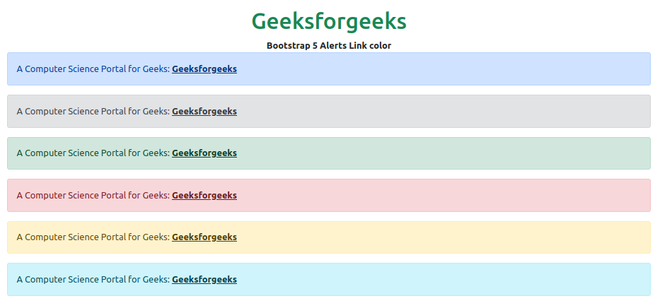
Example 2: In this example, we will use light and dark alert classes for color and one alert will be without a Link color class only the Alert-Link, because of that linked text will be rendered in blue color.
<!DOCTYPE html>
<html>

<head>
    <!-- Bootstrap 5 CDN Link-->
    <link href=
"https://cdn.jsdelivr.net/npm/bootstrap@5.0.2/dist/css/bootstrap.min.css"
          rel="stylesheet"
          integrity=
"sha384-EVSTQN3/azprG1Anm3QDgpJLIm9Nao0Yz1ztcQTwFspd3yD65VohhpuuCOmLASjC"
          crossorigin="anonymous">
    <title>Bootstrap 5 Alerts Link color</title>
</head>

<body class="m-3">
    <center>
        <h1 class="text-success">Geeksforgeeks</h1>
        <strong>Bootstrap 5 Alerts Link color</strong>
    </center>
    <!-- Bootstrap 5 Alerts Link Color and Alerts Link used-->
    <div class="alert alert-light">
        A Computer Science Portal for Geeks:
        <a href="#" class="alert-link">Geeksforgeeks</a>
    </div>
    <div class="alert alert-dark">
        A Computer Science Portal for Geeks:
        <a href="#" class="alert-link">Geeksforgeeks</a>
    </div>
    <div class="alert">
        A Computer Science Portal for Geeks:
        <a href="#" class="alert-link">Geeksforgeeks</a>
    </div>
</body>

</html>
Output:

Reference: https://getbootstrap.com/docs/5.0/components/alerts/#link-color
