
Bootstrap Images SASS has a set of variables with default values for customizing images. We can change those values using sass variables.
Bootstrap 5 Images Sass:
- variables: $thumbnail-padding, $thumbnail-bg, $thumbnail-border-width, etc variables are used to customize the Images. You can find the whole list of variables and their default values here.
Variables for image thumbnails and their default values:
$thumbnail-padding: .25rem;
$thumbnail-bg: $body-bg;
$thumbnail-border-width: $border-width;
$thumbnail-border-color: $gray-300;
$thumbnail-border-radius: $border-radius;
$thumbnail-box-shadow: $box-shadow-sm;
SASS variables of Images:
- $thumbnail-border-color: This variable is used for the color of the thumbnail border.
- $thumbnail-border-radius: This variable is used for the border radius of the images.
- $thumbnail-bg: This variable is used for the background color of images.
- $thumbnail-border-width: This variable is used for the width of the border of the image.
- $thumbnail-padding: It is the padding given to the images.
- $thumbnail-box-shadow: It provides shadow to the thumbnail.
Steps to override SCSS of Bootstrap:
Step 1: Install bootstrap using the following command
npm i bootstrap
Step 2: Create your custom SCSS file and write the variable you want to override. Then include the bootstrap SCSS file using import.
@import "../node_modules/bootstrap/scss/bootstrap.scss";
$variable_to_override: value;
Step 3: Convert the SCSS file to CSS using a live server extension.
Step 4: Include that CSS file in your HTML file.
<link rel="stylesheet" href="./assets/css/style.css">
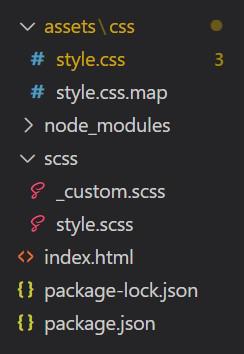
Project Structure:
Syntax:
$thumbnail-border-color:value;
$thumbnail-border-radius:value;
*** : value;
'***' refers to SASS variables
Example 1: Changed $thumbnail-padding and $thumbnail-bg using SASS.
- style.scss
$thumbnail-padding: 1rem;
$thumbnail-bg: blue;

@import "../scss/bootstrap.scss";
- style.css
.img-thumbnail {
    padding: 1rem;
    background-color: blue;
    border: 1px solid var(--bs-border-color);
    border-radius: 0.375rem;
    max-width: 100%;
    height: auto;
}
- index.html
<!DOCTYPE html>
<html lang="en">

<head>
    <meta charset="UTF-8">
    <meta http-equiv="X-UA-Compatible"
          content="IE=edge">
    <meta name="viewport"
          content="width=device-width, initial-scale=1.0">
    <title>Images SASS</title>
    <link rel="stylesheet" href="./assets/css/style.css">
</head>

<body>
    <div class="text-center">
        <h1 class="text-success">
            GeeksforGeeks
        </h1>
        <h2>Bootstrap5 Images SASS</h2><br>
        <img src=
"https://media.geeksforgeeks.org/wp-content/cdn-uploads/20190710102234/download3.png"
             class="img-thumbnail" alt="gfg logo">
    </div>
</body>
</html>
Output:

Example 2 : Changed $thumbnail-border-width, $thumbnail-border-radius and $thumbnail-border-color variables using SASS.
- style.scss
$thumbnail-border-width: 5px;
$thumbnail-border-color: black;
$thumbnail-border-radius: 2rem;

@import "..//scss/bootstrap.scss";
- style.css
.img-thumbnail {
    padding: 0.25rem;
    background-color: #fff;
    border: 5px solid black;
    border-radius: 2rem;
    max-width: 100%;
    height: auto;
}
- index.html
<!DOCTYPE html>
<html lang="en">

<head>
    <meta charset="UTF-8">
    <meta http-equiv="X-UA-Compatible"
          content="IE=edge">
    <meta name="viewport"
          content="width=device-width, initial-scale=1.0">
    <title>Images SASS</title>
    <link rel="stylesheet" href="./assets/css/style.css">
</head>

<body>
    <div class="text-center">
        <h1 class="text-success">
            GeeksforGeeks
        </h1>
        <h2>Bootstrap5 Images SASS</h2><br>
        <img src=
"https://media.geeksforgeeks.org/wp-content/cdn-uploads/20190710102234/download3.png"
             class="img-thumbnail" alt="gfg logo">
    </div>
</body>
</html>
Output:

Reference: https://getbootstrap.com/docs/5.0/content/images/#sass
