
Bootstrap 5 Navbar Supported content contains Navbar which supports various sub-components like .navbar-brand, .navbar-nav, .navbar-text, .navbar-toggler, and .navbar-scroll.
- Brand: It is a company, project, or product name. We add .navbar-brand to various components like a heading or a link. We can add an image, text, or both image and text as our brand name.
- Nav: Navigation links of our navbar are built on .nav options. They occupy as much horizontal space as possible and keep all navbar contents securely aligned. We use .nav-item and .nav-link elements along with .nav. We can also completely avoid list based approach as we use nav classes.
- Forms: We can place form controls within a navbar. We can use the <form> element if our navbar is an entire form.
- Text: Use .navbar-text for inserting bits of text in the navbar. .navbar-text also adjusts vertical alignment and horizontal spacing for text.
Syntax :
<nav class="navbar">
  <a class="navbar-brand" href="#">Navbar</a>
    <ul class="navbar-nav">
      <li class="nav-item">
        <a class="nav-link active">...</a>
      </li>
        ...
    </ul>
    <span class="navbar-text">...</span>
    <form>
        ...
    </form>
</nav>
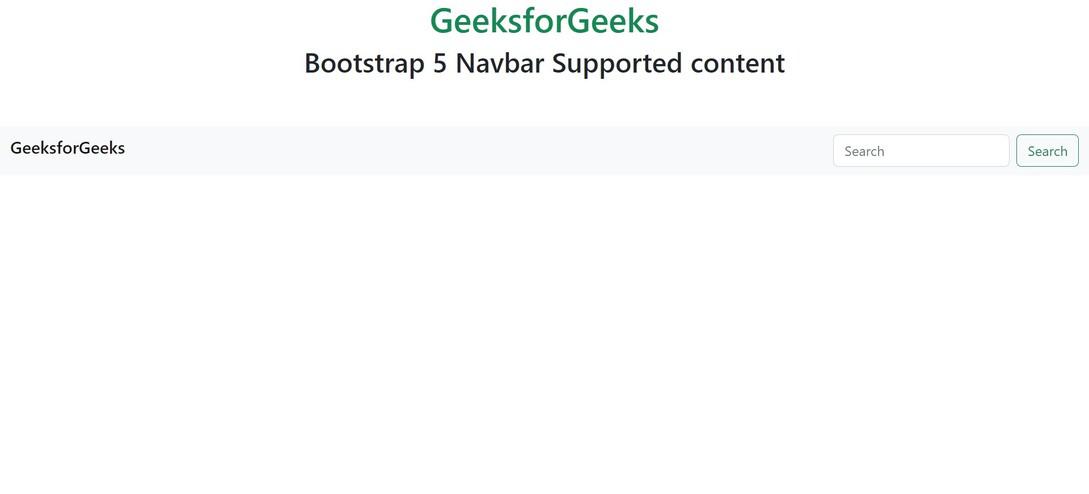
Example 1: The .navbar-brand and <form> are used in this example(brand and form).
<!DOCTYPE html>
<html lang="en">

<head>
    <meta charset="UTF-8">
    <meta http-equiv="X-UA-Compatible" content="IE=edge">
    <meta name="viewport"
          content="width=device-width, initial-scale=1.0">
    <link href=
"https://cdn.jsdelivr.net/npm/bootstrap@5.2.3/dist/css/bootstrap.min.css"
          rel="stylesheet">
    <script src=
"https://cdn.jsdelivr.net/npm/bootstrap@5.2.3/dist/js/bootstrap.bundle.min.js">
    </script>
</head>

<body>
    <div>
        <div class="text-center">
            <h1 class="text-success">GeeksforGeeks</h1>
            <h2>Bootstrap 5 Navbar Supported content</h2>
        </div>
        <br><br>
        <nav class="navbar navbar-light bg-light">
            <div class="container-fluid">
                <h5 class="navbar-brand">
                    GeeksforGeeks
                </h5>
                <form class="d-flex">
                    <input class="form-control me-2"
                           type="search"
                           placeholder="Search"
                           aria-label="Search">
                    <button class="btn btn-outline-success" type="submit">
                      Search
                    </button>
                </form>
            </div>
        </nav>
    </div>
</body>

</html>
Output :
Example 2: The bootstrap 5 .navbar-text and .navbar-nav are used (text and nav).
<!DOCTYPE html>
<html lang="en">

<head>
    <meta charset="UTF-8">
    <meta http-equiv="X-UA-Compatible" content="IE=edge">
    <meta name="viewport"
          content="width=device-width, initial-scale=1.0">
    <link href=
"https://cdn.jsdelivr.net/npm/bootstrap@5.2.3/dist/css/bootstrap.min.css"
          rel="stylesheet">
    <script src=
"https://cdn.jsdelivr.net/npm/bootstrap@5.2.3/dist/js/bootstrap.bundle.min.js">
    </script>
</head>

<body>
  <div>
    <div class="text-center">
      <h1 class="text-success">GeeksforGeeks</h1>
      <h2>Bootstrap 5 Navbar Supported content</h2>
    </div>
    <br><br>
    <nav class="navbar navbar-expand-lg navbar-light bg-light">
      <div class="container-fluid">
        <span class="navbar-text">GeeksforGeeks</span>
        <div class="navbar-nav">
          <a class="nav-link active"
             aria-current="page"
             href="#">DSA</a>
          <a class="nav-link" href="#">Algorithms</a>
          <a class="nav-link" href="#">Data Structures</a>
        </div>
      </div>
    </nav>
    </div>
</body>
</html>
Output :

Reference: https://getbootstrap.com/docs/5.0/components/navbar/#supported-content
