
Toasts are a type of alert box that is used to show a message or an update to the user. You can use bootstrap 5 color and background utilities to create different color schemes and customize your toasts.
Bootstrap 5 Toasts Color Schemes Classes: We can use the Bootstrap 5 Color classes to color the toast background and Toast texts.
Syntax:
<div class="toast align-items-center text-* bg-* " >
    ...
</div>
* can be replaced by any color of preference.
Example 1: In this example, we will learn about Toasts Text Color Schemes.
<!DOCTYPE html>
<html>

<head>
    <!-- Load Bootstrap -->
    <link href=
"https://cdn.jsdelivr.net/npm/bootstrap@5.0.2/dist/css/bootstrap.min.css"
        rel="stylesheet"
        integrity=
"sha384-EVSTQN3/azprG1Anm3QDgpJLIm9Nao0Yz1ztcQTwFspd3yD65VohhpuuCOmLASjC"
        crossorigin="anonymous">
    <script src=
"https://cdn.jsdelivr.net/npm/bootstrap@5.0.2/dist/js/bootstrap.bundle.min.js"
        integrity=
"sha384-MrcW6ZMFYlzcLA8Nl+NtUVF0sA7MsXsP1UyJoMp4YLEuNSfAP+JcXn/tWtIaxVXM"
        crossorigin="anonymous">
    </script>
</head>

<body>
    <div class="container text-center  col-8">
        <h1 class="text-success">
            GeeksforGeeks
        </h1>

        <strong>Bootstrap 5 Toasts Color schemes</strong>

        <div class="container">
            <button type="button" class="btn btn-success"
                id="success" onClick="showToast()">
                Show Toasts with Success Text Utility
            </button>

            <div class="toast  text-success GFG1">
                <div class="toast-header">
                    <img src=
"https://media.geeksforgeeks.org/wp-content/cdn-uploads/gfg_200x200-min.png"
                        class="img-thumbnail rounded me-2"
                        width="40px" alt="GFG Logo">

                    <strong class="me-auto">
                        Toast Success
                    </strong>

                    <button type="button" class="btn-close"
                        data-bs-dismiss="toast">
                    </button>
                </div>
                <div class="toast-body">
                    <p>
                        Welcome to GeeksforGeeks.
                        I am Text Success
                    </p>
                </div>
            </div>
        </div>
    </div>
    <script>
        function showToast() {
            var toastElList =
                [].slice.call(document.querySelectorAll('.GFG1'));
            var toastList = toastElList.map(function (toastEl) {
                return new bootstrap.Toast(toastEl)
            })
            toastList.forEach(toast => toast.show())
        }
    </script>
</body>

</html>
Output:

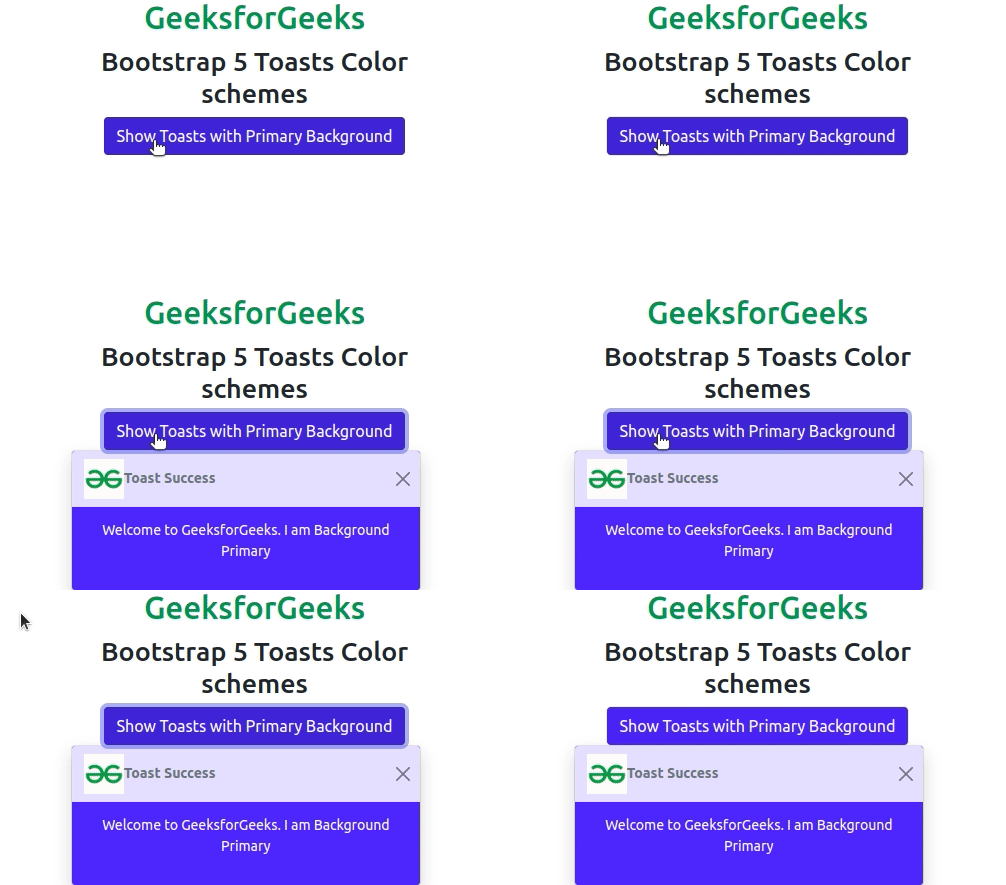
Example 2: In this example, we will learn about Toasts Background Color Schemes.
<!DOCTYPE html>
<html>

<head>
    <!-- Load Bootstrap -->
    <link href=
"https://cdn.jsdelivr.net/npm/bootstrap@5.0.2/dist/css/bootstrap.min.css"
        rel="stylesheet"
        integrity=
"sha384-EVSTQN3/azprG1Anm3QDgpJLIm9Nao0Yz1ztcQTwFspd3yD65VohhpuuCOmLASjC"
        crossorigin="anonymous">
    <script src=
"https://cdn.jsdelivr.net/npm/bootstrap@5.0.2/dist/js/bootstrap.bundle.min.js"
        integrity=
"sha384-MrcW6ZMFYlzcLA8Nl+NtUVF0sA7MsXsP1UyJoMp4YLEuNSfAP+JcXn/tWtIaxVXM"
        crossorigin="anonymous">
    </script>
</head>

<body>
    <div class="container text-center  col-8">
        <h1 class="text-success">
            GeeksforGeeks
        </h1>
        <h2>Bootstrap 5 Toasts Color schemes</h2>
        <div class="container">
            <button type="button" class="btn btn-primary"
                id="success" onClick="showToast()">
                Show Toasts with Primary Background
            </button>

            <div class="toast GFG1 bg-primary">
                <div class="toast-header">
                    <img src=
"https://media.geeksforgeeks.org/wp-content/cdn-uploads/gfg_200x200-min.png"
                        width="40px">
                    <strong class="me-auto">Toast Success</strong>

                    <button type="button" class="btn-close"
                        data-bs-dismiss="toast">
                    </button>
                </div>
                <div class="toast-body">
                    <p>
                        Welcome to GeeksforGeeks.
                        I am Background Primary
                    </p>
                </div>
            </div>
        </div>
    </div>

    <script>
        function showToast() {
            var toastElList =
                [].slice.call(document.querySelectorAll('.GFG1'));
            var toastList = toastElList.map(function (toastEl) {
                return new bootstrap.Toast(toastEl)
            })
            toastList.forEach(toast => toast.show())
        }
    </script>
</body>

</html>
Output
Reference: https://getbootstrap.com/docs/5.0/components/toasts/#color-schemes
