
Cards are very useful things in web development. Cards can hold various types of content, such as text, images, and links, making them perfect for displaying information in a structured format. And the background video can enhance the style of the web page. In this tutorial, we will focus on how to create a responsive card with a video background in Bootstrap 5.
Approach:
- At first, create a new HTML file and set up the basic HTML structure. Then include the Bootstrap 5 CSS link in the <head> section and add the Bootstrap 5 JavaScript link before the closing <body> tag.
- After that create a div for the background video and use the bootsrap class like "w-100" , "h-100" to provide it full width and height.
- And Insive the div you can add any video like if you want to add the youtube video the use the <iframe> page or if you want to use the online other video the use the <source> tag and set it's type like type="video/mp4".
- Inside this container, create a div for the card with Bootstrap's "card" class and add some content inside it. To give a color to the card use the "bg-dark" class and set it's opacity using "bg-opacity-75".
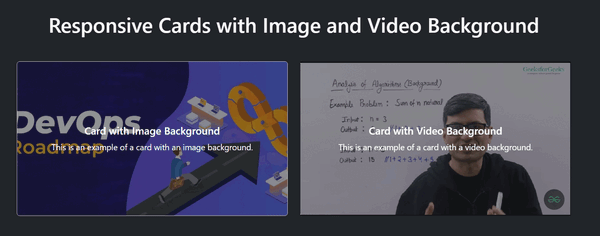
Example: To demonstrate creating a responsive card with a video background in bootstrap 5.
<!DOCTYPE html>
<html lang="en">

<head>
    <meta charset="UTF-8">
    <meta name="viewport" content="width=device-width, initial-scale=1.0">
    <title>Responsive Cards with Image and Video Background</title>
    <link href=
"https://cdn.jsdelivr.net/npm/bootstrap@5.3.0/dist/css/bootstrap.min.css"
          rel="stylesheet">
</head>

<body class="bg-dark text-light">

    <div class="container my-5">
        <h1 class="text-center mb-5">
              Responsive Cards with Image and Video Background
          </h1>
        <div class="row gy-5 justify-content-center">

            <!-- Card with Image Background -->
            <div class="col-12 col-md-6 col-lg-5">
                <div class="card text-white"
                     style="height: 300px;">
                    <img src=
"https://media.geeksforgeeks.org/wp-content/uploads/20230416201559/DevOps-Roadmap.webp"
                        class="card-img"
                        alt="Background Image"
                        style="height: 100%; object-fit: cover;">
                    <div class="card-img-overlay d-flex flex-column
                                justify-content-center bg-dark bg-opacity-50">
                        <h5 class="card-title text-center">
                              Card with Image Background
                          </h5>
                        <p class="card-text text-center">
                              This is an example of a card with an image background.
                          </p>
                    </div>
                </div>
            </div>

            <!-- Card with Video Background -->
            <div class="col-12 col-md-6 col-lg-5">
                <div class="card bg-dark text-white"
                     style="height: 300px;">
                    <div class="position-relative w-100 h-100">
                        <iframe class="w-100 h-100 position-absolute top-0 start-0"
                                style="object-fit: cover;"
                            src=
"https://www.youtube.com/embed/Pt2vYaJgGy8?autoplay=1&mute=1&loop=1&playlist=Pt2vYaJgGy8"
                            title="YouTube video player"
                            frameborder="0"
                            allow="accelerometer; autoplay;
                                   clipboard-write; encrypted-media;
                                   gyroscope; picture-in-picture; web-share"
                            allowfullscreen></iframe>
                        <div class="card-img-overlay d-flex
                                    flex-column justify-content-center
                                    bg-dark bg-opacity-50">
                            <h5 class="card-title text-center">
                                  Card with Video Background
                              </h5>
                            <p class="card-text text-center">
                                  This is an example of a card with a
                                  video background.
                              </p>
                        </div>
                    </div>
                </div>
            </div>

        </div>
    </div>

    <script src=
"https://cdn.jsdelivr.net/npm/bootstrap@5.3.0/dist/js/bootstrap.bundle.min.js">
      </script>
</body>

</html>
Output:
