
Text is essential for any game for showing score, health, timer or menu options. Unity offers two text systems: legacy Text (UI) and TextMeshPro (TMP). TextMeshPro is the modern, recommended option with better quality and more features.
TextMeshPro
TextMeshPro is Unity's advanced text rendering system. It provides sharper text, better spacing, and more styling options than the old Unity Text.
- Crisp text at any size or resolution.
- Rich styling options (bold, italic, color, size).
- Support for custom fonts and icons.
- Better performance than legacy text.
Creating a TextMeshPro Element
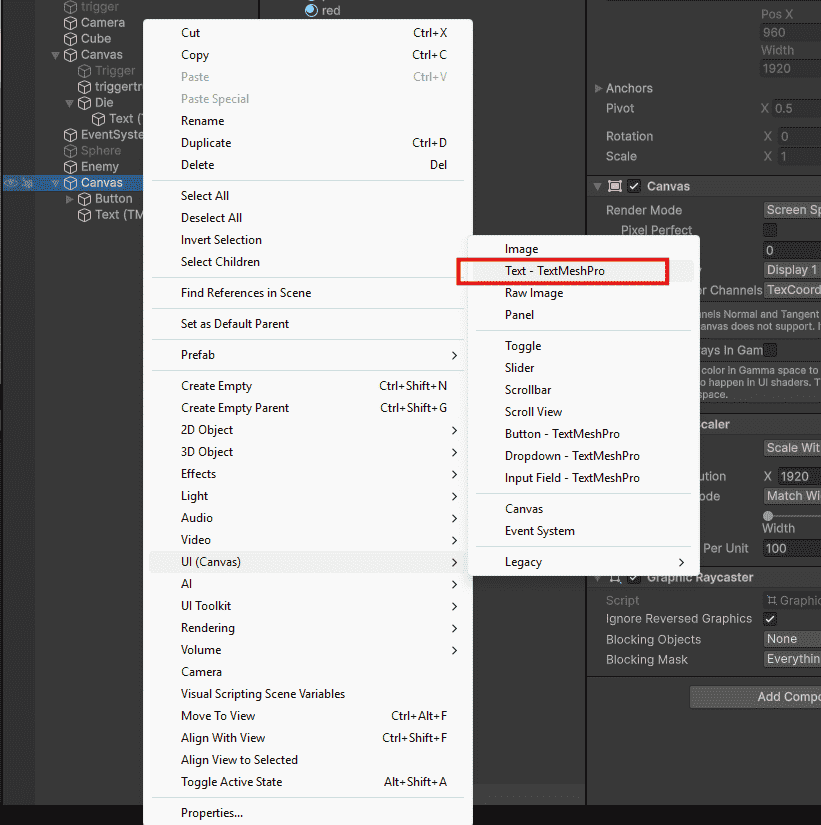
Method 1: Right-click in Hierarchy - UI - Text - TextMeshPro.
Method 2: If you see "Import TMP Essentials" popup – click Import. This happens the first time you use TextMeshPro.
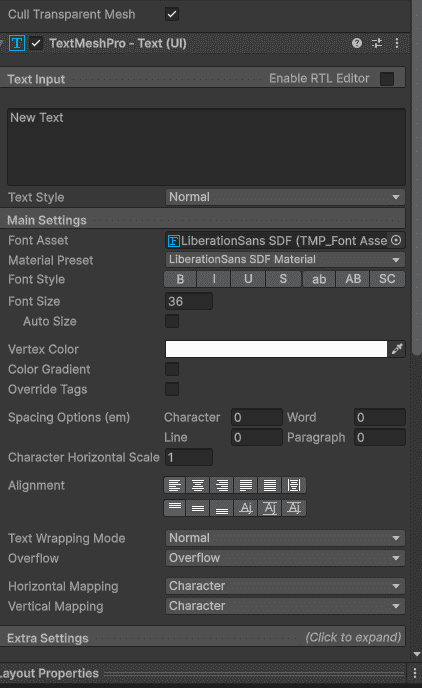
Text Component Inspector
When you select a Text element, the Inspector shows these key properties:
- Text Input: What the text says (example: "Score: 0").
- Font Asset: Which font to use.
- Font Size: How big or small.
- Color: Text color.
- Alignment: Left, center, right, top, middle, bottom.
- Wrapping: Auto wrap to next line or not.
Changing Text from Script
To update text during gameplay (score, timer, health), use a script.
public class ScoreDisplay : MonoBehaviour
{
    public TextMeshProUGUI scoreText;
    private int score = 0;
    void Start()
    {
        scoreText.text = "Score: " + score;
    }
    public void AddScore(int amount)
    {
        score += amount;
        scoreText.text = "Score: " + score;
    }
}
TextMeshProUGUI is the component type for UI text. Change the .text property to update what the player sees.
Rich Text Tags
You can style specific parts of text using tags (like HTML).
// In Inspector text input field
"This is <b>bold</b> and this is <i>italic</i>"
"<color=red>Red text</color> and <color=green>green text</color>"
"<size=200%>Big text</size> normal text"
Common tags:
- <b>bold</b>: Makes text bold
- <i>italic</i>: Makes text italic
- <color=red>red</color>: Changes color
- <size=150%>big</size>: Changes size
- <br>: Line break
Font Assets
Fonts control how text looks. TextMeshPro uses .ttf or .otf font files.
To change font:
- Download a .ttf font file.
- Drag into Project window.
- Right-click font - Create - TextMeshPro - Font Asset.
- Drag new Font Asset into Text component's Font Asset slot.
Common Text Use Cases
Score Display
scoreText.text = "Score: " + playerScore;
Health Text
healthText.text = "HP: " + currentHealth + "/" + maxHealth;
Timer
int minutes = Mathf.FloorToInt(timeLeft / 60);
int seconds = Mathf.FloorToInt(timeLeft % 60);
timerText.text = string.Format("{0:00}:{1:00}", minutes, seconds);
