
Games run at different frame rates on different devices. A game running at 30 FPS on a mobile phone and 144 FPS on a gaming PC will behave very differently if your code depends on frame rate. Unity provides time-related properties to make your game run consistently on any device.
Understanding the Frame Rate Problem
Without proper time handling, your game will run faster on powerful machines and slower on weak ones.
void Update()
{
    transform.Translate(5, 0, 0);  // 5 units every frame
    // At 30 FPS: 150 units per second
    // At 144 FPS: 720 units per second (much faster!)
}
- Higher frame rate = more Update() calls per second
- Movement without Time.deltaTime becomes frame-dependent
- Players with better hardware get unfair advantages
Time.deltaTime
Time.deltaTime is the time in seconds since the last frame. Multiply by it to convert "per frame" to "per second".
void Update()
{
    transform.Translate(5 * Time.deltaTime, 0, 0);
    // Moves 5 units per second regardless of frame rate
}
How it works:
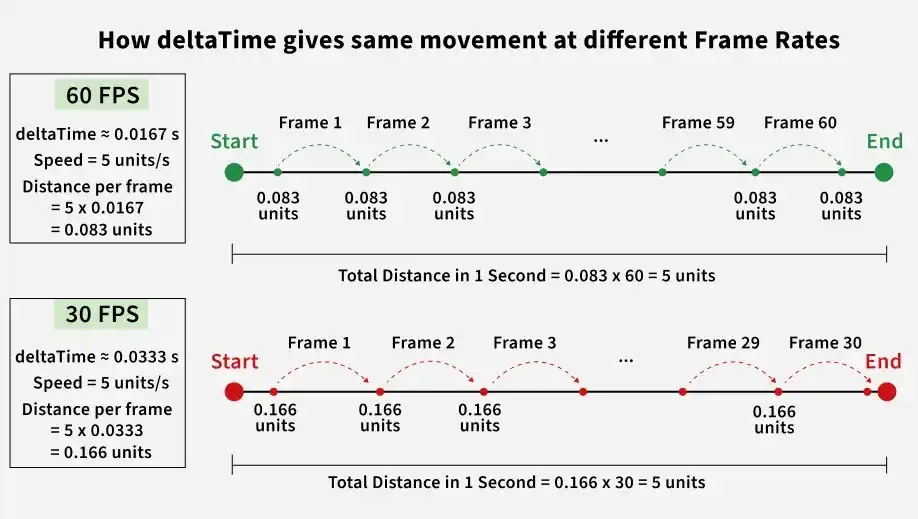
- At 60 FPS: deltaTime = ~0.0167 seconds (5 × 0.0167 = 0.083 per frame, 60 frames = 5 per second)
- At 30 FPS: deltaTime = ~0.0333 seconds (5 × 0.0333 = 0.166 per frame, 30 frames = 5 per second)
Common Uses of Time.deltaTime
Movement
Moves the object smoothly at a constant speed regardless of frame rate.
transform.Translate(speed * Time.deltaTime, 0, 0);
Rotation
Rotates the object at a consistent angular speed on any device.
transform.Rotate(0, rotateSpeed * Time.deltaTime, 0);
Smooth value changes
Gradually changes a value towards a target over time, independent of frame rate.
health = Mathf.Lerp(health, targetHealth, smoothSpeed * Time.deltaTime);
Timers and cooldowns
Decreases a timer value each frame based on real time, ensuring cooldowns last the correct duration.
private float shootCooldown;
void Update()
{
    if (shootCooldown > 0)
    {
        shootCooldown -= Time.deltaTime;
    }
}
FixedUpdate and Time.fixedDeltaTime
For physics-related code, use FixedUpdate() instead of Update().
void FixedUpdate()
{
    // Physics movement - already frame-rate independent
    rb.AddForce(moveDirection * force);
}
Key differences:
- Update(): Called every frame, variable interval, use Time.deltaTime
- FixedUpdate(): Called at fixed interval (default 0.02 seconds = 50 times per second), use Time.fixedDeltaTime (rarely needed manually)
Essential Time Properties
- Time.deltaTime: Time since last frame (scaled) – use for movement.
- Time.unscaledDeltaTime: Time since last frame (ignores timeScale) – use for UI during pause.
- Time.fixedDeltaTime: Fixed interval for physics (default 0.02).
- Time.time: Total seconds since game start (scaled).
- Time.unscaledTime: Total seconds ignoring timeScale.
- Time.timeScale: Speed multiplier (1 = normal, 0 = paused).
- Time.frameCount: Total frames rendered so far.
Common Errors and Solutions
- Missing Time.deltaTime in Update() makes movement frame-rate dependent.
- Using Time.deltaTime in FixedUpdate() is unnecessary since it runs at fixed intervals.
- Not all calculations need Time.deltaTime, such as score updates.
- Setting timeScale = 0 pauses timers; use unscaled time for pause menus.
