
Amazon Elastic File System (EFS) is a fully managed, serverless, and elastic file storage service provided by AWS. It allows users to share file data without managing storage infrastructure and automatically scales as files are added or removed. Unlike Amazon EBS, which provides block storage for a single EC2 instance, EFS uses the NFS protocol to provide shared file storage that can be accessed simultaneously by thousands of compute resources.
- Automatically scales storage capacity based on usage.
- Supports simultaneous access from EC2 instances, ECS/EKS containers, and AWS Lambda functions.
- Uses standard NFSv4.0 and NFSv4.1 protocols for Linux systems.
- Automatically replicates data across multiple Availability Zones within a Region for high durability and availability.
- Supports lifecycle policies to move infrequently accessed files to lower-cost storage classes.
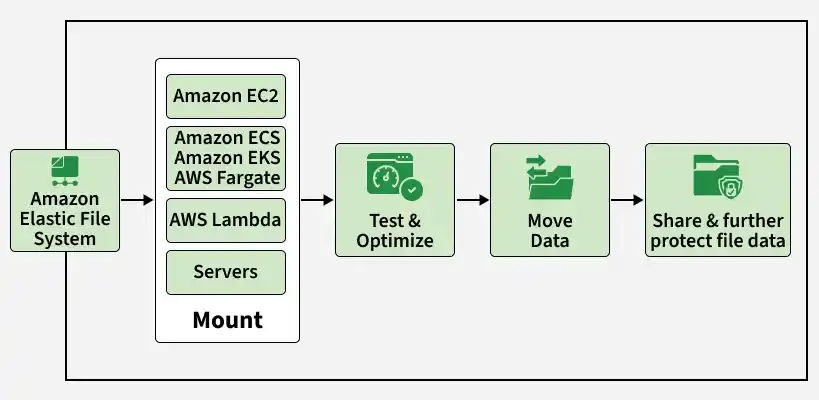
Working of Amazon EFS
Amazon EFS operates through a regional architecture that replicates data across multiple Availability Zones.
- File System: The top-level AWS resource representing your shared storage.
- Mount Targets: Created in each VPC subnet to provide an IP address for EC2 instances or containers to connect to EFS.
- NFS Protocol: Mounts the file system onto EC2 instances as a standard local directory using NFSv4.
- Regional Replication: Automatically replicates data across multiple Availability Zones within a region for maximum durability.
Use Cases of Amazon EFS
Amazon EFS is widely used in enterprise applications that require scalable and shared file storage.
- Secured File Sharing: Enables secure, fast, and consistent file sharing across multiple instances.
- Web Hosting: Serves as common storage for fleet-based web applications (e.g., WordPress) requiring simultaneous file access.
- Machine Learning and AI Workloads: Stores massive datasets, allowing parallel access by training models across multiple instances.
EFS Performance and Throughput Modes
Configuring EFS performance and throughput correctly is essential for optimizing cost and latency.
1. Performance Modes
- General Purpose: The default mode that offers low latency and is ideal for web serving, CMS, and general file sharing.
- Max I/O: Designed to scale to higher throughput and aggregate IOPS, making it suitable for scale-out workloads.
2. Throughput Modes
- Elastic: The modern recommended default that automatically scales throughput based on workload activity.
- Bursting: Ties throughput limits directly to the amount of storage size, using a credit-based system.
- Provisioned: Allocates a dedicated throughput speed (in MB/s) regardless of the storage size.
EFS vs. EBS vs. S3
Understanding the differences between AWS storage options helps in choosing the right storage service.
| Feature | Amazon EFS | Amazon EBS | Amazon S3 |
|---|---|---|---|
| Type | File Storage (NFS) | Block Storage (Virtual Hard Drive) | Object Storage (REST API) |
| Access | Multi-Attach (Thousands of instances) | Single-Attach (Usually one EC2 instance) | API-based Access (Global web access) |
| Latency | Low (milliseconds) | Lowest (sub-millisecond) | Moderate/Variable (milliseconds) |
| OS Boot | No | Yes | No |
| Storage Limit | Elastic (Virtually unlimited) | Up to 64 TiB per volume | Unlimited |
| Pricing | High (~$0.30/GB-month) | Moderate (~$0.08 to $0.10/GB-month) | Low (~$0.023/GB-month) |
Storage Classes and Lifecycle Management
Amazon EFS offers four storage classes that are managed automatically via lifecycle policies to optimize costs.
- EFS Standard: SSD-backed storage classes that deliver high-performance access for active data.
- EFS Standard-IA (Infrequent Access): Cost-optimized class for files that are not accessed daily.
- EFS One Zone: Reduces costs by approximately 47% by storing data in a single Availability Zone.
- EFS One Zone-IA: The most cost-effective tier, storing infrequently accessed data in a single Availability Zone.

Lifecycle Management transitions files to Infrequent Access
Performance Modes Specifications
Choosing the correct performance mode ensures that your application meets its I/O requirements.
1. General Purpose Mode
- Latency: Offers the lowest latency per operation for files.
- IOPS Limit: Supports up to 35,000 read IOPS and 7,000 write IOPS.
- Monitoring: Track the PercentIOLimit metric in CloudWatch to determine if you need to switch to Max I/O mode.
2. Max I/O Mode
- Scaling: Recommended for workloads that exceed 35,000 read IOPS or 7,000 write IOPS.
- Throughput: Scales to virtually unlimited throughput and IOPS across thousands of parallel connections.

Selecting Performance Mode in AWS Console
Throughput Modes Specifications
EFS provides multiple throughput options to match your budget and application traffic.
- Elastic Mode: Automatically adjusts throughput performance on-demand to match your active workload.
- Bursting Mode: Provides baseline throughput tied to storage size, scaling with burst credits up to 100 MB/s per TiB.
- Provisioned Mode: Guarantees a constant, dedicated throughput limit regardless of the amount of data stored.

Selecting Throughput Mode in AWS Console
Configuring Amazon EFS
Here is the detailed procedure to set up Amazon EFS and connect it to your EC2 instances.
Step 1: Create Amazon EFS
Launch the AWS Management Console, navigate to EFS, click "Create file system", and select the target VPC.
.webp)
Creating a File System in the AWS Console
Step 2: Launch EC2 Instances
Create one or more EC2 instances in the same VPC to mount the EFS file system.
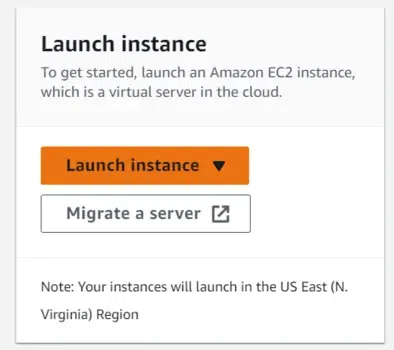
Configuring an EC2 Instance on AWS
Step 3: Allow EFS Access and Mount
Update the Security Group of the EFS to allow inbound traffic on port 2049 from the EC2 instance's Security Group.
-(1).webp)
Modifying Security Group Inbound Rules
.webp)
Attaching EFS using the Mount Helper
After successful mounting, you can manage files across your fleet effortlessly.
- Shared Directory: Files created in the mounted folder are instantaneously accessible and writable by all connected instances.
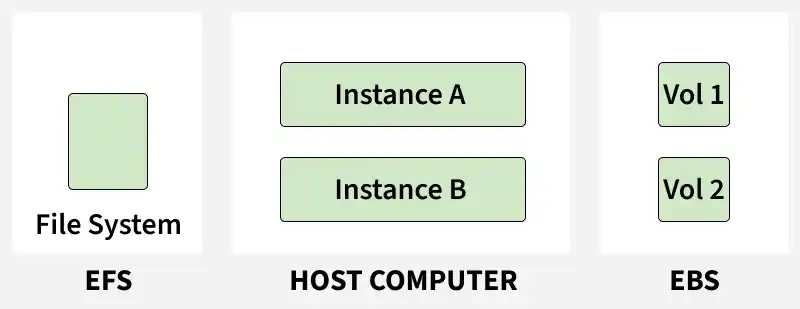
Amazon EFS offers distinct advantages in specific multi-server architectural patterns.
- Multiple Server Architectures: Provides a highly shared file system, enabling scalable file access for multi-instance application pools.
- Big Data Analytics: Supports massive analytics jobs by delivering parallel throughput and scale-on-demand capabilities.
- Reliable Storage: Distributes data across multiple Availability Zones, ensuring higher durability compared to single-AZ EBS volumes.
- Media Processing: Supports high-throughput media processing and rendering workloads.
Security Best Practices for Amazon EFS
Securing your file storage requires a multi-layered approach combining network and access controls.
- Security Groups: Configure the EFS security group to allow inbound traffic on NFS Port 2049 exclusively from trusted client security groups.
- IAM Authorization: Implement IAM policies to manage mount permissions and strictly control root access credentials.
- Data Encryption: Enable KMS-managed encryption for data at rest, and use TLS mount options to enforce encryption in transit.
Advantages
- EFS is highly elastic, scaling up or down automatically in response to file storage additions or deletions.
- It supports parallel, simultaneous access from multiple compute instances to simplify distributed data sharing.
- It provides high availability by replicating file system data across multiple Availability Zones within an AWS Region.
- It integrates seamlessly with AWS Backup to provide automated, point-in-time recovery points.
- It supports standard POSIX file system permissions and semantics, ensuring native compatibility with Linux-based applications.
Limitations
- Amazon EFS primarily supports Linux-based workloads using the NFS protocol and is not natively designed for Windows systems.
- EFS generally has higher latency compared to Amazon EBS because it is network-based file storage.
- The maximum supported file size in EFS is 47.9 TiB.
- EFS can be more expensive than Amazon EBS or Amazon S3 for large-scale storage workloads.
- Cross-region replication may introduce additional latency during data access and synchronization.
Amazon EFS Pricing Model
EFS cost structure is based on the specific storage tier, data transfer, and configuration choices.
- Storage Tiering: Billed on a per-GB-month rate which differs significantly between active SSD storage (Standard) and archival storage (IA).
- Throughput Mode: Elastic mode charges per GB read or written, whereas Provisioned mode bills a flat hourly rate for reserved MB/s.
- Read/Write Requests: Access charges are applied to data transitioned and read from the Infrequent Access (IA) storage classes.
Note: Aggressively use Lifecycle Policies to move data to EFS IA. It reduces storage costs by up to 92%.
