
MMDetection is an open source Object Detection toolbox based on PyTorch that helps you build and use models to find and recognize objects in images and videos. It’s built with PyTorch and provides ready made code for popular detection methods. With MMDetection you can easily train your own object detectors, test them and use them in real applications all without writing complicated code from scratch. It’s flexible, easy to use and widely used by researchers and developers around the world.
Key Features
- Modular Architecture: MMDetection is designed with modular components like backbones, necks, heads and losses that can be easily swapped or customized allowing flexible model building and experimentation.
- Extensive Model Zoo: It supports a wide range of state of the art detection frameworks including Faster R-CNN, Mask R-CNN, RetinaNet, Cascade R-CNN, YOLO series and more ready to use with pretrained weights.
- Config Driven Workflow: All aspects of training, testing and inference are controlled through user friendly configuration files making experiments reproducible and easy to modify without changing the code.
- Multi Task Support: Supports various computer vision tasks such as object detection, instance segmentation and keypoint detection within a unified framework.
- Integration with OpenMMLab ecosystem: MMDetection is tightly integrated with OpenMMLab tools like MMEngine and MMCV enabling shared functionality such as efficient model training, modular pipelines and common utilities for computer vision tasks.
Basic Functions
Here we have listed some of the commonly used functions in MMDetection:
| Function | Description |
|---|---|
init_detector | Initialize a detection model from config and checkpoint files. |
inference_detector | Run inference (object detection) on images using the model. |
show_result | Visualize detection results on images with bounding boxes. |
train_detector | Train a detection model on a dataset with specified configs. |
load_checkpoint | Load saved model weights from a checkpoint file. |
save_checkpoint | Save current model weights during or after training. |
build_dataset | Prepare and build datasets from config files for training/testing. |
How to use MMDetection
- MMDetection works by breaking down the detection pipeline into key components such as the backbone which extracts features from images, the neck which enhances multi scale features and the head which performs object classification and bounding box prediction.
- Users configure these components along with datasets, training schedules and optimization strategies through easy to edit configuration files making experimentation simple and reproducible.
- During training the model processes input images to generate predictions compares them to ground truth annotations and updates its weights accordingly.
- At inference it produces bounding boxes and class labels applying techniques like Non Maximum Suppression to refine results.
- MMDetection’s design allows users to swap or customize parts of the pipeline easily supporting a wide range of models and tasks while enabling efficient development for both research and real world applications.
How to Install MMDetection
- These commands install the core libraries needed for MMDetection.
- !pip install mmcv-full installs MMCV a foundational toolkit that provides important utilities and optimized operations for computer vision.
- !pip install mmdet installs MMDetection itself the object detection toolbox built on top of MMCV and PyTorch.
!pip install mmcv-full
!pip install mmdet
Example
- This code uses MMDetection to perform object detection.
- First it initializes a Faster R-CNN model with a specified config and pre trained checkpoint on a CUDA device.
- Then it runs inference on an input image (test.jpg) to detect objects.
- Finally it visualizes the detection results and saves the output image as result.jpg.
from mmdet.apis import init_detector, inference_detector
import mmcv

config_file = 'configs/faster_rcnn/faster_rcnn_r50_fpn_1x_coco.py'
checkpoint_file = 'checkpoints/faster_rcnn_r50_fpn_1x_coco_20200130-047c8118.pth'

model = init_detector(config_file, checkpoint_file, device='cuda:0')

img = 'test.jpg'

result = inference_detector(model, img)

model.show_result(img, result, out_file='result.jpg')
MMDetection vs Other Frameworks
Let us compare MMDetection with Other Frameworks like Detectron and YOLOv8:
| Feature | MMDetection | Detectron2 | YOLOv8 |
|---|---|---|---|
| Framework | PyTorch based open source toolbox | PyTorch based framework by Facebook AI | Ultralytics’ PyTorch based real time model |
| Algorithm Support | Wide range: Faster R-CNN, Mask R-CNN, Cascade, RetinaNet and more | State of the art models like Faster R-CNN, Mask R-CNN, RetinaNet | Primarily YOLO series (latest YOLOv8) |
| Modularity | Highly modular and customizable | Modular with clean design | Less modular, focuses on ease of use |
| Performance | Strong accuracy, good for research and production | State of the art accuracy, well optimized | High speed and efficiency, good accuracy |
| Use Case | Research, industrial deployment | Research and benchmarking | Real time applications, edge device |
Applications
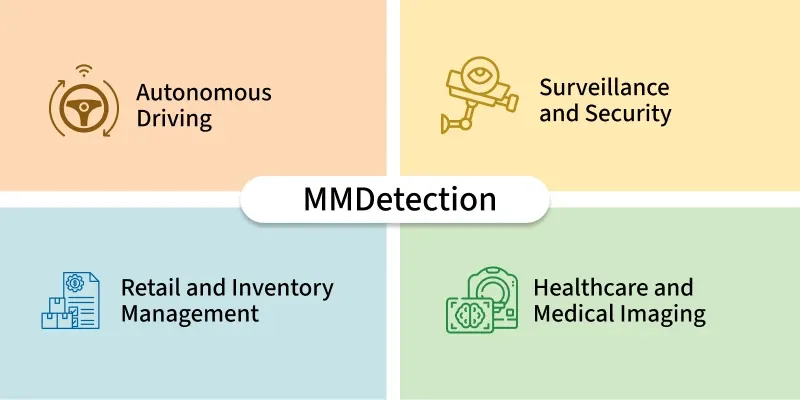
- Autonomous Driving: Detects vehicles, pedestrians, traffic lights and road signs in real time to enable safe navigation and decision making for self driving cars.
- Surveillance and Security: Monitors public spaces or restricted areas by detecting suspicious activities, unusual objects or people for enhanced security and threat prevention.
- Retail and Inventory Management: Identifies products on shelves, tracks inventory levels and assists in automated checkout systems to improve retail efficiency.
- Healthcare and Medical Imaging: Detects tumors, lesions or anatomical structures in medical scans such as MRI, CT and X rays aiding diagnosis and treatment planning.
