
User-defined data types in C++ allow programmers to create custom types beyond built-in ones, making code more structured and meaningful. They are widely used to model real-world entities efficiently.
- Help extend built-in data types with custom definitions.
- Improve code readability and organization.
- Enable object-oriented and structured programming concepts.
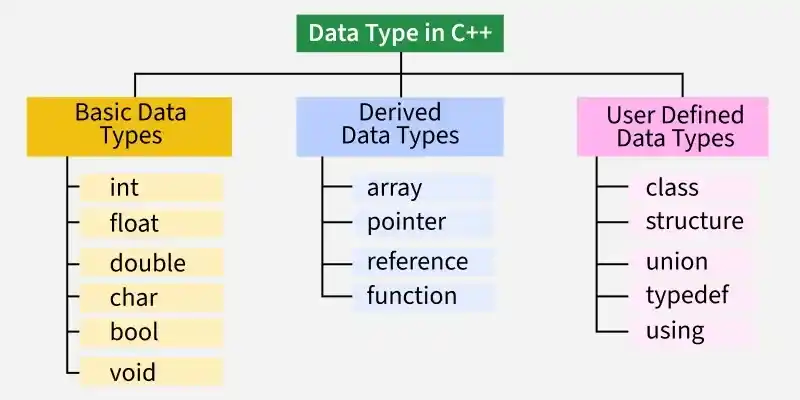
Types of User-Defined Data Types
User-defined data types are those data types that are defined by the user. In C++, these data types allow programmers to extend the basic data types provided by the language and create new types that are better suited to specific needs. C++ supports 5 user-defined data types:
Class
A Class is a user-defined data type used in object-oriented programming to group data members and member functions together.
- Acts as a blueprint for objects
- Contains data and functions together
- Supports encapsulation and reusability
#include <bits/stdc++.h>
using namespace std;

class GfG {

    // Access specifier
public:

    // Data Member
    string name;

    // Member Function
    void printname() {
        cout << name;
    }
};

int main() {

    // Declare an object of class geeks
    GfG g;

    // Accessing data member
    g.name = "GeeksForGeeks";

    // Accessing member function
    g.printname();

    return 0;
}
Output
GeeksForGeeks
Explanation: The above program defines a class named GfG with a name attribute and a function printname() to print the name. In the main function, it creates an object named g, sets the geekname as "GeeksforGeeks", and calls the printname() function to display it.
Structure
A Structure is a user-defined data type used to group different types of variables under one name.
- Groups related data of different types
- Similar to class but with default public access
- Mainly used for simple data storage
#include <iostream>
using namespace std;

// Declaring structure
struct A {
    int i;
    char c;
};

int main() {

    // Create an instance of structure
    A a;

    // Initialize structure members
    a.i = 65;
    a.c = 'A';

    cout << a.c << ": " << a.i;

    return 0;
}
Output
A: 65
Explanation: The above demonstrates program demonstrates the use of structures by defining a structure named A having i and c members. It then creates an instance if structure in the main function, sets the members' values, and prints them.
Structures in C++ are different from structures in C and resembles classes. Refer to this article to learn more - Difference Between C Structures and C++ Structures
Union
Like structures , union is a special data type where all members share the same memory location.
- All members use the same memory space
- Only one member can hold a value at a time
- Useful for memory optimization
#include <iostream>
using namespace std;

// Declaration of union is same as the structures
union A {
    int i;
  	char c;
};

int main() {
    // A union variable t
    A a;

  	// Assigning value to c, i will also
  	// assigned the same
    a.c = 'A';

	cout << "a.i: " << a.i << endl;
  	cout << "a.c: " << a.c;

    return 0;
}
Output
a.i: 65
a.c: A
Explanation: The above program demonstrates the use of unions. Union named A with members i and c is defined that shares the same memory space. It is shown that when we only assign c some value, the i also stores the same value.
Enumeration
Enumeration (enum) is used to assign names to integral constants.
- Improves code readability
- Represents a set of named values
- Helps in making code easier to maintain
#include <iostream>
using namespace std;

// Declaring enum
enum Week { Mon, Tue, Wed, Thur, Fri, Sat, Sun };

int main() {

  	// Creating enum variable
    enum Week day;

  	// Assigning value to the variabe
    day = Wed;

    cout << day;
    return 0;
}
Output
2
Typedef and Using
typedef or using are used to create alias names for existing data types.
- Creates alternative names for data types
- Does not create new data types
- Improves code readability and portability
#include <iostream>
using namespace std;

// Using typedef to define a new name for existing type
typedef float f;

// Using 'using' to define a new name for existing type
using integer = int;

int main() {
    // Declaring variables using new type names
    f x = 3.14;
    integer y = 42;

    cout << "Float Value: " << x << endl;
    cout << "Integer Value: " << y;

    return 0;
}
Output
Float Value: 3.14
Integer Value: 42
