
Bulma is a flexbox-based open-source CSS framework and it's completely free. It is component rich, compatible, and well documented. It is highly responsive in nature. It uses classes to implement its design.
The ‘pagination’ is a component used to indicate the existence of a series of related content across multiple pages. Pagination is used to enable navigation between pages on a website. The pagination component includes several other components that we have to add exclusively to design our content well.
These components are listed below.
- pagination-previous: It is used to navigate to the previous page.
- pagination-next: It is used to navigate to the next page.
- pagination-list: It is used to display different pages of the website.
- pagination-link: It is to indicate the page number in the anchor tag.
- pagination-ellipsis: It creates the range separators between the page numbers.
Variable Used:
| Name | Description | Type | Value | Computed Value | Computed Type |
|---|---|---|---|---|---|
| $pagination-color | This variable is used to provide color to the pagination. | variable | $text-strong | hsl(0, 0%, 21%) | color |
| $pagination-border-color | This variable is used to provide border color to the pagination | variable | $border | hsl(0, 0%, 86%) | color |
| $pagination-margin | This variable is used to define the margin of the pagination. | size | -0.25rem | ||
| $pagination-min-width | This variable is used to provide the min-width of the pagination. | variable | $control-height | ||
| $pagination-item-font-size | This variable is used to define the size of the item font in pagination. | size | 1em | ||
| $pagination-item-margin | This variable is used to provide margin in pagination. | size | 0.25rem | ||
| $pagination-item-padding-left | This variable is used to provide padding from the left position of the pagination. | size | 0.5em | ||
| $pagination-item-padding-right | This variable is used to provide padding from the right position of the pagination. | size | 0.5em | ||
| $pagination-nav-padding-left | This variable is used to provide padding from the left position in nav. | size | 0.75em | ||
| $pagination-nav-padding-right | This variable is used to provide padding from the right position in nav. | size | 0.75em | ||
| $pagination-hover-color | This variable is used to provide a color effect on hover. | variable | $link-hover | hsl(0, 0%, 21%) | color |
| $pagination-hover-border-color | This variable is used to provide a border color effect on hover. | variable | $link-hover-border | hsl(0, 0%, 71%) | color |
| $pagination-focus-color | This variable is used to provide color at focus in pagination. | variable | $link-focus | hsl(0, 0%, 21%) | color |
| $pagination-focus-border-color | This variable is used to provide color at focus in pagination. | variable | $link-focus-border | hsl(229, 53%, 53%) | color |
| $pagination-active-color | This variable is used to provide color to active pagination. | variable | $link-active | hsl(0, 0%, 21%) | color |
| $pagination-active-border-color | This variable is used to provide border-color to active pagination. | variable | $link-active-border | hsl(0, 0%, 29%) | color |
| $pagination-disabled-color | This variable is used to provide color to disabled pagination. | variable | $text-light | hsl(0, 0%, 48%) | color |
| $pagination-disabled-background-color | This variable is used to provide background color to disabled pagination. | variable | $border | hsl(0, 0%, 86%) | color |
| $pagination-disabled-border-color | This variable is used to provide border color to the disabled pagination. | variable | $border | hsl(0, 0%, 86%) | color |
| $pagination-current-color | This variable is used to provide color to the current pagination. | variable | $link-invert | #fff | color |
| $pagination-current-background-color | This variable is used to provide background-color to the current pagination. | variable | $link | hsl(229, 53%, 53%) | color |
| $pagination-current-border-color | This variable is used to provide border color to the current pagination. | variable | $link | hsl(229, 53%, 53%) | color |
| $pagination-ellipsis-color | This variable is used to provide color to ellipses pagination. | variable | $grey-light | hsl(0, 0%, 71%) | color |
| $pagination-shadow-inset | This variable is used to provide the inset shadow effect to pagination. | size | inset 0 1px 2px rgba($scheme-invert, 0.2) |
Example 1: In the below code, we will make use of the above variable to modify pagination.
<!DOCTYPE html>
<html>
<head>
    <meta charset="utf-8">
    <meta name="viewport" content=
"width=device-width, initial-scale=1">
    <title>Hello Bulma!</title>
    <link rel="stylesheet" href=
"https://cdn.jsdelivr.net/npm/bulma@0.8.0/css/bulma.min.css">

     <!-- font-awesome cdn -->
    <script src=
'https://cdnjs.cloudflare.com/ajax/libs/font-awesome/5.12.0-2/js/all.min.js'>
    </script>
    <style>
       .container {
            background-color: green; }
    </style>
</head>

<body>
    <center>
        <h1 class="title has-text-centered has-text-success">
            GeeksforGeeks
        </h1>
        <h3 class="subtitle has-text-centered">
            A computer science portal for geeks.
        </h3>
        <div class='container'>
            <div class='columns is-mobile is-centered'>
                <div class='column is-10'>
                    <nav class="pagination" role="navigation"
                         aria-label="pagination">
                        <a class="pagination-previous">Previous</a>
                        <a class="pagination-next">Next page</a>
                        <ul class="pagination-list">
                            <li>
                                <a href="#" class="pagination-link"
                                   aria-label="Page 1">1</a>
                            </li>
                            <li>
                                <a href="#" class="pagination-link
                                  is-current" aria-label="Goto page 2"
                                  aria-current="page">2</a>
                            </li>
                            <li>
                                <a href="#" class="pagination-link"
                                   aria-label="Goto page 3">3</a>
                            </li>
                            <li>
                                <a href="#" class="pagination-link"
                                   aria-label="Goto page 4">4</a>
                            </li>
                            <li>
                                <a href="#" class="pagination-link"
                                    aria-label="Goto page 5">5</a>
                            </li>
                            <li>
                                 <a class="pagination-link"
                                    aria-label="Goto page 6">6</a>
                            </li>
                        </ul>
                    </nav>
                </div>
            </div>
        </div>
    </center>
</body>
</html>
SCSS Code:
$pagination-color:green;
.container {
    background-color:$pagination-color;
}
Compiled CSS Code:
.container {
    background-color: green;
}
Output:

Example 2: In the below code, we will make use of the above variable to modify pagination.
<!DOCTYPE html>
<html>
<head>
    <meta charset="utf-8">
    <meta name="viewport" content=
"width=device-width, initial-scale=1">
    <title>Hello Bulma!</title>
    <link rel="stylesheet" href=
"https://cdn.jsdelivr.net/npm/bulma@0.8.0/css/bulma.min.css">

     <!-- font-awesome cdn -->
    <script src=
'https://cdnjs.cloudflare.com/ajax/libs/font-awesome/5.12.0-2/js/all.min.js'>
    </script>
</head>

<body>
    <center>
        <h1 class="title has-text-centered has-text-success">
            GeeksforGeeks
        </h1>
        <h3 class="subtitle has-text-centered">
            A computer science portal for geeks.
        </h3>
        <div class='container'>
            <div class='columns is-mobile is-centered'>
                <div class='column is-10'>
                    <nav class="pagination" role="navigation"
                        aria-label="pagination">
                        <a class="pagination-previous">Previous</a>
                        <a class="pagination-next">Next page</a>
                        <ul class="pagination-list">
                            <li>
                                <a href="#" class="pagination-link"
                                   aria-label="Page 1">1</a>
                            </li>
                            <li>
                                <a href="#" class="pagination-link
                                  is-current" aria-label="Goto page 2"
                                  aria-current="page">2</a>
                            </li>
                            <li>
                                <a href="#" class="pagination-link"
                                   aria-label="Goto page 3">3</a>
                            </li>
                            <li>
                               <a href="#" class="pagination-link"
                                  aria-label="Goto page 4">4</a>
                            </li>
                            <li>
                               <a href="#" class="pagination-link"
                                  aria-label="Goto page 5">5</a>
                            </li>
                            <li>
                               <a class="pagination-link"
                                aria-label="Goto page 6">6</a>
                            </li>
                        </ul>
                    </nav>
                </div>
            </div>
        </div>
    </center>
</body>
</html>
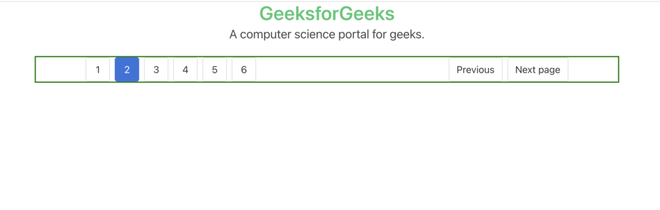
SCSS Code:
$pagination-border-color:2px solid green;
.container {
    border:$pagination-border-color;
}
Compiled CSS Code:
.container {
    border: 2px solid green;
}
Output:
Reference: https://bulma.io/documentation/components/pagination/
