
It represents by <percentage > takes a number as a parameter. It is used to define the relative size to the parent size. With the help of this, you can adjust all the HTML-CSS elements. In CSS, many properties that take a percentage as parameters such as padding, width, height, margin, and font-size.
Syntax:
html
Output:
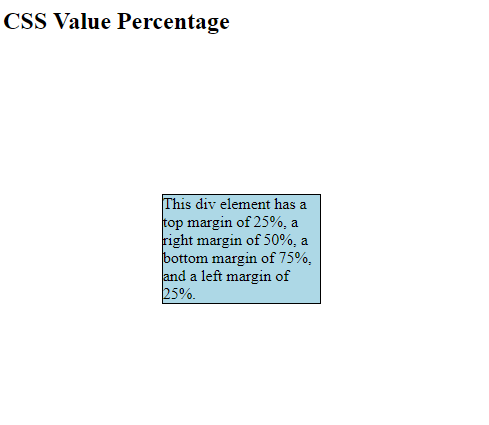 Example 2:
html
Output:
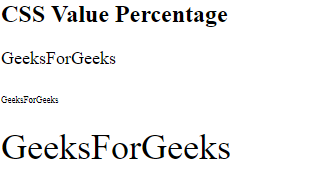
<Percentage>It takes a number as parameter followed by percentage sign(%). The number can be positive and negative but some properties do not accept negative percentages. Note: No space between number and percentage sign(%) is acceptable. Example 1:
<!DOCTYPE html>
<html>

<head>
    <style>
        div {
            border: 1px solid black;
            margin: 25% 50% 75% 25%;
            background-color: lightblue;
        }
    </style>
</head>

<body>
    <h2>CSS Value Percentage</h2>

    <div>
        This div element has a top margin
        of 25%, a right margin of 50%, a
        bottom margin of 75%, and a left
        margin of 25%.
    </div>
    <hr />
</body>

</html>
<!DOCTYPE html>
<html>

<head>
    <title>
        CSS | Percentage Value
    </title>
</head>

<body>
    <h2>CSS Value Percentage</h2>

    <!-- size of text is 18px -->
    <div style="font-size: 18px;">

        <p>GeeksForGeeks</p>

        <!-- Size of text is 50% of 18px -->
        <p><span style="font-size: 50%;">
                GeeksForGeeks
            </span>
        </p>

        <!-- Size of text is 200% of 18px -->
        <p><span style="font-size: 200%;">
                GeeksForGeeks
            </span>
        </p>
    </div>

    <hr />
</body>

</html>
