
Retrieval-Augmented Generation (RAG) is a framework that combines the strengths of information retrieval and generative models:
- Retriever: The retriever component fetches relevant documents from a large corpus or knowledge base based on the input query.
- Generator: The generator then takes the retrieved documents and the query to generate a coherent and contextually relevant response.
It allows a model to retrieve relevant documents from a knowledge base and use those documents to augment the generation process, resulting in more accurate, context-aware and insightful responses. This approach has shown promising results in various applications such as question answering, dialogue systems and content generation. In this article we will build a RAG Application.
Building a Customer Help Bot
Before building the model lets see how RAG Works in customer-support Help Bot:
- Query Input: A customer submits a query like "How do I return an item?"
- Document Retrieval: The retriever searches knowledge base, pulling relevant documents that can answer the query. These documents can include FAQs, return policies and product information.
- Response Generation: The generator processes the retrieved documents and the customer’s query to generate a response that integrates information from the documents, providing an accurate and helpful answer.
Lets build a Amazon Help Bot which can answer to the queries of customers.
Step 1: Install the required Libraries
Install required libraries for generating embeddings, similarity search, text generation and deep learning by running the following command.
pip install sentence-transformers faiss-cpu transformers torch
Step 2: importing Libraries
sentence-transformers: Used for generating sentence embeddings which are vector representations of text for similarity comparison.faiss-cpu: A library for efficient similarity search, used to index and search document embeddings based on cosine similarity.transformers: A library for accessing pre-trained models such as FLAN-T5, for text generation and other NLP tasks.torch: A deep learning framework used to run models and perform tensor computations necessary for NLP tasks.
from sentence_transformers import SentenceTransformer
import numpy as np
import faiss
from transformers import pipeline
Step 3: Documentation Setup
A list of documents i.e knowledge base will be used to retrieve relevant context for answering customer queries. The documents might include return policies, troubleshooting guides and FAQs.
documents = [
    "To track your Amazon order, log into your account, go to 'Your Orders,' and click 'Track Package' for real-time updates.",
    "Amazon's return policy allows most items to be returned within 30 days of delivery for a full refund, provided they are in new condition with original packaging and accessories.",
    "To return an Amazon order, initiate a return through 'Your Orders,' ship the item back, and receive a refund once processed.",
    "To contact Amazon customer service, use the 'Help' section on the website or app to chat, call, or email support.",
    "Amazon Prime members receive free two-day shipping, exclusive deals, and access to Prime Video and Music.",
    "If your Amazon package is delayed, check the estimated delivery date in 'Your Orders' or contact customer service for assistance.",
    "To cancel an Amazon order, go to 'Your Orders,' select the order, and click 'Cancel Items' if it hasn't shipped yet.",
    "To purchase an Amazon gift card, visit the Amazon website, navigate to 'Gift Cards,' select a design and amount, add to cart, and complete the purchase at checkout; the gift card can be redeemed for eligible products.",
    "To update your Amazon payment method, go to 'Your Account,' select 'Your Payments,' and add or edit your card details.",
    "To log into your Amazon account, go to the Amazon website or app, click 'Sign In,' and enter your email or phone number and password."
]
Step 4: Embedding Generation
We will use SentenceTransformer to generate vector embeddings for the documents which represent each document numerically for similarity comparison.
embedding_model = SentenceTransformer('all-MiniLM-L6-v2')
doc_embeddings = embedding_model.encode(documents)
doc_embeddings = np.array(doc_embeddings).astype('float32')
Step 5: FAISS Index Setup
Create a FAISS index for performing efficient similarity searches using the document embeddings and normalizes the embeddings for cosine similarity.
dimension = doc_embeddings.shape[1]
index = faiss.IndexFlatIP(dimension)
faiss.normalize_L2(doc_embeddings)
index.add(doc_embeddings)
Step 6: Text Generation Pipeline
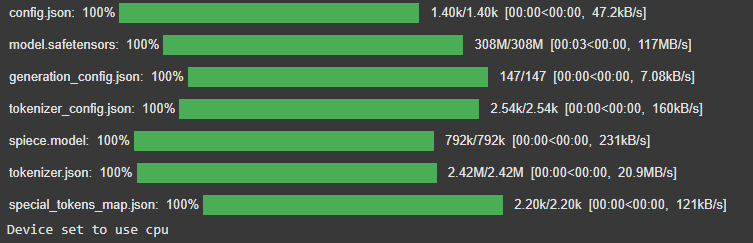
Loads the FLAN-T5 model and tokenizer from Hugging Face for generating text-based responses based on input prompts.
generator = pipeline('text2text-generation',
                     model='google/flan-t5-small', tokenizer='google/flan-t5-small')
Output:
Step 7: RAG Answer Function
Retrieves the top-k most relevant documents for the query, generates a prompt and uses FLAN-T5 to generate a response based on the retrieved context.
def rag_answer(query, top_k=1, threshold=0.3):
    query_embedding = embedding_model.encode([query]).astype('float32')
    faiss.normalize_L2(query_embedding)

    distances, indices = index.search(query_embedding, top_k)

    if distances[0][0] < threshold:
        return None, "Sorry, I couldn't find a relevant document to answer your question."

    retrieved_doc = documents[indices[0][0]]

    prompt = f"Context: {retrieved_doc}\nQuestion: {query}\nAnswer in one sentence:"

    response = generator(prompt, max_new_tokens=30,
                         do_sample=False, truncation=True)[0]['generated_text']

    return retrieved_doc, response
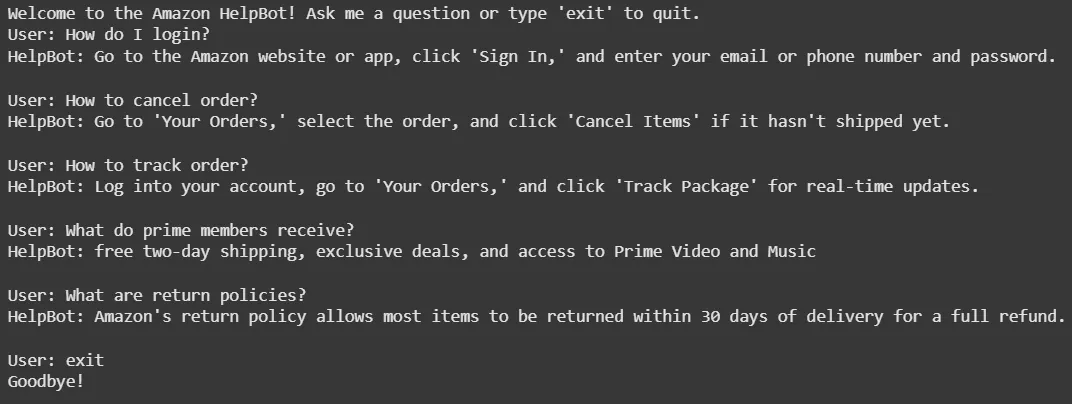
Step 8: Interactive Q&A Bot Loop
Continuously takes user input, processes the query using the rag_answer function and displays the relevant context and generated response. Ends when the user types 'exit'.
def run_qa_bot():
    print("Welcome to the RAG Q&A Bot! Ask a question or type 'exit' to quit.")
    while True:
        query = input("User: ")
        if query.lower() == 'exit':
            print("Goodbye!")
            break
        if not query.strip():
            print("Please enter a valid question.")
            continue
        context, answer = rag_answer(query)
        print(f"HelpBot: {answer}\n")


run_qa_bot()
Output:
Use Cases for Help Bot:
- Customer Support: Provide real-time support for order inquiries, shipping issues and returns.
- Product Recommendations: Help customers with product suggestions based on preferences or previous purchases.
- Troubleshooting: Assist with product troubleshooting by retrieving relevant instructions or FAQ entries.
- Order Tracking: Answer queries related to order status and tracking.
Advantages
- Improved Accuracy: Access to an external knowledge base improves answer quality especially for complex topics.
- Scalability: Can easily scale by updating the knowledge base without retraining the entire model.
- Flexibility: RAG can adapt to various applications like from customer service to technical support.
- Faster Specialized Systems: Enables rapid deployment and maintenance by updating the knowledge base without retraining.
Challenges
- Computational Resources: RAG-based systems can be resource-intensive, especially for large-scale retrieval and text generation.
- Handling Ambiguity: RAG models may struggle with vague or ambiguous queries leading to irrelevant results.
- Response Length Control: Generating concise, relevant responses can be difficult leading to overly detailed answers.
- Document Retrieval Precision: Incorrect documents may be retrieved leading to inaccurate responses.
