
LangSmith is a platform designed to help developers debug, test and monitor large language model applications. It provides detailed visibility into how chains, agents and prompts perform during execution. It acts as a debugging and evaluation layer for LangChain workflows hence allowing developers to trace model interactions, analyze errors, compare outputs and improve overall reliability and performance.
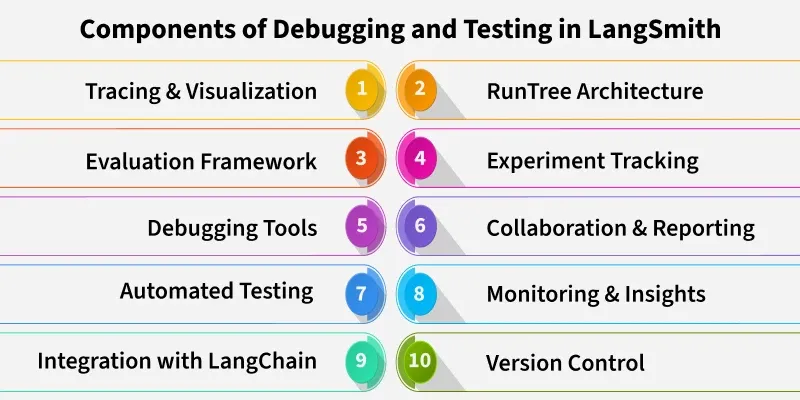
Importance of Debugging and Testing in LLMs
Debugging and Testing is important because:
- Ensures Reliability: Helps verify that the LLM consistently produces correct and logical outputs.
- Identifies Errors Early: Detects prompt issues, data mismatches and logic errors before deployment.
- Improves Model Accuracy: Enables fine-tuning based on detailed error analysis and test results.
- Enhances User Experience: Reduces unexpected or irrelevant responses ensuring smoother interactions.
- Supports Continuous Improvement: Allows performance comparison between model versions and workflows.
- Builds Trust in AI Systems: Ensures transparency, traceability and accountability in LLM-driven applications.
Tracing LLM Workflows
LLM workflow can be traced through following ways:
1. Tracks Complete Workflow: Tracing captures every step of an LLM process for full visibility.
2. Traces, Runs and Spans:
- Trace: represents the entire workflow.
- Run: a single chain or component execution.
- Span: sub-steps or internal operations within a run.
3. Visualizes Execution Flow: LangSmith displays chains as trees or timelines for easy understanding.
4. Identifies Bottlenecks: Helps detect slow steps or inefficient model calls.
5. Finds Errors Quickly: Makes it easier to locate and fix API failures, logic issues or data mismatches.
6. Improves Optimization: Supports fine-tuning workflow design for better performance and speed.
Testing Strategies in LangSmith
Some of the testing strategies in LangSmith are:
- Unit Testing for Chains and Agents: Test individual chains, tools or agents to verify that each component behaves as expected before combining them into larger workflows.
- Regression Testing for LLM Outputs: Compare new model responses with previous ones to ensure that updates or prompt changes don’t degrade performance or accuracy.
- Automated Evaluation Pipelines: Set up automated testing workflows in LangSmith to continuously evaluate LLM outputs, measure quality using metrics and detect issues early.
Evaluating Model Performance
Model performance can be evaluated by:
- Using Metrics and Scores: LangSmith provides quantitative metrics such as accuracy, relevance or custom evaluation scores to measure how well an LLM performs on given tasks.
- Comparing Different Model Versions: Test and compare outputs from multiple LLM versions or prompt variations to identify which configuration delivers better performance and consistency.
- Error Analysis and Model Behavior Tracking: Analyze incorrect or inconsistent responses to understand model weaknesses, improve prompt design and track behavioral changes over time.
- Human-in-the-Loop Evaluation: Incorporate human feedback to validate LLM outputs, especially for nuanced or subjective tasks.
- Custom Benchmarking: Create task-specific benchmarks within LangSmith to evaluate LLMs against specialized criteria or domain specific datasets.
Implementation
Step by step implementation of Debugging and Testing in LangSmith:
Step 1: Install Required Packages
Installing packages like LangChain, OpenAI and LangSmith.
%pip install langchain langsmith openai langchain-experimental
Step 2: Import Required Modules
Importing required modules.
- LLMChain and PromptTemplate from LangChain for building LLM workflows.
- ChatOpenAI for interacting with OpenAI GPT models.
- Client and RunTree from LangSmith for tracing runs and logging outputs.
- os to set environment variables for API keys and project information.
from langchain.chains import LLMChain
from langchain.prompts import PromptTemplate
from langsmith import Client
from langsmith.run_trees import RunTree
import os
from langchain_openai.chat_models import ChatOpenAI
Step 3: Set Up API Keys and Project
Setting up environment variables for LangChain, LangSmith and OpenAI. We can also use any other model access.
os.environ["LANGCHAIN_PROJECT"] = "MyLangChainProject"
os.environ["LANGCHAIN_API_KEY"] = "Your LangSmith API Key"
os.environ["OPENAI_API_KEY"] = "Your OpenAI API Key"
Refer to this article: Fetching OpenAI API Key
Step 4: Initialize LangSmith Client
Creating a client to interact with LangSmith.
client = Client()
Step 5: Initialize Your LLM
Using ChatOpenAI to connect to the GPT-4 model.
llm = ChatOpenAI(model_name="gpt-4", temperature=0)
Step 6: Define a Prompt Template
Creating a prompt template with dynamic input.
prompt = PromptTemplate(
    input_variables=["topic"],
    template="Write a short paragraph explaining {topic} in simple terms."
)
Step 7: Create an LLMChain
Creating LLM Chain.
- Combining the LLM and prompt template into a chain.
- verbose=True prints intermediate outputs to help debug the workflow.
chain = LLMChain(
    llm=llm,
    prompt=prompt,
    verbose=True
)
Step 8: Run the Chain with LangSmith Tracing
- Creating a RunTree to trace the execution.
- Executing the chain.
- Ending the run and logging outputs to LangSmith.
- Displaying the LLM output in the console.
rt = RunTree(
    name="MyLLMChainRun",
    run_type="chain",
    inputs={"topic": "LangChain Tracing"},
    client=client,
)

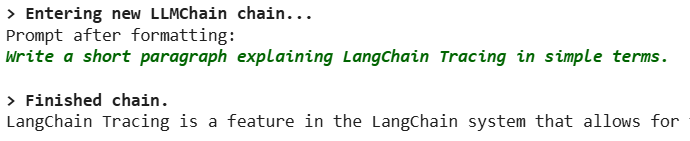
result = chain.run({"topic": "LangChain Tracing"})
rt.end(outputs={"output": result})
print(result)
Output:
Best Practices for Debugging and Testing
Some of the best practices for debugging and testing are:
- Connecting LangChain Projects to LangSmith: Integrate your LangChain workflows with LangSmith to start capturing traces, runs and spans for all chains, agents and tools.
- Configuring Tracin and Logging: Set up logging to capture relevant metadata including inputs, outputs, API calls and model parameters.
- Custom Logging Levels: Adjust logging levels to capture only critical events or full execution details depending on debugging needs.
- Environment and Project Settings: Ensure API keys, project identifiers and environment configurations are correctly set to enable seamless workflow monitoring.
- Initial Validation: Run test chains or small workflows to verify that tracing and logging are correctly capturing all necessary information before scaling up.
