
Amazon EC2 Spot Instances let you use unused EC2 capacity at steep discounts compared to On-Demand pricing. Because AWS can reclaim that capacity at any time, understanding which workloads qualify is essential before adopting them.
- Spot Instances offer discounts of up to 90% compared to On-Demand prices.
- AWS provides a two-minute warning before reclaiming a Spot Instance.
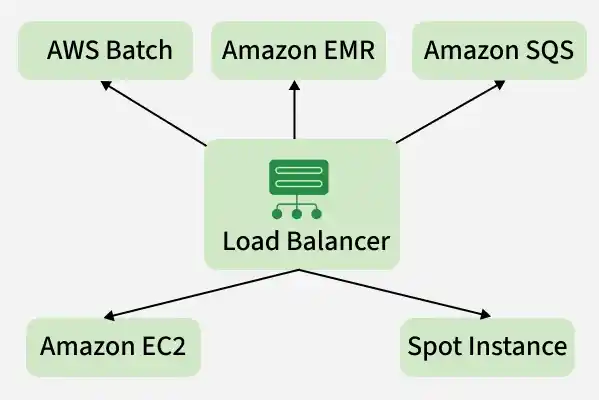
- Spot Instances integrate natively with CloudFormation, Auto Scaling, EMR, ECS, EKS, and AWS Batch.
- Instances can be configured to hibernate, stop, or terminate when capacity is reclaimed.
- Fault-tolerant, stateless, or flexible jobs such as batch processing, CI/CD, big data, containerized workloads, and web servers are good candidates.
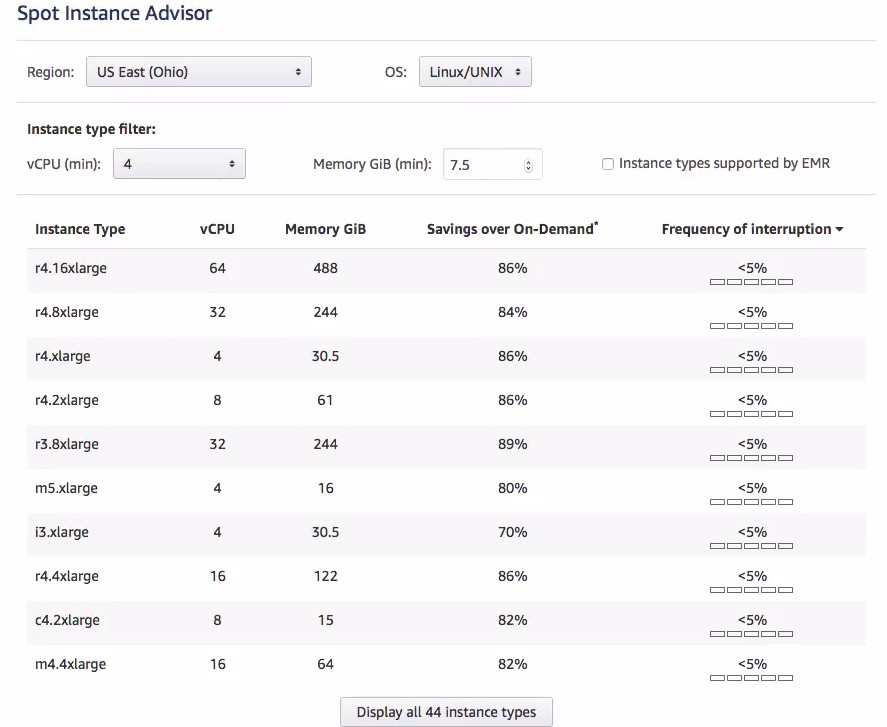
Profiling Workloads for Spot Instances
Before adopting Spot Instances, evaluate whether your workload can tolerate interruption. Key indicators of spot-readiness include:
- The workload scales horizontally across multiple instances.
- Instances are treated as replaceable, not persistent.
- Recovery and replacement happen without human intervention.
- Components are not tightly dependent on a single instance.
- The system remains functional if any one instance disappears.
The key qualifying question is: what would happen if a server were taken away?
- Batch or queue processing: The job should automatically restart on a different instance without human intervention.
- Web applications: A load balancer should automatically route traffic to healthy instances.
- Time-insensitive workloads: If the workload cannot yet be architected for interruption, AWS can hibernate the instance — persisting memory to disk and resuming when capacity becomes available again.
Advantages of Spot Instances
- Cost Savings: Spot pricing is typically far lower than On-Demand, significantly reducing compute costs.
- Flexible Pricing: You set a maximum price you are willing to pay, giving you budget control.
- Scalability: Compute capacity can be scaled up or down rapidly based on workload demand, with no upfront commitment.
- Availability: Spot Instances draw from unused EC2 capacity across the AWS Region.
- AWS Service Integration: Native integration with Auto Scaling, EMR, ECS, and EKS makes it straightforward to build scalable, cost-effective architectures.
Note: Spot Instances are not suitable for workloads that cannot tolerate interruptions, such as real-time applications, critical production systems, or stateful databases.
When to Use
Spot Instances are the best fit for workloads with variable schedules and a tolerance for interruption — batch processing, testing, large data processing pipelines, and traffic spike scenarios where paused work can be resumed when capacity returns.
Spot Instance Interruptions
A Spot Instance interruption occurs when AWS needs to reclaim capacity. The instance is terminated with a two-minute warning, halting any running workloads.
- Trigger Conditions: Interruptions are driven by changes in supply, demand, and internal AWS capacity allocation — not solely by bid price comparisons.
- Mitigation Strategies: Use checkpointing, distributed computing frameworks, or AWS-managed interruption handling to minimize data loss.
- Interruption Actions: Instances can be configured to terminate, stop, or hibernate on interruption.

Spot Instance Pricing
1. How AWS Determines Spot Prices
- Market-Based Pricing: AWS sets Spot prices based on supply-demand dynamics, not individual bid prices.
- Bid as a Cap: Your bid price acts as the maximum you are willing to pay, not a competitive auction price against other customers.
- Interruption Independence: Interruptions are driven by capacity needs and internal algorithms, not by your bid price being exceeded by another customer's bid.
Note: Setting a bid higher than the On-Demand price does not guarantee immunity from interruption or provide additional benefits.
2. Checking Spot Instance Price History
Use the AWS Management Console to view historical Spot pricing for any instance type and region.
- Log in to the AWS Management Console.
- Navigate to the EC2 Dashboard.
- Select Spot Requests from the Instances menu on the left.
- Review the listed instance type, region, bid price, and request status, along with the price history for your selected configuration.

AWS Spot Fleet
AWS Spot Fleet automatically requests and manages a collection of Spot Instances (and optionally On-Demand Instances) to meet a specified target capacity, performance, and availability requirement.
- Flexible Scaling: The fleet automatically adds or replaces instances to maintain the desired processing capacity at all times.
- Mix and Match: Spot Fleet can span multiple instance types and Availability Zones, improving resilience against capacity shortages in any single pool.
- Cost Savings: The fleet prioritizes cheaper Spot Instances whenever available, reducing overall compute costs.
- Reliability: By distributing workloads across multiple instance types and zones, Spot Fleet keeps applications running even if a specific pool is interrupted or becomes expensive.
EC2 Spot Instances vs On-Demand Instances
| Aspect | EC2 Spot Instances | On-Demand Instances |
|---|---|---|
| Pricing | Variable; prices adjust gradually based on long-term supply/demand. | Fixed; set by AWS for specific instance types/regions. |
| Pricing Model | Market-based; typically 70-90% discount off On-Demand. | Pay-as-you-go; no upfront commitment or bidding. |
| Interruptions | Yes; AWS can reclaim capacity with a 2-minute notice. | No; instances remain active until you stop or terminate them. |
| Availability | Dynamic; depends on unused AWS capacity in a specific pool. | High; designed for immediate, reliable access. |
| Use Cases | Fault-tolerant, stateless, or distributed workloads (e.g., Big Data). | Long-running, stateful, or mission-critical applications. |
| Cost Savings | High (up to 90%); best for reducing "burn rate." | None (baseline); use Reserved Instances or Savings Plans for discounts. |
| Best Workloads | CI/CD, batch processing, rendering, and containerized microservices. | Primary databases, core web servers, and production environments. |
