
IAM architecture is the framework that helps securely manage user identities, authentication, and authorization across an organization's IT environment.
In this article we will discuss about the Architecture of IAM in cloud computing from the basic to advance level so anyone who has just started learning cloud computing can easily understand about this topic.
Pre-requisite: Identity and Access Management
The Architecture of Identity Access Management
The architecture of IAM is as follows:
- User Management: It consists of activities for the control and management over the identity life cycles.
- Authentication Management: It consists of activities for effectively controlling and managing the processes for determining which user is trying to access the services and whether those services are relevant to him or not.
- Authorization Management: It consists of activities for effectively controlling and managing the processes for determining which services are allowed to access according to the policies made by the administrator of the organization.
- Access Management: It is used in response to a request made by the user wanting to access the resources with the organization.
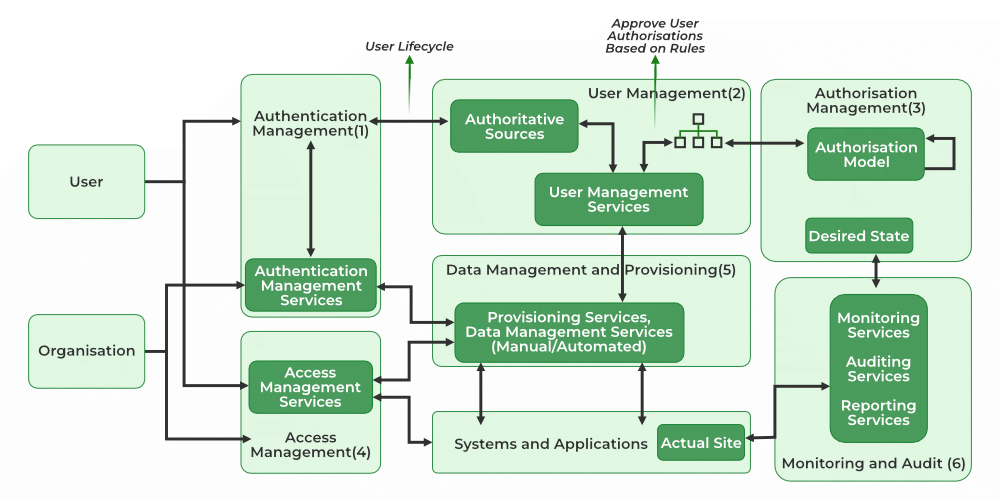
- Data Management and Provisioning: The authorization of data and identity are carried towards the IT resource through automated or manual processes.
- Monitoring and Auditing: Based on the defined policies the monitoring, auditing, and reporting are done by the users regarding their access to resources within the organization.
- Operational Activities of IAM: In this process, we onboard the new users on the organization's system and application and provide them with necessary access to the services and data. Deprovisioning works completely opposite in that we delete or deactivate the identity of the user and de-relinquish all the privileges of the user.
- Credential and Attribute Management: Credentials are bound to an individual user and are verified during the authentication process. These processes generally include allotment of username, static or dynamic password, handling the password expiration, encryption management, and access policies of the user.
- Entitlement Management: These are also known as authorization policies in which we address the provisioning and de-provisioning of the privileges provided to the user for accessing the databases, applications, and systems. We provide only the required privileges to the users according to their roles. It can also be used for security purposes.
- Identity Federation Management: In this process, we manage the relationships beyond the internal networks of the organization that is among the different organizations. The federations are the associate of the organization that came together for exchanging information about the user's resources to enable collaboration and transactions.
- Centralization of Authentication and Authorization: It needs to be developed in order to build custom authentication and authorization features into their application, it also promotes the loose coupling architecture.

Why is it important to understand IAM Architecture?
Understanding how IAM works helps you keep cloud systems safe and organized. Here is why each part matters, with easy examples:
1. Keep your data safe
IAM makes sure only the right people can access important information. For example, imagine you have a cloud folder with your company’s secret plans. IAM stops strangers or the wrong employees from opening that folder. Only authorized people, like your manager or team, can see it. This keeps your data safe from hackers or mistakes.
2. Control who can do what
Not everyone needs full access. IAM helps give people only the permissions they need. For example, a sales employee might only need to view customer data, but a developer needs to update the app. IAM makes sure the sales employee can’t accidentally change things they should not. This prevents accidents and keeps everything running smoothly.
3. Follow the Rules
Many countries have laws about protecting user data. Companies need to follow these rules or face penalties. For example, a hospital must keep patient info private by law. IAM helps track who accessed what and when, so the hospital can prove it is protecting patient data properly.
4. Save time and avoid mistakes
Without IAM, someone would have to manually give or remove access to every person which can take a long time and cause errors. IAM automates this. For example, when a new employee joins, IAM can automatically give access to the right cloud apps, saving time and reducing mistakes.
5. Grow Easily
As a company grows, managing access gets harder. IAM helps manage many users and resources without confusion. For example, if your startup grows from 5 to 50 people, IAM helps add new users quickly and safely without opening security holes.
Key Components of IAM Architecture in Cloud Computing
Identity and Access Management (IAM) in cloud computing helps control who can use cloud resources and what they can do. It has several important parts working together to keep everything safe and organized:
1. Identity Management
This is like creating a digital ID card for every user, device, or app. Each identity is unique and helps the system know who is trying to access cloud resources. Companies store this information in directories (like a phonebook) and update it when people join, leave, or change roles. Sometimes, with federated identity, one login can work across different apps or organizations so you don’t need multiple passwords.
2. Authentication
This step is about proving who you are. The system checks your identity before letting you in. Common methods include:
- Single Sign-On (SSO): Log in once and access many apps without logging in again.
- Multi-Factor Authentication (MFA): You enter a password plus another verification like a code sent to your phone or fingerprint.
- Passwordless Authentication: Uses things like biometrics or security keys instead of passwords.
- Adaptive Authentication: Changes how strict the check is depending on risk. For example, if you log in from a new device or location.
3. Authorization and Permission Controls
After proving who you are, IAM decides what you can do. This is called authorization. You can use Role-Based Access Comtrol(RBAC) and provide permissions based on your job like "manager" and "developer".
4. Access Policies
These are rules that say who can do what and when. For example, a policy might say "only HR staff can view employee records" or "access is only allowed during work hours". A key idea is least privilege access, which means users only get the minimum permissions they need to do their jobs.
5. Monitoring and Auditing
IAM systems keep a close eye on who is accessing what. They log every login, failed attempt, and any changes in permissions. Regular checks (audits) help find and remove unnecessary access. Advanced systems use AI to spot suspicious activities like someone logging in from two different countries within minutes and alert security teams right away.
6. Integration with Cloud Services
IAM connects smoothly with cloud platforms and apps you use every day. It allows you to use one identity to access many cloud services, whether your company uses one cloud or many (multi-cloud). This integration also supports federated identity, so you don’t have to remember many passwords for different services.
Shared Responsibility Model for Identity Access Management
Cloud Service Provider (CSP)
- Infrastructure (Global Security of the Network)
- Configuration and Vulnerability Analysis
- Compliance Validation
Customer
- Users, Groups, Roles, Policies Management and Monitoring
- Use IAM tools to apply for appropriate permissions.
- Analyze access patterns and review permissions.
Challenges in IAM Architecture for Cloud Environments
The below are the main challenges organization faces while managing Identity and Access Management(IAM) in the cloud:
1. Managing Many Users and Devices
Cloud environments have lots of users, devices, and apps that need access. Keeping track of who can do what for each user and device can get complicated very fast, especially as the company grows.
2. Handling Multiple Cloud Providers (Multi-Cloud)
Many companies use more than one cloud service (like AWS, Azure, Google Cloud). Managing access across all these different platforms with their own IAM tools can be confusing and difficult to keep consistent.
3. Ensuring the Right Level of Access
Giving too much access to users is risky, but giving too little can block work. Finding the right balance (called “least privilege”) and making sure access is updated as roles change is a big challenge.
4. Protecting Against Security Threats
Cloud systems face constant cyberattacks. IAM must be strong enough to prevent unauthorized users from getting in, but hackers keep finding new ways to try. Things like stolen credentials, phishing, or insider threats make this hard.
5. Managing Identity Lifecycle
Users join, change roles, or leave a company all the time. IAM systems need to quickly update or remove access to avoid old or incorrect permissions lingering and causing security risks.
6. Compliance and Auditing
Many industries have strict rules about who can access what data. IAM systems must track and log all access properly so companies can prove they follow these rules during audits.
7. Complexity of Integration
IAM has to work smoothly with many different cloud services, apps, and on-premise systems. Making sure everything integrates well without gaps or conflicts can be difficult.
Best Practices for Implementing IAM Architecture in Cloud Computing
Implementing IAM (Identity and Access Management) in the cloud needs to be done carefully to keep everything safe and running smoothly. Here are some easy-to-follow best practices:
1. Use the Principle of Least Privilege
Give users only the access they absolutely need to do their job nothing more. This reduces the chance of mistakes or misuse. For example, if someone only needs to view files, don’t give them permission to delete or change them.
2. Enable Multi-Factor Authentication (MFA)
Always require users to verify their identity with more than just a password. MFA adds an extra step like a code sent to your phone or a fingerprint scan, making it much harder for hackers to get in.
3. Regularly Review and Update Access Rights
People’s roles change, or they might leave the company. So, regularly check who has access and remove permissions that are no longer needed. This keeps your system clean and secure.
4. Use Strong Password Policies
Make sure users create strong passwords long and with a mix of letters, numbers, and symbols. Also, encourage changing passwords regularly to reduce the risk of stolen passwords.
5. Monitor and Log All Access Activity
Keep a record of who accessed what and when. This helps detect suspicious behavior early and is useful for audits and investigations.
6. Implement Role-Based Access Control (RBAC)
Organize users into roles based on their job functions and assign permissions to those roles. This simplifies managing access and makes sure everyone has the right level of access.
7. Use Federated Identity and Single Sign-On (SSO)
Allow users to sign in once and access multiple cloud services. This reduces the number of passwords they have to remember and improves security by centralizing login controls.
8. Encrypt Sensitive Data
IAM protect our important data by encrypting it, so even if someone who are having IAM access won't be able to read our important information without the key.
Conclusion
Identification and access management are very important to protect data and information in the cloud environment, it helps control that can reach the company's data and services, ensure that only the right people receive and only what they need. By understanding the IAM architecture, you can better manage users, now secure access with strong authentication and set clear rules for permits. There are challenges such as dealing with many users and more cloud platforms when managing IAM in the cloud, which helps protect everything such as using the least privileges, enabling multifactor authentication for better security.
