
The Google Cloud Platform (GCP) VPC Serverless Connector allows serverless resources, such as Cloud Functions and Cloud Run services, to connect securely to your VPC network. This connector enables these resources to access resources in your VPC, such as Compute Engine VM instances or databases, without exposing them to the public internet.
Key Points
- Connector Configuration: Create a connector within your VPC network, specifying an IP address range (subnet or custom CIDR block) for the serverless environment.
- Implicit Firewall Rule: Automatically creates an implicit firewall rule allowing ingress traffic from the connector's IP range to your VPC network, ensuring secure internal communication.
- Supported Environments: Compatible with Cloud Run, Cloud Functions, and both standard and flexible environments of App Engine, supporting TCP, UDP, and ICMP.
- Service Configuration: Post-setup, serverless services (Cloud Run, Cloud Functions, and App Engine) are configured to use the connector via console, CLI, or configuration files.
- Use Cases: Secure database access, internal APIs, and legacy system connectivity within a VPC.
How Google Cloud's Serverless VPC Access Works
The Serverless VPC Connector acts as a bridge between serverless services and your VPC network, ensuring secure communication without exposing sensitive services directly to the internet.
There are some points that shows how it works:
- The VPC Serverless Connector serves as a bridge between serverless services (like Cloud Functions or Cloud Run) and your VPC network. It ensures secure communication without exposing sensitive services directly to the internet.
- You define a connector in your VPC network configuration, specifying a range of IP addresses that the serverless services can use to communicate with resources within the VPC.
- It's commonly used when your serverless applications need to access private resources within your VPC, such as databases or legacy applications that are not exposed to the public internet.
- By using VPC Serverless Connector, you maintain a higher level of security by keeping critical resources hidden from the public internet while still leveraging the scalability and ease of management that serverless computing offers.
The aspects and considerations regarding Google Cloud's Serverless VPC Access
Use Cases
- Database Access Serverless applications often need to connect securely to databases or other backend services within a VPC.
- Internal APIs Accessing internal APIs or microservices that are not exposed to the public internet.
Performance and Latency
- By utilizing Serverless VPC Access, you can potentially reduce latency because the traffic stays within Google's private backbone network rather than traversing over the public internet.
- This can lead to faster response times for your serverless applications, which is critical for real-time or latency-sensitive applications.
Integration Flexibility
- Integration with Serverless VPC Access is straightforward and can be configured via the Google Cloud Console, command-line interface (CLI), or infrastructure-as-code tools like Terraform.
- You have the flexibility to adjust the configuration settings of the connector to meet specific performance or scalability requirements.
Security Considerations
- Traffic between your serverless environment and the VPC network remains secure due to the implicit firewall rules created by the connector.
- This setup helps mitigate risks associated with exposing sensitive services or data to the public internet.
Scalability
- Google Cloud allows you to scale Serverless VPC Access connectors based on your application's demands.
- You can configure automatic scaling to handle varying traffic loads efficiently without manual intervention.
Monitoring and Management
- Google Cloud provides monitoring and logging capabilities to track the performance and health of your Serverless VPC Access connections.
- This includes visibility into metrics such as latency, throughput, and error rates, helping you to maintain and optimize your serverless applications effectively.
Cost Considerations
- While using Serverless VPC Access generally incurs additional networking costs, the benefits in terms of performance, security, and operational simplicity often outweigh these expenses.
- Google Cloud's pricing structure for networking and serverless services allows you to estimate and manage costs effectively based on your usage patterns.
Sample Architecture
- VPC Network: Create or use an existing VPC network.
- Subnet Creation: Define a subnet within the VPC for the connector's IP range.
- Serverless VPC Connector: Set up the connector in the specified subnet and region.
- Serverless Services: Configure Cloud Functions, Cloud Run, or App Engine to use the connector for accessing private resources.
- Private Resources: Examples include Google Cloud SQL, internal APIs, or legacy applications hosted on VMs.
Setting Up and Configuring GCP VPC Serverless Connector
1. Prerequisites
- Google Cloud Project: Ensure you have a GCP project. If not, create one.
- Billing Enabled: Ensure billing is enabled for your GCP project.
- IAM Permissions: Project Editor or Owner, Network Admin, Serverless VPC Access Admin.
2. Enable Required APIs
Enable the following APIs for your project:
1. VPC Access API:
gcloud services enable vpcaccess.googleapis.com2. Cloud Functions API:
gcloud services enable cloudfunctions.googleapis.com3. Cloud Run API:
gcloud services enable run.googleapis.com4. App Engine Admin API :
gcloud services enable appengine.googleapis.comCreate a VPC Network
If you don't already have a VPC network, create one:
gcloud compute networks create my-vpc-network --subnet-mode=custom2. Create a Subnet:
gcloud compute networks subnets create my-subnet \
    --network=my-vpc-network \
    --range=10.0.0.0/24 \
    --region=us-central1
Create a Serverless VPC Access Connector
1. Create the Connector
gcloud compute networks vpc-access connectors create my-connector .png)
gcloud compute networks vpc-access connectors create my-connector \
    --network my-vpc-network \
    --region us-central1 \
    --range 10.8.0.0/28
.png)
2. Verify the Connector
gcloud compute networks vpc-access connectors describe my-connector --region us-central1.png)
Configure Your Serverless Service
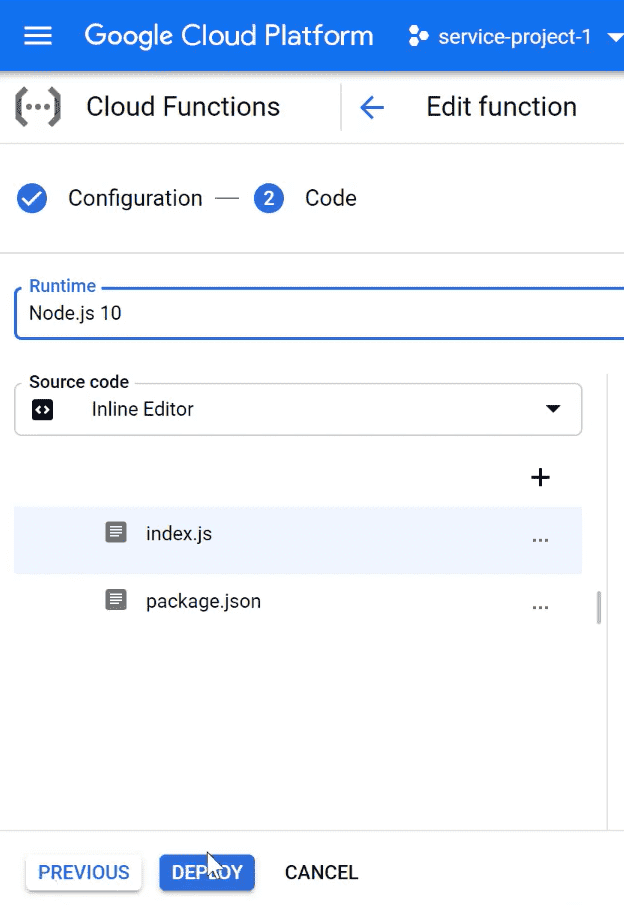
1. Deploying a Cloud Function with VPC Connector
When deploying your Cloud Function, specify the --vpc-connector flag to connect it to your VPC network:
gcloud functions deploy my-function \
    --runtime python39 \
    --trigger-http \
    --vpc-connector my-connector \
    --allow-unauthenticated
.png)
2. Accessing VPC Resources from Cloud Run
Inside your Cloud Run service container, you can access resources within your VPC network using their internal IP addresses or DNS names. Ensure your Cloud Run service account has the necessary IAM permissions.
.png)
.png)
Configuring App Engine
Edit app.yaml configuration file to specify the VPC connector
service: my-app
network:
  name: my-vpc-network
  connectors:
    - name: my-connector
      ingress_settings: ALLOW_INTERNAL_ONLY
Serverless VPC Access enhances Google Cloud's serverless computing by securely connecting serverless services to VPC networks. It offers a secure and low-latency way for applications to access internal resources, while still benefiting from the flexibility and scalability that serverless architectures provide.
