
Google Cloud Security Scanner is a security scanning tool offered by Google Cloud Platform that checks for common vulnerabilities in web applications hosted on GCP. It scans for a wide range of security issues such as cross-site scripting (XSS), missing security headers, out-of-date software, and other common vulnerabilities. It simulates an attack on the web application and analyzes the responses to identify vulnerabilities.

It can be integrated with Google App Engine, Compute Engine, and Kubernetes Engine. After the scan is complete, it generates a report highlighting all vulnerabilities found and providing recommendations on how to fix them; in this way, it allows for improving the security of the web application. It's a useful tool for security professionals and developers to identify and remediate potential vulnerabilities in their web applications running on GCP infrastructure.
Key Terminology
Here are some key terminologies used in Google Cloud Security Scanner:
- Vulnerability: A weakness or flaw in a web application that can be exploited by an attacker to gain unauthorized access or perform unauthorized actions.
- Cross-Site Scripting (XSS): A type of vulnerability that allows an attacker to inject malicious code into a web page viewed by other users.
- Flash Injection: A vulnerability that allows an attacker to inject a malicious flash object into a web page.
- Mixed Content: A vulnerability that occurs when a web page is loaded with both secure (HTTPS) and insecure (HTTP) content, potentially exposing sensitive data to eavesdropping.
- Security Headers: HTTP headers that can be used to enhance the security of a web application. Examples include the "X-XSS-Protection" header, which can help prevent XSS attacks, and the "Content-Security-Policy" header, which can help prevent cross-site scripting and other types of code injection attacks.
- Out-of-Date Software: This refers to software that is not updated to its latest version and can contain known vulnerabilities that could be exploited by attackers.
- Scan Report: This is the report generated by the scanner after the security scan, which contains the vulnerabilities found and its recommendations to remediate them.
How does Google Cloud Security Scanner Work?
Google Cloud Security Scanner checks your web applications for security problems by pretending to be a real user and even a hacker. It visits your site, clicks on links, fills out forms, and watches how your application reacts. Then, it tries out common tricks that hackers use like adding fake scripts or checking if your application is using old software.If it finds anything unsafe (like missing security settings or outdated tools), it lets you know so you can fix it and keep your app secure.
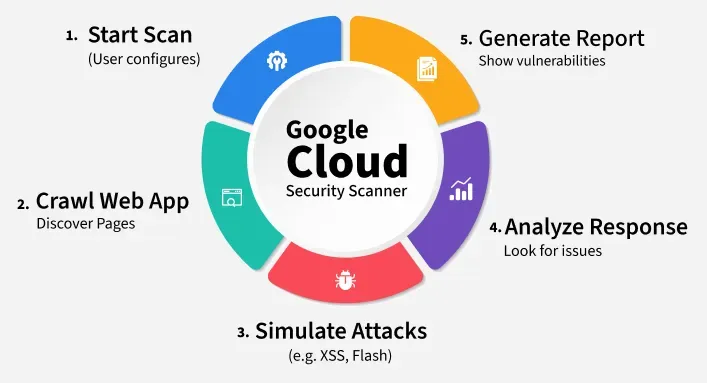
Here is a step-by-step breakdown of how it works:
1. Start the Scan
You begin by setting things up in the Google Cloud Console. Just enter the URL of your website or app, choose what kind of scan you want (like quick or full), and, if needed, add login details so the scanner can access protected pages.
2. Crawling the Application
Next, the scanner acts like a user browsing your site. It clicks links, fills out forms, and visits different pages—basically trying to explore everything it can, just like a search engine crawler.
3. Simulating Attacks
Now comes the interesting part! The scanner tries out fake attacks, like injecting scripts (to test for XSS) or checking for weak spots in the code. Don’t worry it’s all safe and controlled!
4. Analyzing Responses
It then checks how your app reacts. Does it handle the input safely? Does it leak any data? The scanner looks closely at the responses to figure out if there’s anything that could be dangerous.
5. Generate Report
Finally, you get a full report. It lists all the problems it found, how serious they are, and most importantly how to fix them. This helps you make your app safer and stronger.
Easy-to-Use Web Application Security Scanning Tools
There are several easy-to-use web application security scanning tools available in the market:
Acunetix
Acunetix is a web application security scanning tool that provides comprehensive scanning and reporting capabilities. It is designed to identify vulnerabilities in web applications, such as SQL injection, cross-site scripting (XSS), and broken authentication and session management. The tool uses a combination of automated and manual techniques to scan web applications and provide detailed reports on potential security risks.
Acunetix provides a user-friendly interface that makes it easy to use and navigate, even for those without a technical background. It also provides remediation guidance, helping organizations to quickly resolve vulnerabilities and improve the security of their web applications.
Qualys Web Application Scanning (WAS)
Qualys Web Application Scanning (WAS) is a cloud-based tool that provides automated vulnerability scanning, remediation guidance, and reporting capabilities for web applications. It is designed to help organizations identify security risks and vulnerabilities in their web applications, such as cross-site scripting (XSS), SQL injection, and broken authentication and session management.
Qualys WAS provides a cloud-based platform that makes it easy to use and manage and supports a wide range of web applications, technologies, and platforms. The tool integrates with the Qualys Cloud Platform, providing organizations with a unified view of their security operations and a streamlined approach to managing vulnerabilities.
Nessus
Nessus is a widely used vulnerability scanning tool that provides a range of features, including web application scanning, compliance checking, and reporting capabilities. It is designed to help organizations identify security risks and vulnerabilities in their systems, networks, and web applications. Nessus provides a comprehensive and flexible scanning platform, with support for a wide range of operating systems, applications, and network devices. The tool can be run on-premises or in the cloud and provides a range of features to help organizations improve the security of their systems.
WebInspect
WebInspect is a web application security assessment tool that helps organizations identify and remediate vulnerabilities in web applications. It uses various techniques like dynamic and static analysis to identify security threats, such as cross-site scripting, SQL injection, and others, in web applications. The tool also provides reporting and management capabilities to help organizations track their security posture over time. WebInspect can be used as part of a comprehensive security program to reduce the risk of web application security incidents and meet regulatory compliance requirements.
OWASP ZAP
OWASP ZAP (Zed Attack Proxy) is an open-source web application security scanner that helps organizations identify and remediate vulnerabilities in web applications. It is designed to be used by both security professionals and development teams, making it an accessible tool for organizations of all sizes. OWASP ZAP uses various techniques like active and passive scanning, and manual testing to identify security threats such as cross-site scripting, SQL injection, and others. The tool also provides reporting and management capabilities, as well as a large library of plugins to extend its functionality. OWASP ZAP is widely used as part of a comprehensive security program to reduce the risk of web application security incidents and meet regulatory compliance requirements.
Google Cloud Security Scanner vs Other Scanners
The below comparison table showing how Google Cloud Security Scanner stacks up against other popular web application security scanners like OWASP ZAP, Acunetix, Qualys WAS, and Nessus:
| Feature / Tool | Google Cloud Security Scanner | OWASP ZAP | Acunetix | Qualys WAS | Nessus |
|---|---|---|---|---|---|
| Platform Support | GCP only (App Engine, GKE, etc.) | Any platform | Any platform | Any platform | Any platform |
| Pricing | Free (within GCP projects) | Free (open-source) | Paid | Paid | Paid |
| Ease of Use | Easy with GCP Console | Moderate (technical setup) | User-friendly UI | Easy via web dashboard | Moderate |
| Vulnerability Types Detected | XSS, missing headers, outdated libs | XSS, SQLi, etc. | XSS, SQLi, CSRF, etc. | XSS, SQLi, broken auth, etc. | Broad range, including system |
| Customization | Limited | High (custom scripts, plugins) | High | Medium | High |
| CI/CD Integration | Limited | Yes | Yes | Yes | Yes |
| Reporting | Basic reports | Basic to advanced | Detailed with risk levels | Detailed | Detailed |
| Scan Scope | Public-facing web apps on GCP | Full web app scan | Full web app scan | Full web app scan | Full network + web scan |
| Authentication Support | Yes (basic and custom) | Yes | Yes | Yes | Yes |
Use Cases of Google Cloud Security Scanner
Google Cloud Security Scanner is helpful in many real-life situations. Let's try to connect it by discussing the following examples:
1. Detecting XSS in a Blog Hosted on GCP
Let’s say you built a blog using Google App Engine. You allow users to leave comments. A hacker might try to inject harmful scripts into a comment (this is called Cross-Site Scripting or XSS). Google Cloud Security Scanner can test these comment boxes and detect if such attacks are possible before a hacker tries them.
2. Pre-Launch Security Check
You are about to launch a new e-commerce site on Google Kubernetes Engine. Before going live, you run a security scan to check for problems like:
- Missing security headers
- Insecure login forms
- Outdated JavaScript libraries
This helps you fix issues early and launch with confidence.
3. Regular Security Audits
If your team updates the website often, things can break. By running regular scans, you can catch new vulnerabilities as they appear. It is like routine health checkups but for your web app!
4. Compliance and Internal Policies
Some companies need to meet certain security standards or follow rules (like GDPR or HIPAA). Running security scans regularly helps prove you are keeping user data safe and following best practices.
Benefits of Google Cloud Security Scanner
Google Cloud Security Scanner provides several benefits, including:
- Automated Vulnerability Scanning: It automatically scans web applications for common vulnerabilities such as cross-site scripting and SQL injection, reducing the effort and time required for manual testing.
- Improved Security: It identifies potential security issues and provides recommendations for remediation, helping to improve the security of web applications.
- Compliance: It helps organizations meet compliance requirements by identifying security vulnerabilities that could impact sensitive data.
- Integration with Google Cloud Platform: The security scanner integrates with Google Cloud Platform, making it easy to use and manage within the Google Cloud ecosystem.
- Cost-Effective: Google Cloud Security Scanner is a cost-effective solution for organizations looking to improve the security of their web applications.
Limitations of Google Cloud Security Scanner
Google Cloud Security Scanner is a powerful tool for identifying vulnerabilities in web applications running on the Google Cloud Platform, but it has some limitations:
- Limited Scan Coverage: Google Cloud Security Scanner is only able to scan the parts of the application that are publicly accessible. It cannot scan internal network components or back-end systems.
- False Positives: Google Cloud Security Scanner may sometimes report false positives, which are vulnerabilities that don't actually exist. This can happen if the scanner is unable to accurately interpret the behavior of the application.
- Complex Configurations: Google Cloud Security Scanner may have difficulty scanning applications with complex configurations, such as multi-tier architectures or the use of custom technologies.
- Scan Speed: Large applications can take a long time to scan, which may impact performance and limit the frequency with which scans can be run.
- Reliance on Google Cloud Platform: Google Cloud Security Scanner is only able to scan applications running on the Google Cloud Platform. It is not a general-purpose security scanner that can be used to scan applications running on other platforms.
These limitations should be taken into consideration when using Google Cloud Security Scanner and a comprehensive security program that includes multiple security tools and techniques is recommended to reduce the risk of web application security incidents.
Conclusion
Google Cloud Security Scanner is a simple and effective tool for detecting common web application vulnerabilities like XSS, missing headers, and outdated software on GCP-hosted apps. It simulates real-world attacks, analyzes responses, and provides actionable reports to help developers fix issues before they become serious threats. While it is cost-effective and well-integrated with GCP, its limited scope and platform dependency mean it is best used alongside other security tools for complete coverage.
