
Kubernetes is an open-source container orchestration platform.
- Orchestrates containerized apps deploys, manages, and scales them across a cluster.
- Originated at Google (2014); now open-sourced and maintained by the CNCF.
- Groups containers into pods and manages their full lifecycle.
- Keeps desired state: auto-restarts, replaces failed containers, and reschedules on healthy nodes.
1. Explain Kubernetes Architecture.
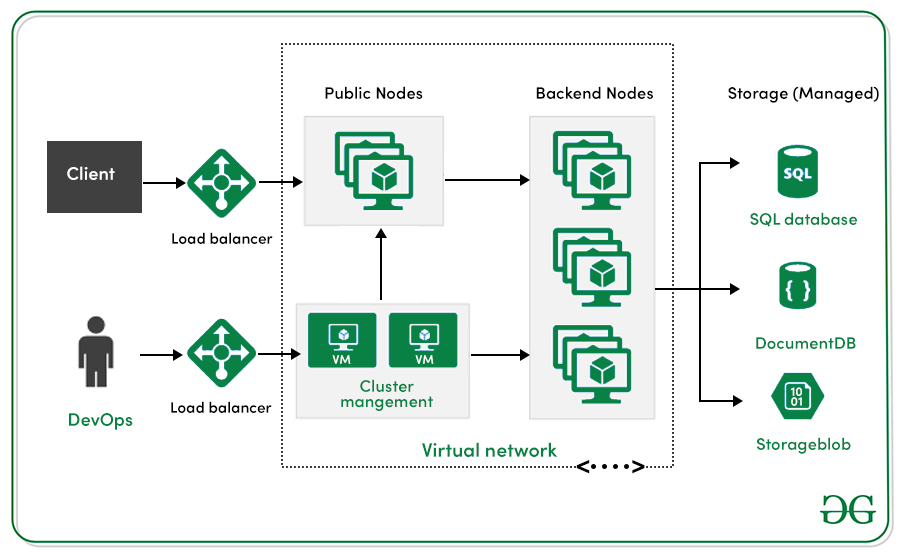
Control Plane (Cluster Management)
Responsible for managing the overall state and behavior of the cluster.
- API Server: Entry point for all REST commands; validates and updates cluster state in
etcd. - etcd: Distributed key-value store; the single source of truth for cluster data.
- Scheduler: Assigns Pods to nodes based on resource needs and policies.
- Controller Manager: Runs controllers that reconcile desired vs. actual state (e.g., Node, Deployment controllers).
Data Plane (Workload Execution)
Runs actual application workloads on worker nodes.
- Kubelet: Ensures containers are running as specified; reports node status to the control plane.
- Kube-proxy: Manages network rules for Pod communication.
- Container Runtime: Executes containers (e.g., containerd, CRI-O).
.jpg)
2. Explain the concept of Container Orchestration.
Container orchestration is the automated process of managing the lifecycle of software containers. It involves tasks such as provisioning, deployment, scaling (up or down), networking, load balancing, and health monitoring of containers across a cluster of machines. Tools like Kubernetes handle this complexity, ensuring applications are highly available and operate efficiently at scale.
3. What is the difference between a Pod and a container?
A container is a single, isolated process. A Pod is a logical host for one or more tightly coupled containers that need to share resources. Containers within the same Pod share the same network namespace (they can communicate via localhost) and can share storage volumes. While a Pod can contain a single container, the Pod itself is the object that Kubernetes manages, schedules, and scales.
4. How does Kubernetes handle container scaling?
To automatically scale the workload to match demand, a Horizontal Pod Autoscaling in Kubernetes updates a workload resource (such a deployment or stateful set). The Horizontal Pod Autoscaler (HPA) automatically scales the number of Pod replicas in a Deployment, ReplicaSet, or StatefulSet based on observed metrics, such as CPU utilization or custom metrics. It increases the number of Pods to handle increased load and decreases them when the load subsides, optimizing resource usage.
apiVersion: autoscaling/v2beta2
kind: HorizontalPodAutoscaler
metadata:
name: my-hpa
spec:
scaleTargetRef:
apiVersion: apps/v1
kind: Deployment # or StatefulSet, or ReplicaSet, depending on your workload
name: my-deployment
minReplicas: 3
maxReplicas: 5
metrics:
- type: Resource
resource:
name: cpu
target:
type: Utilization
averageUtilization: 65
5. What is Sidecar-Container.
A sidecar container is an auxiliary container that runs alongside the main application container within the same Pod. It enhances or supports the primary container without being part of the core application logic.
Common Use Cases
- Log forwarding
- Metrics collection
- Service mesh proxies (e.g., Envoy)
- TLS termination
- Data synchronization
6. Explain the difference between a StatefulSet and a Deployment.
StatefulSet | Deployment |
|---|---|
| A collection of identical stateful pods are handled by the resource is called StatefulSet. | This resource controls identical pods deployment. |
| Statefulset helpful in managing stateful applications that need persistent storage with a dependable network ID. | It enables you to control your application's state and ensure that the right number of replicas are always running. |
7. What is the relationship between a Deployment, ReplicaSet, and Pod?
Management Hierarchy
- Deployment: Defines the desired state of an application (e.g., number of replicas, container image) and manages updates.
- ReplicaSet: Ensures the specified number of Pods are running; created and managed by the Deployment.
- Pod: The smallest deployable unit; runs one or more containers.
Update Strategy
- Updating a Deployment (e.g., new image) triggers creation of a new ReplicaSet.
- Kubernetes performs a rolling update: scales up the new ReplicaSet while scaling down the old one.
- The old ReplicaSet is retained (scaled to zero) for rollback if needed.
8. What are ConfigMaps and Secrets in Kubernetes, and how do they differ?
ConfigMaps and Secrets are Kubernetes API objects used to externalize configuration from application code, but they serve distinct purposes:
ConfigMap
- Stores non-sensitive configuration data as key-value pairs.
- Used for environment variables, command-line args, or config files.
Secret
- Stores sensitive data like passwords, tokens, and SSH keys.
- Data is base64-encoded by default (not encrypted).
- Supports fine-grained access control via RBAC.
9. What is the difference between a Deployment, a StatefulSet, and a DaemonSet?
These are all workload controllers, but they serve different purposes based on the nature of the application.
- Deployment: The most common controller, used for stateless applications where any Pod can be replaced by another without loss of service. Pods are interchangeable.
- StatefulSet: Used for stateful applications that require stable, unique network identifiers, stable persistent storage, and ordered deployment and scaling. Examples include databases or message queues.
- DaemonSet: Ensures that all (or some) nodes run a copy of a Pod. This is useful for cluster-level agents like log collectors, monitoring agents, or storage daemons that must run on every node.
10. What are Liveness, Readiness, and Startup Probes in Kubernetes
Probes are health checks performed by the Kubelet to monitor container status and ensure application reliability. Each probe serves a distinct purpose in managing Pod lifecycle:
Liveness Probe
- Checks if the container is still running.
- If it fails, the container is killed and restarted.
- Useful for detecting deadlocks or stalled processes.
Readiness Probe
- Checks if the container is ready to serve traffic.
- If it fails, the Pod is removed from Service endpoints.
- Ideal for handling temporary unavailability, like during startup or heavy processing.
Startup Probe
- Verifies if the application has successfully started.
- Temporarily disables liveness and readiness probes until it passes.
- Crucial for slow-starting apps, preventing premature restarts.
11. Explain the concept of Ingress in Kubernetes.
Ingress and Ingress Controllers work together to manage external access to services within a Kubernetes cluster, especially for HTTP/HTTPS traffic.
Ingress
- A Kubernetes API object that defines Layer 7 routing rules.
- Routes traffic based on hostnames (e.g.,
api.example.com) or paths (e.g.,/users). - Enables centralized and declarative management of external access.
Ingress Controller
- A runtime component that enforces the rules defined in the Ingress object.
- Acts as a reverse proxy or load balancer (e.g., NGINX, Traefik, cloud-native options).
- Must be deployed separately-Ingress rules alone don’t function without it.

12. How does Kubernetes enforce communication boundaries between Pods?
A Network Policy defines how Pods communicate with each other and with external endpoints, acting as a firewall at Layer 3/4 (IP and port level). By default, all Pods can talk to each other freely, but applying Network Policies enables a zero-trust model, restricting traffic based on defined rules.
Role in the Kubernetes Networking Stack
- Services handle Layer 4 connectivity and internal load balancing.
- Ingress manages Layer 7 routing for external HTTP/S traffic.
- Network Policies enforce security filtering at the IP/port level, independent of Services and Ingress.
This layered architecture allows for clear separation of concerns:
- Developers manage Service definitions.
- Platform teams configure Ingress routing.
- Security teams enforce communication boundaries with Network Policies.
13. Describe the role of etcd in Kubernetes.
It is a distributed, consistent, and highly available key-value store that serves as the central database for Kubernetes. It plays a foundational role in maintaining the state and configuration of the entire cluster
What etcd Stores:
• Desired state: Definitions of resources like Deployments, Services, ConfigMaps, etc.
• Current state: Real-time status of Pods, Nodes, and other components.
• Metadata: Cluster-wide configuration, access control policies, and runtime data.
14. How do rolling updates work in a Deployment?
- The Deployment controller creates a new ReplicaSet with the updated configuration (e.g., new container image).
- It then incrementally scales up the new ReplicaSet while scaling down the old one.
- This process continues until the desired number of updated Pods is running and the old Pods are terminated.
15. You're managing a Kubernetes cluster shared by multiple teams working on different projects. How would you isolate their resources and avoid naming conflicts?
In this scenario, Namespaces are the ideal solution. Kubernetes Namespaces allow you to divide a single cluster into virtual sub-clusters, each with its own scope for resources like Pods, Services, and ConfigMaps.
Benefits of Using Namespaces
- Isolation: Each team gets its own namespace, preventing accidental interference with others’ workloads.
- Avoids naming conflicts: Resources like
web-servicecan exist in multiple namespaces without clashing. - Access control: You can apply Role-Based Access Control (RBAC) to restrict who can access or modify resources in each namespace.
- Resource quotas: Set limits on CPU, memory, and object counts per namespace to prevent overuse.

16. Explain the use of Labels and Selectors in Kubernetes.
Labels and Selectors are essential sections in Kubernetes configuration files for deployments and services due to how they link Kubernetes services to pods. Labels are key-value pairs that identify pods distinctly; the deployment assigns these labels and uses them as a starting point for the pod prior to its creation, and the Selector matches these labels. Labels and selectors combine to create connections between deployments, pods, and services in Kubernetes.
17. Describe the role of a Proxy in Kubernetes.
One essential Kubernetes agent that exists on every cluster node is called Kube-Proxy. Its primary function is to keep track of modifications made to the Service of objects and the endpoints that correspond to them. It then changes these modifications into actual network rules that are implemented into the node.
18. What are Persistent Volumes (PVs) and PersistentVolumeClaims (PVCs)?
This is a two-part abstraction for managing storage in a cluster.
- PersistentVolume (PV): A piece of storage in the cluster that has been provisioned by an administrator or dynamically provisioned using a StorageClass. It is a cluster-level resource, like a node.
- PersistentVolumeClaim (PVC): A request for storage by a user or application. It is similar to a Pod requesting CPU or memory. A PVC consumes a PV resource and must exist in the same namespace as the Pod that uses it.
19. Explain the differences between a DaemonSet and a ReplicaSet.
ReplicaSet | DaemonSet |
|---|---|
| On any node, ReplicaSet will make sure that the number of operating pods in the Kubernetes cluster match the number of pods that is planned. | Every node will have just the minimum of one pod of the application that we deployed because of DaemonSet. |
| Replicaset most suitable for applications like web applications which are stateless. | If you want all nodes of the k8s cluster runs a specific pod use daemonset. |
20. How can you achieve communication between Pods in different Nodes?
Pods in a cluster of k8s can speak to one another by default use the internal IP addresses. The underlying container runtime or network plugin gives a virtual network overlay to this communication.
21. How the Kubernetes Scheduler Assigns Pods to Nodes
The Kubernetes scheduler (kube-scheduler) is a control plane component responsible for deciding where each Pod should run. It ensures optimal placement based on resource availability, constraints, and policies.
Scheduling Workflow
- Filtering Phase (Predicates)
The scheduler first filters out nodes that cannot host the Pod.
Examples of filtering criteria: Insufficient CPU or memory , Node taints and tolerations , Node selectors or affinity rules, Volume or topology constraints - Scoring Phase (Priorities)
From the remaining eligible nodes, the scheduler scores each one based on priority functions. - Binding
The Pod is bound to the highest-scoring node, and the API Server updates the cluster state accordingly.
22. You're deploying a mix of latency-sensitive services and batch jobs in a Kubernetes cluster. How would you ensure each workload is scheduled appropriately?
In a Kubernetes cluster hosting both latency-sensitive services and batch jobs, scheduling decisions must be tailored to meet the unique demands of each workload. This is where the kube-scheduler and its extensibility come into play.
Default Behavior with kube-scheduler
The default kube-scheduler evaluates Pods in the scheduling queue and assigns them to Nodes based on:
- Resource availability (CPU, memory)
- Constraints like affinity/anti-affinity, taints/tolerations
- Scoring functions that rank eligible nodes for optimal placement
This works well for general-purpose workloads, including latency-sensitive services that need consistent performance and fast response times.
23. Describe how a Horizontal Pod Autoscaler (HPA) works.
The Horizontal Pod Autoscaler (HPA) automatically scales the number of Pod replicas in a Deployment, ReplicaSet, or StatefulSet based on observed metrics, such as CPU utilization or custom metrics. It increases the number of Pods to handle increased load and decreases them when the load subsides, optimizing resource usage.
apiVersion: autoscaling/v2
kind: HorizontalPodAutoscaler
metadata:
name: webserver-mem-hpa
spec:
maxReplicas: 5
minReplicas: 1
scaleTargetRef:
apiVersion: apps/v1
kind: Deployment
name: webserver
metrics:
- type: Resource
resource:
name: memory
target:
type: Utilization
averageValue: 2Mi
24. Explain the concept of Custom Resources in Kubernetes.
Following a custom resource is installed, users can create and access its objects using kubectl, just like they do for built-in resources like Pods. A custom resource is an extension of the Kubernetes API that is not always available in a default Kubernetes installation. However, many core Kubernetes functions are now built using custom resources, making Kubernetes more modular. Custom resources can come and go in a running the cluster through dynamic registration, and cluster admins can update custom resources independently of the cluster.
25. What are Affinity and Anti-Affinity?
Affinity and anti-affinity rules expand the types of constraints you can define for scheduling Pods.
- Node Affinity: Attracts Pods to a set of nodes based on node labels. It is conceptually similar to nodeSelector but more expressive.
- Inter-pod Affinity/Anti-affinity: Attracts or repels Pods from other Pods based on the labels of Pods already running on a node. This can be used to co-locate Pods of a service in the same availability zone (affinity) or spread them across different zones for high availability (anti-affinity).
26. What is a Network Policy in Kubernetes?
Kubernetes Network Policies are an application-centric build that let you specify how pod is allowed to communicate with various network "entities" (we use the term "entity" here to avoid over change the more common terms such as "endpoints" and "services", which have specific K8s connotations) over the network. Network Policies apply to the connection with pod on one or both sides, and are not relevant to any other connections.

27. Describe the role of a kube-proxy in the cluster.
kube-proxy is a critical network component that runs on every node in a Kubernetes cluster. Its primary job is to enable communication between services and Pods, ensuring that traffic is routed correctly across the cluster.
What kube-proxy Does:
- Service Discovery & Routing
- Load Balancing
- Protocol Handling
28. What is a Helm chart, and how is it used?
Helm utilizes a packaging format called charts, which are collection of files which describe the cohesive set of Kubernetes resources. Whether you are deploying a simple component, like a memcached pod, or a complex web app stack which involves HTTP servers, databases, caches, and more, all the files you need are contained in a single chart. Helm chart packages provide all the resources you need to deploy an application to a Kubernetes cluster, which involves YAML configuration files for secrets, services, deployments, and config maps that provide the app's desired state.
29. Explain the concept of Taints and Tolerations in Kubernetes.
Taints and Tolerations are scheduling mechanisms that work together to control which Pods can run on which Nodes, helping enforce workload isolation and resource specialization.
Taint (NodeLevel)
- A taint is applied to a Node.
- It tells Kubernetes: “Do not schedule Pods here unless they explicitly tolerate this condition.”
- Format: (e.g., )
Toleration (Pod-Level)
- A toleration is added to a Pod.
- It allows the Pod to ignore specific taints and be scheduled on matching Nodes.
- It doesn’t guarantee placement just permits it.
30. How does Kubernetes manage storage orchestration?
The Container Storage Interface (CSI) is the standard to establish device-independent relationships across block and file storage systems and containerized workloads. In essence, CSI allows storage interfaces to be declared to be implemented by containers.
Key Components in Kubernetes Storage
- PersistentVolume (PV): Represents a piece of storage in the cluster, provisioned manually or dynamically.
- PersistentVolumeClaim (PVC): A request for storage by a user or application.
- StorageClass: Defines the type of storage (e.g., SSD, HDD, encrypted) and links to a CSI driver for dynamic provisioning.
31. Describe the use of init containers in Kubernetes.
This page provides an overview of init containers, which are specialized containers that carry out in front of app containers in a Pod. You can specify init containers in the Pod specification as well as to the containers array (which describes app containers). Init containers can contain utilities or setup scripts that aren't present in an app image. Resource limitations, volumes, and security settings are just a few of the characteristics and functions that app containers support in it containers.
32. In Kubernetes, what are the various services available?
Kubernetes supports a number of services, include the following: 1) Cluster IP, 2) Node Port, 3) Load Balancer, & 4) External Name Creation.
1. Cluster IP Service
A ClusterIP service in Kubernetes provides a stable virtual IP address (Cluster IP) to the service, allowing internal communication between various parts in the Kubernetes cluster, it exposes a set of Pods within the cluster to other objects in the cluster.
2. Node Port Service
A NodePort service in Kubernetes is a type of service that allows a group of Pods accessible to external customers on an allocated port on all cluster nodes.
3. Load Balancer service
An external load balancer is automatically provided by a LoadBalancer service in Kubernetes to distribute incoming traffic between the Pods when a group of Pods are accessible to the outside world.
4. External Name Creation Service
An ExternalName service in Kubernetes works as an alias which allows pods inside the cluster to contact services outside cluster using a user-defined DNS name. External name provides DNS-based service discovery to map a service to an external DNS name.
Also Read: Kubernetes - Images
33. Explain the concept of a Custom Operator in Kubernetes.
A Custom Operator automates complex application tasks-like deployment, scaling, and backup-using Kubernetes-native APIs. It consists of:
- A Custom Resource Definition (CRD) that defines a new type of object (e.g.,
MyDatabase) - A Controller that watches for changes and acts to maintain the desired state
Operators embed domain-specific logic, making Kubernetes capable of managing not just infrastructure but full application lifecycles. They’re ideal for stateful apps like databases, caches, or monitoring systems.
34. How do you troubleshoot a Pod in a CrashLoopBackOff state?
A Pod in a CrashLoopBackOff state means its container is repeatedly crashing and restarting. To troubleshoot:
- Describe the Pod using to check the container’s last state and exit code. Exit code usually indicates an application error, while suggests it was killed due to exceeding memory limits (OOMKilled)
- Check for incorrect CMD and missing binaries.
- Check logs with to view the output from the previous container instance. This often reveals the root cause, such as missing files, misconfigurations, or runtime errors.
- Verify configuration by inspecting environment variables, ConfigMaps, Secrets, and command-line arguments. Incorrect values or missing dependencies can cause startup failures.
- Inspect probes especially liveness probes. Misconfigured probes can cause healthy containers to be restarted unnecessarily, leading to a crash loop.
35. What is the purpose of the Kubernetes API server?
As the front end to the cluster's shared state, the API server manages REST operations and serves as the hub through which all other components communicate. Its main responsibility is to receive and handle HTTP requests in the form of API calls, which come from consumers or other Kubernetes system components. The Kubernetes API server is crucial to the validation as well as the configuration of data for different API objects, including pods, services, replication controllers, and more.
36. How do you handle an ImagePullBackOff error?
ImagePullBackOff means that the Kubelet was unable to pull the container image from its registry. The steps are:
- Describe the Pod: Run kubectl describe pod <pod-name> and check the Events section for detailed error messages.
- Verify Image Name: Check for typos in the container image name or tag in your Pod or Deployment manifest.
- Check Registry Accessibility: Ensure the node can connect to the container registry.
Check Pull Secrets: If the image is in a private registry, verify that an imagePullSecret is correctly configured in your namespace and referenced in the Pod's spec.
37. How would you perform a Kubernetes cluster upgrade?
To upgrade a Kubernetes cluster:
- Review release notes for breaking changes.
- Back up etcd to protect cluster state.
- Upgrade control plane components one master at a time.
- Upgrade worker nodes using
kubectl drain, update packages, thenkubectl uncordon. - Update add-ons like CNI, CoreDNS, and Ingress to compatible versions.
Always test in staging before applying to production.
38.How would you back up and restore a cluster?
A cluster backup strategy involves two main components :
- Cluster State (etcd): The most critical component is the etcd database. Regular snapshots of etcd should be taken. Restoration involves stopping the API server, restoring the etcd data from a snapshot, and restarting the control plane components.
- Application Data (Persistent Volumes): For stateful applications, the data stored in Persistent Volumes must also be backed up. Tools like Velero are commonly used for this purpose. Velero can take snapshots of your cluster's resources and persistent volumes, allowing you to restore the entire state of your applications, not just the cluster configuration.
39. How does Kubernetes handle node failures and resiliency?
Whenever a node fails or a container becomes hazardous, Kubernetes makes sure that a sufficient amount of replicas is maintained by launching new replicas on numerous servers, which maintains continuous availability.
Here are some key mechanisms and strategies that Kubernetes employs:
- Node Health Monitoring
- Pod Restart Policies
- Replication and Desired State
- Pod Disruption Budgets
- Node Pools and Multi-Cloud Deployments
40. Explain how to set up and use Role-Based Access Control (RBAC) in Kubernetes.
Role-Based Access Control (RBAC) in Kubernetes lets you define who can do what within your cluster. It’s essential for securing resources and delegating responsibilities.
Step-by-Step Setup
- Define User Groups and Access Levels
- Choose an Authentication Method
- Create Roles or ClusterRoles
- Bind Roles to Users or Groups

