
AWS Lambda is a serverless computing service that runs the code without any management of servers by the user. On the other hand, Docker is a tool that helps to encapsulate applications with its dependency into docker containers. AWS Lambda and Docker are some of the most important services used by organizations. Here in this, I will first explain what is AWS Lambda. Then I will discuss what is Docker. After this, I will walk you through the steps to run a containerized Python application on AWS Lambda.
What is AWS Lambda?
AWS Lambda is a serverless computing service that runs the code without any management of servers. AWS Lambda supports various programming languages such as Python, Golang, Node.js, Java, and many more. The Lambda function can be triggered automatically on the occurrence of any specific event or at a particular scheduled time. AWS Lambda only charges you when someone executes the code and if the AWS Lambda does not receive any request for execution then there will be no cost incurred on your AWS account. When you are running your code on the AWS EC2 Instance, you have to add an additional autoscaling group to scale up or down on the basis of the request. But in AWS Lambda, it will automatically scale up or down on the amount of traffic it receives. In summary, we can say AWS Lambda simplifies the development of serverless applications and provides a flexible, scalable, and cost-effective platform to run code without any management of servers.
What is Docker?
Docker is a tool that is used to containerize applications along with their dependencies. This means packing the application and its dependencies into compact units called docker containers. These containers contain all the application code, run time, dependencies, and other libraries to run the application. Here the developers first write a dockerfile mentioning the base image, working directory, build commands, and commands to run the application. This docker file is then built to generate a docker image using the docker build command. These docker images are lightweight and portable. The docker images can run on any operating system, only condition is that the docker should be installed on that system. In this way, it allows cross-platform compatibility. The docker containers use fewer resources to run on a system. This means we can run multiple docker containers on a single machine. This results in the maximum utilization of resources in a machine and also it decreases overall infrastructure cost. In summary we can docker has become a very important tool for the organization for software application developments and delivery pipelines.
Pre-requisites
Before moving to the next section make sure that you have installed docker on your system. If not installed then follow these detailed geeks for geeks articles to install docker on your system.
- For Windows users: Docker – Installation on Windows
- For Ubuntu users: How To Install and Configure Docker in Ubuntu?
Steps To Run A Docker Container On AWS Lambda
Step 1 : Create a sample python app .

Step 2 : Write necessary requirements to install on the docker container in requirements.txt .

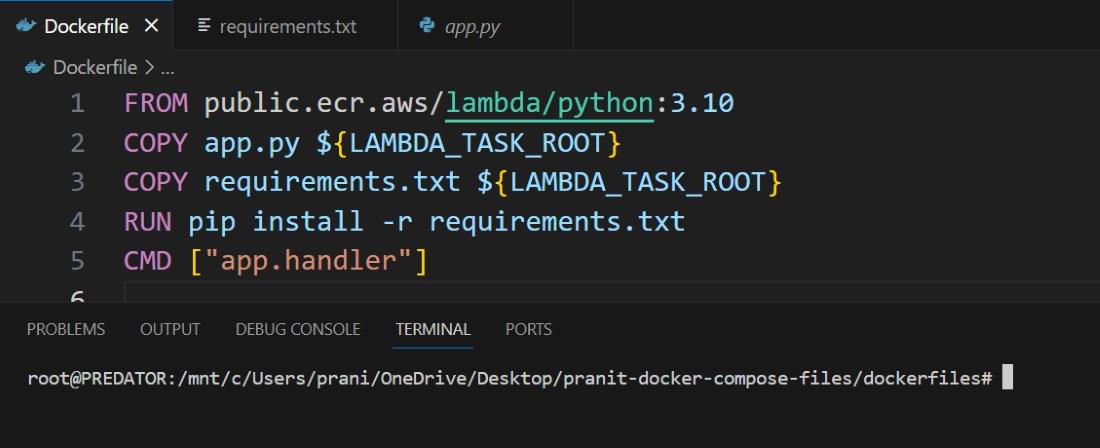
Step 3 : Create a dockerfile which will help to containerize the python application .
Step 4 : Now to go AWS Console and then create an ECR repository . Here in this repository you will store the docker image .

Step 5 : Now search for AWS IAM service. Here go to security credential to create access key and security key.

Give a name to the credentials .

Step 6 : Now use this command below to configure your AWS on the local environment . After this enter the access key , secret key and region that is created in Step 5 .
aws configure

Step 7 : Now go to AWS ECR . Here enter inside the demo repository . Here click on the view push commands .

Step 8 : Now run all the push commands on the local editor where your python application and dockerfile is stored .
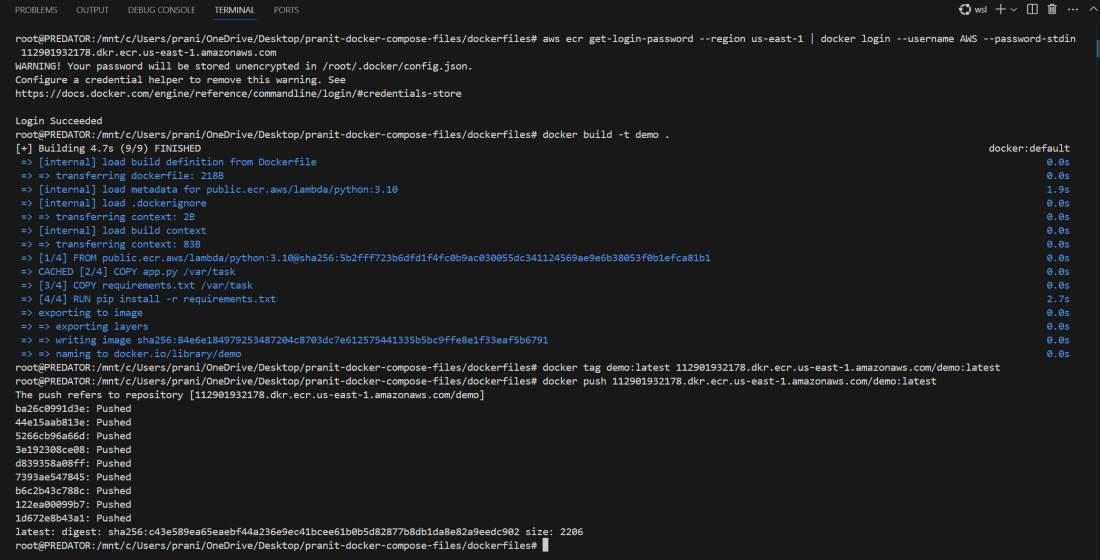
Step 9 : After step 8 , your docker image will be pushed to ECR repo . Now you copy image URI .
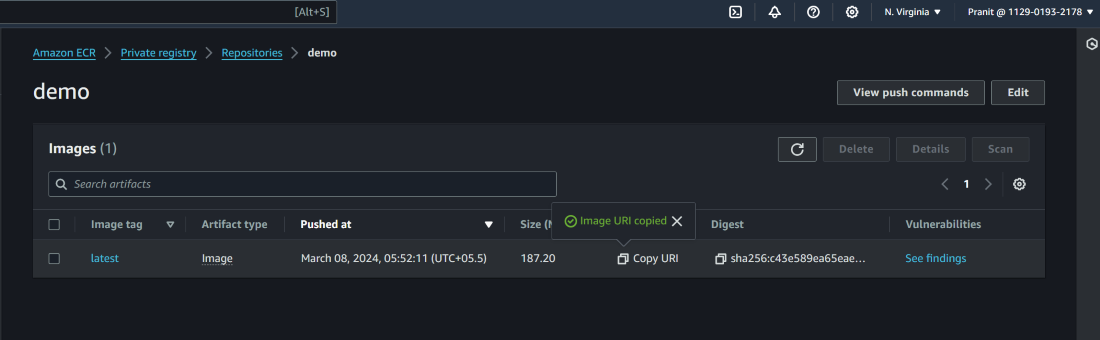
Step 10 : Create a AWS Lambda function using container image . Here paste the image URI and then click create function .

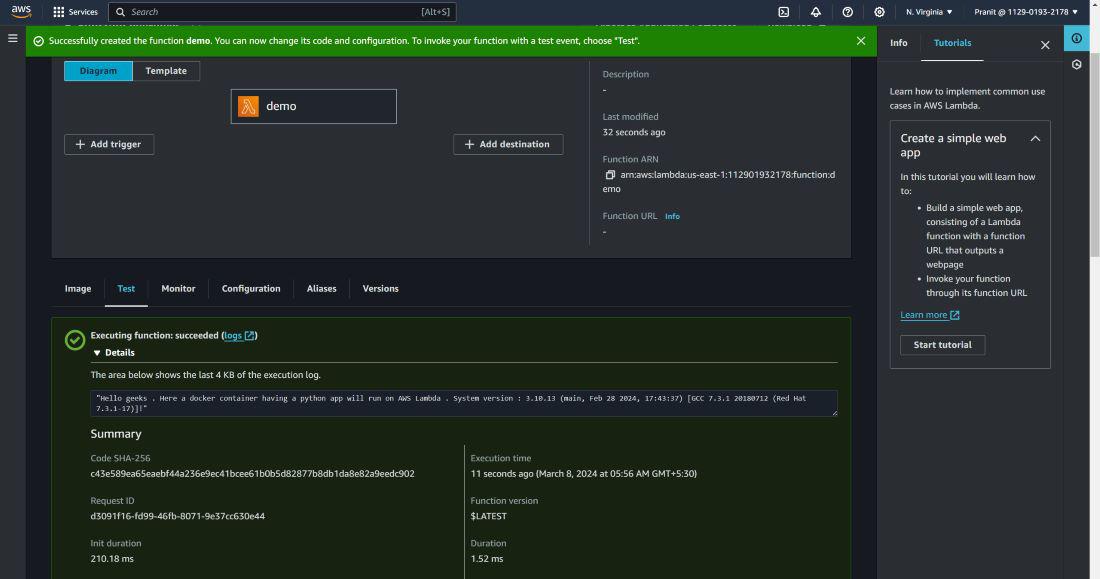
Step 11 : After this Lambda function will be created . Now click test to execute the code and then observe the output .
Conclusion
Combining AWS Lambda with Docker containers for serverless computing offers a powerful and flexible development approach.
