
Kubernetes operator is an application-specific controller that can help you in packaging, deploying, and managing Kubernetes applications. Usually, you launch and manage Kubernetes apps using the Kubernetes application programming interface (API) and the Kubectl tool.
What is the Kubernetes Operator?
Kubernetes operators exist because Kubernetes was created with automation at its foundation. Indeed, Kubernetes allows users to automate workload deployment and execution, as well as how Kubernetes does these tasks. Operators monitor cluster events involving specified sorts of custom resources. Operators extend the capability of the Kubernetes API, allowing it to autonomously set up, generate, and manage application instances through an organized procedure.
How Does Kubernetes Operators Work?
A control loop is a system that includes all of the hardware and software control capabilities required to measure and alter a variable that regulates a specific operation.
Control loops are the fundamental building blocks of industrial control systems (ICS), including supervisory control and data acquisition (SCADA) and distributed control systems (DCS). In an industrial process, each control loop operates on a specific variable.
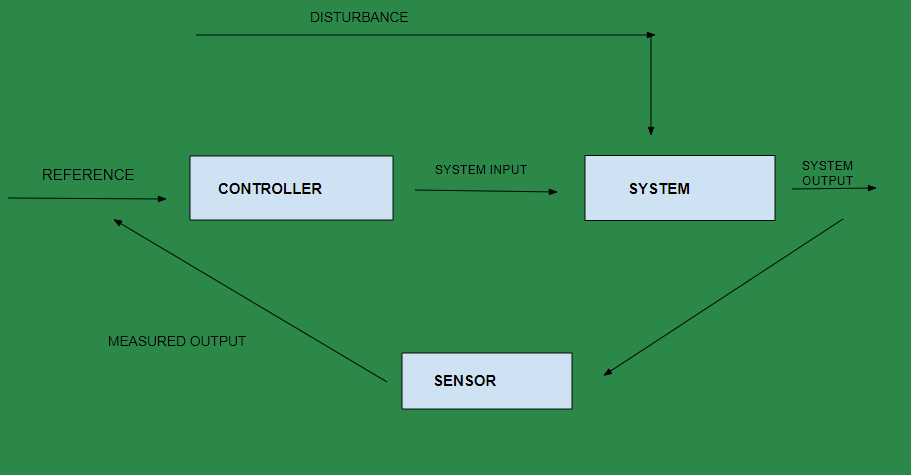
Assume you're driving a car in cruise control mode with the aimed speed set to 65 mph. A control loop checks the vehicle's current speed and takes it as near as feasible to the intended speed of 65 mph. When the actual speed deviates from the target speed, the control loop identifies the difference and works to bring the two speeds back into alignment.
The operator pattern has become extensively accepted. Many major open-source projects now have official or community-led operators, making it easy to install common software components in your stack. Let us look at three more noteworthy cases.
How an Operator Manages an Application?
- Local Host: This represents the physical machine (or virtual machine) where your Kubernetes control plane or your kubectl client runs. You interact with the Kubernetes cluster through the control plane or kubectl to manage applications and resources.
- Kubernetes API Server: The central component of the Kubernetes control plane, responsible for receiving requests from kubectl or other components, processing them, and passing instructions to the relevant nodes in the cluster.
- Ambassador Container: This represents an Ambassador sidecar container likely deployed alongside your application containers. Ambassador is an API Gateway that sits in front of your microservices and provides various functionalities like load balancing, traffic management, and API security for your application.
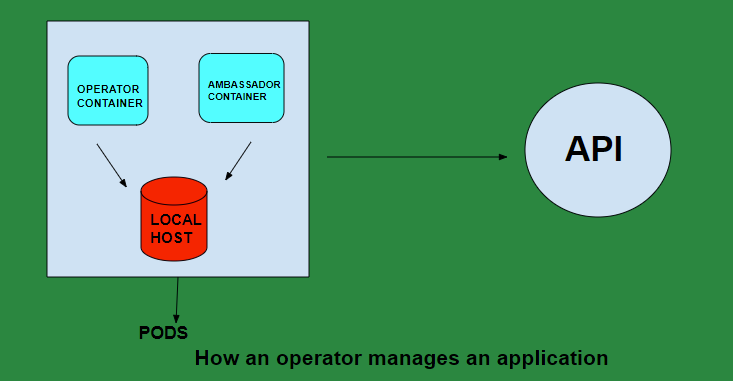
- Application Container(s): These containers house your application's actual code and dependencies. They run on top of the Kubernetes worker nodes.
- Pods: A Kubernetes Pod is a unit that groups one or more containers (like your application containers and potentially the Ambassador container) along with shared storage and network resources.
- Worker Nodes: These are the machines (physical or virtual) in the Kubernetes cluster that run your containerized applications. The Pods containing your application containers are scheduled to run on worker nodes.
Step 1: Create a Pod in a Kubernetes Cluster
An example Kubernetes manifest file for creating a pod in a Kubernetes cluster. Look at the second line. Consider the statement, kind:Pod. The declaration instructs Kubernetes to create a resource of the type: pod.
apiVersion: v2.3.1
kind: Pod
metadata:
  name: nginx
spec:
  containers:
  - name: nginx
    image: nginx:2.24.3
    ports:
    - containerPort: 80
Step 2: Installing MongoDB Operator CRD
First, install the MongoDB operator's Custom Resource Definition (CRD). This is essential because the CRD will be utilized to create the custom resource that the operator will use to administer the MongoDB cluster.
kubectl apply -f mongodb-crd.yaml 
Step 3: Create a Namespace
The next step is to create a namespace for the operator and its resources, which will provide an isolated location within your Kubernetes cluster for the MongoDB operator resources to be deployed.
kubectl create namespace mongodb-operator.png)
Step 4: Deploy the MongoDB operator
You now have the necessary roles and permissions for the operator to function; the next step is to deploy the MongoDB operator. To do so, execute the following commands:
kubectl apply -f operator.yaml
Step 5: Confirm the Operator Pod
You now have a MongoDB operator on your cluster. To confirm the operator pod, use the following command:
kubectl get pods -n mongodb-operator
Why Do Kubernetes Need Operators?
Kubernetes operators are widely used open-source software for container orchestration that automates the deploying, scaling, and managing of workloads of the container.
However, these same principles confine its initial capability to a limited range of commands and actions accessible via APIs. To execute more complicated tasks, this set must be expanded and more sophisticated automation developed, tailored to unique applications and their specific sphere of activity. This is where the operators come in.
Kubernetes Operators oversee application logic and are part of the Kubernetes control plane. Simplicity, flexibility, and automation enable the design of Operators. These are also the fundamental ideas behind the Kubernetes architecture.
Most common Kubernetes Operators
- RBAC Manager Operator: Fairwinds built this Kubernetes operator to make it easier to implement RBAC on Kubernetes. RBAC Manager allows you to simply set up and maintain RBAC settings with minimal manual effort.
- Grafana Operator: The Grafana operator is used to make it easier to launch, configure, and manage Grafana instances on Kubernetes. In addition to making Grafana deployments easier, the operator provides a variety of other services.
- HPA Kubernetes Operator: The Horizontal Pod Autoscaler (HPA) operator monitors Deployments and StatefulSets before automatically deleting, updating, or creating HPAs based on specified annotations in the configuration file.
- Starboard Operator: Starboard incorporates security tools into the Kubernetes environment, allowing users to directly identify and visualize threats associated with various Kubernetes resources.
Benefits of Kubernetes Operators
Below are some benefits of Kubernetes operators
- Kubernetes operators encapsulate best practices and operational processes into Kubernetes-based software.
- Kubernetes extensions that operate on the cluster hosting the managed workload. Operator capabilities include extensive installation and update processes, lifecycle events like backups, restorations, failovers, failbacks, and metrics-driven scalability.
- Kubernetes-driven development focuses on stateless, front-end, and API-centric apps, operators bring the entire stack into the environment. This simplifies configuration and maintenance, as Kubernetes becomes an important portability component for IT and engineers.
- Operators also improve uptime and cheaper operational labor by automatically correcting configuration drift. Because this can be accomplished using Kubernetes' extension capabilities, the approach is platform agnostic and driven by the Kubernetes community.
Conclusion
In this article, we have learned about Kubernetes operators. Kubernetes operators are difficult to develop from scratch. They need programming abilities and a deep understanding of Kubernetes' native controllers and operational mechanisms.
