
Gnome Sort also called Stupid sort is based on the concept of a Garden Gnome sorting his flower pots. A garden gnome sorts the flower pots by the following method-
- He looks at the flower pot next to him and the previous one; if they are in the right order he steps one pot forward, otherwise he swaps them and steps one pot backwards.
- If there is no previous pot (he is at the starting of the pot line), he steps forwards; if there is no pot next to him (he is at the end of the pot line), he is done.
Input -
Array- arr[]
Total elements - n
How gnome sort works?
Lets consider an example: arr[] = {34, 2, 10, -9}
- Underlined elements are the pair under consideration.
- “Red” colored are the pair which needs to be swapped.
- Result of the swapping is colored as “blue”
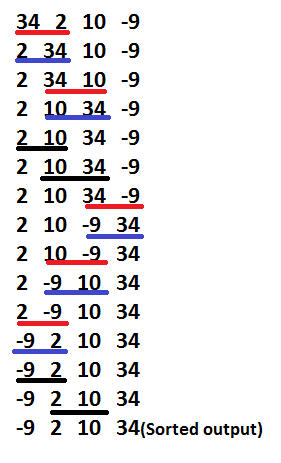
Algorithm Steps:
- If you are at the start of the array then go to the right element (from arr[0] to arr[1]).
- If the current array element is larger or equal to the previous array element then go one step right
if (arr[i] >= arr[i-1])
i++;
- If the current array element is smaller than the previous array element then swap these two elements and go one step backwards
if (arr[i] < arr[i-1])
{
swap(arr[i], arr[i-1]);
i--;
}
- Repeat steps 2) and 3) till ‘i’ reaches the end of the array (i.e- ‘n-1’)
- If the end of the array is reached then stop and the array is sorted.
Below is the implementation of the algorithm.
// A C++ Program to implement Gnome Sort
#include <iostream>
using namespace std;

// A function to sort the algorithm using gnome sort
void gnomeSort(int arr[], int n)
{
    int index = 0;

    while (index < n) {
        if (index == 0)
            index++;
        if (arr[index] >= arr[index - 1])
            index++;
        else {
            swap(arr[index], arr[index - 1]);
            index--;
        }
    }
    return;
}

// A utility function ot print an array of size n
void printArray(int arr[], int n)
{
    cout << "Sorted sequence after Gnome sort: ";
    for (int i = 0; i < n; i++)
        cout << arr[i] << " ";
    cout << "\n";
}

// Driver program to test above functions.
int main()
{
    int arr[] = { 34, 2, 10, -9 };
    int n = sizeof(arr) / sizeof(arr[0]);

    gnomeSort(arr, n);
    printArray(arr, n);

    return (0);
}
// Java Program to implement Gnome Sort

import java.util.Arrays;
public class GFG {
    static void gnomeSort(int arr[], int n)
    {
        int index = 0;

        while (index < n) {
            if (index == 0)
                index++;
            if (arr[index] >= arr[index - 1])
                index++;
            else {
                int temp = 0;
                temp = arr[index];
                arr[index] = arr[index - 1];
                arr[index - 1] = temp;
                index--;
            }
        }
        return;
    }

    // Driver program to test above functions.
    public static void main(String[] args)
    {
        int arr[] = { 34, 2, 10, -9 };

        gnomeSort(arr, arr.length);

        System.out.print("Sorted sequence after applying Gnome sort: ");
        System.out.println(Arrays.toString(arr));
    }
}

// Code Contributed by Mohit Gupta_OMG
# Python program to implement Gnome Sort

# A function to sort the given list using Gnome sort
def gnomeSort( arr, n):
    index = 0
    while index < n:
        if index == 0:
            index = index + 1
        if arr[index] >= arr[index - 1]:
            index = index + 1
        else:
            arr[index], arr[index-1] = arr[index-1], arr[index]
            index = index - 1

    return arr

# Driver Code
arr = [ 34, 2, 10, -9]
n = len(arr)

arr = gnomeSort(arr, n)
print "Sorted sequence after applying Gnome Sort :",
for i in arr:
    print i,

# Contributed By Harshit Agrawal
// C# Program to implement Gnome Sort
using System;

class GFG {

    static void gnomeSort(int[] arr, int n)
    {
        int index = 0;

        while (index < n)
        {
            if (index == 0)
                index++;
            if (arr[index] >= arr[index - 1])
                index++;
            else {
                int temp = 0;
                temp = arr[index];
                arr[index] = arr[index - 1];
                arr[index - 1] = temp;
                index--;
            }
        }
        return;
    }

    // Driver program to test above functions.
    public static void Main()
    {
        int[] arr = { 34, 2, 10, -9 };

        // Function calling
        gnomeSort(arr, arr.Length);

        Console.Write("Sorted sequence after applying Gnome sort: ");

        for (int i = 0; i < arr.Length; i++)
            Console.Write(arr[i] + " ");
    }
}

// This code is contributed by Sam007
<?php
// PHP Program to implement
// Gnome Sort

// A function to sort the
// algorithm using gnome sort
function gnomeSort($arr, $n)
{
    $index = 0;

    while ($index < $n)
    {
        if ($index == 0)
            $index++;
        if ($arr[$index] >= $arr[$index - 1])
            $index++;
        else
        {
            $temp = 0;
            $temp = $arr[$index];
            $arr[$index] = $arr[$index - 1];
            $arr[$index - 1] = $temp;
            $index--;
        }
    }
    echo "Sorted sequence ",
         "after Gnome sort: ";
    for ($i = 0; $i < $n; $i++)
        echo $arr[$i] . " ";
    echo "\n";
}

// Driver Code
$arr = array(34, 2, 10, -9);
$n = count($arr);

gnomeSort($arr, $n);

// This code is contributed
// by Sam007
?>
<script>

// Javascript Program to implement Gnome Sort

   function gnomeSort(arr, n)
    {
        let index = 0;

        while (index < n) {
            if (index == 0)
                index++;
            if (arr[index] >= arr[index - 1])
                index++;
            else {
                let temp = 0;
                temp = arr[index];
                arr[index] = arr[index - 1];
                arr[index - 1] = temp;
                index--;
            }
        }
        return;
    }

// Driver Code

        let arr = [34, 2, 10, -9 ];

        gnomeSort(arr, arr.length);

        document.write("Sorted sequence after applying Gnome sort: ");
        document.write(arr.toString());

</script>
Output
Sorted sequence after Gnome sort: -9 2 10 34
Time Complexity: As there are no nested loop (only one while) it may seem that this is a linear O(N) time algorithm. But the time complexity is O(N^2).
This is because:
- The variable – ‘index’ in our program doesn’t always gets incremented, it gets decremented too.
- However this sorting algorithm is adaptive and performs better if the array is already/partially sorted.
Auxiliary Space: This is an in-place algorithm. So O(1) auxiliary space is needed.
