
Conditional Probability helps determine the chance of an event occurring when another event has already happened. In Excel, you can calculate it using simple formulas like COUNTIF and COUNTIFS. These functions help analyze data based on specific conditions and find relationships between events. In this article, we will learn how to calculate conditional probability in Excel with easy examples.
The formula of conditional probability having events A and B is as follows:
Steps to Calculate Conditional Probability in Excel
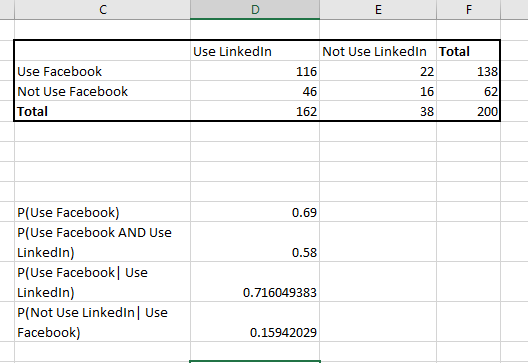
For example, the data below represents a population of a town that uses social networking sites, namely LinkedIn and Facebook. The data shows the number of people using Facebook and using LinkedIn, the number of people using Facebook but not using LinkedIn, and so on. The total population taken is 200.

Now, we need to calculate.
- Probability of people using Facebook. P(Use Facebook)
- Probability of people using Facebook and using LinkedIn. P(Use Facebook AND Use LinkedIn.)
- The conditional probability of people using Facebook who also uses LinkedIn. P(Use Facebook | Use LinkedIn)
- The conditional probability of people using LinkedIn who also uses Facebook. P(Not Use LinkedIn | Use Facebook)
Calculating Probability of People using Facebook (Use Facebook)
Step 1: Divide the total number of Facebook users by the total number of users. The formula for this is =F3/F5.

Step 2: Press Enter key and you'll get the results.
Calculating Probability of People Using Facebook and Using LinkedIn.P(Use Facebook AND Use LinkedIn)
Here, we need to calculate the probability of people who uses Facebook and LinkedIn.
Step 1: Find the number of people who uses Facebook and LinkedIn.
Step 2: Apply the formula in the cell where you want your results to appear =D3/F5.

Step 3: Press Enter key and you'll get the results.
Calculating Conditional Probability of People Using Facebook Who Also Use LinkedIn. P(Use Facebook| Use LinkedIn)
Step 1: Find the number of people who uses Facebook and LinkedIn.
Step 2: Apply the formula in the cell where you want your results to appear =D3/D5. The only change in this question is we need to find the probability among people who use LinkedIn irrespective of their usage of Facebook i.e. the population or the sample space has changed to all the people who use LinkedIn.

Step 3: Press Enter key and you'll get the results.
Calculating Conditional Probability of People not Using LinkedIn Who Also Use Facebook P(Not Use LinkedIn| Use Facebook)
Step 1: Find the number of people who uses Facebook and don't use LinkedIn.
Step 2: Apply the formula in the cell where you want your results to appear =E3/F3. The only change in this question is we need to find the probability among people who don't use LinkedIn irrespective of their usage of Facebook. i.e the population or the sample space has changed to all the people who use Facebook.

Step 3: Press Enter key and you'll get the results.
Output:

