
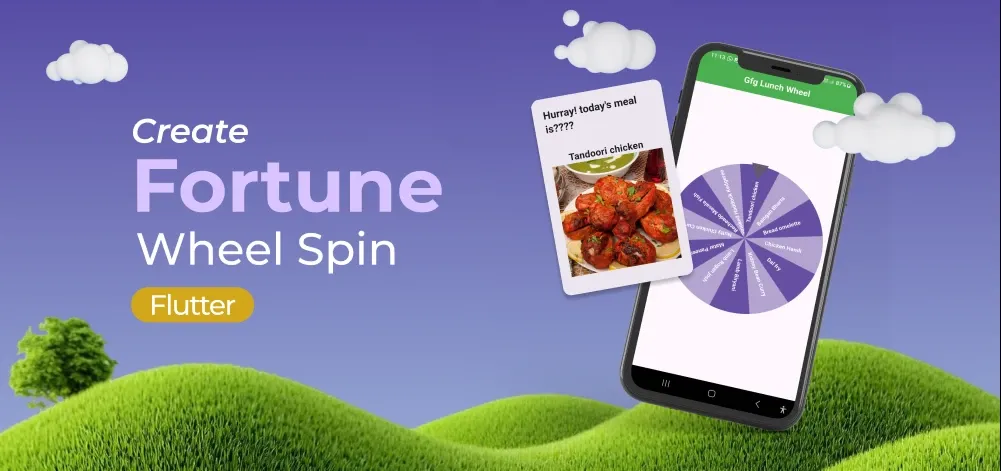
Deciding what to eat can be a daily dilemma, especially when you have a plethora of options to choose from. To make this decision-making process more exciting and interactive, in this article, we will be creating – the Lunch Spinning Wheel app.
Steps to Implement Fortune Wheel in Flutter
Step 1: Create a new Flutter Application
Create a new Flutter application using the command Prompt. To create a new app, write the following command and run it.
flutter create app_nameTo know more about it refer this article: Creating a Simple Application in Flutter
Step 2: Adding the Dependency
To add the dependency to the pubspec.yaml file, add flutter_fortune_wheel, http, and confetti as dependencies in the dependencies part of the pubspec.yaml file, as shown below:
dependencies:
     flutter:
       sdk: flutter
     flutter_fortune_wheel: ^1.3.2
     http: ^1.3.0
     confetti: ^0.8.0
Now, run the below command in the terminal.
flutter pub getStep 3: Import libraries
Now, import these packages in the main.dart file,
import 'package:http/http.dart' as http;
import 'package:flutter_fortune_wheel/flutter_fortune_wheel.dart';
import 'package:confetti/confetti.dart';
Step 4: Create Lunch Class
Create a Lunch class that requires the meal parameter to be provided when creating an instance of the Lunch class, and the img parameter is optional. The fromJson factory method is used to create Lunch instances by extracting values from a JSON map.
class Lunch {
  final String meal;
  var img;

  Lunch({required this.meal, this.img});

  factory Lunch.fromJson(Map<String, dynamic> json) {
    return Lunch(meal: json['strMeal'], img: json['strMealThumb']);
  }
}
Step 5: Loading Lunch Ideas from an API
Fetch a list of lunch ideas from the MealDB API to retrieve a variety of Indian meal options.
 String url = "https://www.themealdb.com/api/json/v1/1/filter.php?a=Indian";
  List<Lunch> _ideas = [];

  Future<void> _getLunchIdeas() async {
    http.Response response;

    Uri uri = Uri.parse(url);
    response = await http.get(uri);

    if (response.statusCode == 200) {
      Map<String, dynamic> jsonData = json.decode(response.body);

      if (jsonData['meals'] != null) {
        List<dynamic> meals = jsonData['meals'];
        setState(() {
          _ideas = meals.map((json) => Lunch.fromJson(json)).toList();
        });
      }
    }
  }
To know more about it refer this article Flutter - Make an HTTP GET Request.
Step 6: Create the Spinning Wheel
The spinning wheel is implemented using the FortuneWheel widget provided by the Flutter Fortune Wheel package. It takes the list of lunch ideas and randomly selects one when the wheel is spun. The selected idea is displayed in the alert dialog when the wheel is stopped.
FortuneWheel(
  selected: selected.stream,
  items: [
    for (var it in _ideas)
      FortuneItem(child: Text(it.meal)),
  ],
  onAnimationEnd: () {
    _centerController.play();
    showDialog(
      barrierDismissible: true,
      context: context,
      builder: (BuildContext context) {
        return StatefulBuilder(
          builder: (context, setState) {
            return AlertDialog(
              scrollable: true,
              title:
                  Text("Hurray! today's meal is????"),
              content: Stack(
                alignment: Alignment.center,
                children: [
                  Align(
                    alignment: Alignment.topRight,
                    child: SizedBox(
                      width: 300,
                      height: 300,
                      child: Center(
                        child: ConfettiWidget(
                          confettiController:
                              _centerController,
                          blastDirection: pi,
                          maxBlastForce: 10,
                          minBlastForce: 1,
                          emissionFrequency: 0.03,
                          numberOfParticles: 100,
                          gravity: 0,
                        ),
                      ),
                    ),
                  ),
                  Column(
                    crossAxisAlignment:
                        CrossAxisAlignment.center,
                    children: [
                      Text(
                        selectedIdea,
                        style: TextStyle(fontSize: 22),
                      ),
                      Image.network(selectedImg),
                    ],
                  ),
                ],
              ),
            );
          },
        );
      },
    );
  },
  onFocusItemChanged: (value) {
    if (flag == true) {
      setValue(value);
    } else {
      flag = true;
    }
  },
),
Complete Source Code
main.dart:
import 'dart:async';
import 'dart:convert';
import 'dart:math';
import 'package:http/http.dart' as http;
import 'package:flutter/material.dart';
import 'package:flutter_fortune_wheel/flutter_fortune_wheel.dart';
import 'package:confetti/confetti.dart';

// Run the MyApp widget
void main() => runApp(const MyApp());

class MyApp extends StatelessWidget {
  const MyApp({Key? key}) : super(key: key);

  @override
  Widget build(BuildContext context) {
    return MaterialApp(

      // Disable debug banner
      debugShowCheckedModeBanner: false,

      // App title
      title: 'Gfg Lunch Wheel',

      // Set the home screen
      home: ExamplePage(),
    );
  }
}

class ExamplePage extends StatefulWidget {
  @override
  _ExamplePageState createState() => _ExamplePageState();
}

// Lunch class to represent a meal
class Lunch {

  // Name of the meal
  final String meal;

  // Image URL of the meal
  var img;

  Lunch({required this.meal, this.img});

  // Factory constructor to create a Lunch object from JSON
  factory Lunch.fromJson(Map<String, dynamic> json) {
    return Lunch(
      meal: json['strMeal'],
      img: json['strMealThumb'],
    );
  }
}

class _ExamplePageState extends State<ExamplePage> {

  // StreamController to manage the selected index of the wheel
  StreamController<int> selected = StreamController<int>();

  // ConfettiController to manage confetti animation
  late ConfettiController _centerController;

  // API URL to fetch Indian meals
  String url = "https://www.themealdb.com/api/json/v1/1/filter.php?a=Indian";

  // List to store meal ideas
  List<Lunch> _ideas = [];

  // Function to fetch meal ideas from the API
  Future<void> _getLunchIdeas() async {
    http.Response response;

    Uri uri = Uri.parse(url);
    response = await http.get(uri);

    if (response.statusCode == 200) {
      Map<String, dynamic> jsonData = json.decode(response.body);

      if (jsonData['meals'] != null) {
        List<dynamic> meals = jsonData['meals'];
        print("Fetched meals: $meals");
        setState(() {
          _ideas = meals.map((json) => Lunch.fromJson(json)).toList();
        });
      }
    }
  }

  @override
  void initState() {
    super.initState();

    // Fetch meal ideas when the widget initializes
    _getLunchIdeas();

    // Initialize confetti controller
    _centerController =
        ConfettiController(duration: const Duration(seconds: 10));
  }

  @override
  void dispose() {

    // Close the stream controller
    selected.close();

    // Dispose the confetti controller
    _centerController.dispose();
    super.dispose();
  }

  // Variables to store the selected meal and its image
  var selectedIdea = "";
  late var selectedImg;

  // Function to set the selected meal and image
  void setValue(value) {
    selectedIdea = _ideas[value].meal.toString();
    selectedImg = _ideas[value].img;
  }

  @override
  Widget build(BuildContext context) {

    // Flag to handle initial wheel focus
    var flag = false;

    return Scaffold(
      appBar: AppBar(
        centerTitle: true,

        // AppBar title
        title: const Text('Gfg Lunch Wheel'),

        // AppBar background color
        backgroundColor: Colors.green,

        // AppBar text color
        foregroundColor: Colors.white,
      ),
      body: _ideas.length > 2
          ? Padding(
              padding: const EdgeInsets.all(8.0),
              child: GestureDetector(
                onTap: () {
                  setState(() {
                    selected.add(

                      // Spin the wheel
                      Fortune.randomInt(0, _ideas.length),
                    );
                  });
                },
                child: Column(
                  mainAxisAlignment: MainAxisAlignment.center,
                  children: [
                    SizedBox(
                      height: 350,
                      child: FortuneWheel(

                        // Stream for selected index
                        selected: selected.stream,

                        items: [
                          for (var it in _ideas)
                            FortuneItem(child: Text(it.meal)), // Wheel items
                        ],
                        onAnimationEnd: () {
                          // Play confetti animation
                          _centerController.play();

                          showDialog(
                            barrierDismissible: true,
                            context: context,
                            builder: (BuildContext context) {
                              return StatefulBuilder(
                                builder: (context, setState) {
                                  return AlertDialog(
                                    scrollable: true,

                                    // Dialog title
                                    title: Text("Hurray! today's meal is????"),
                                    content: Stack(
                                      alignment: Alignment.center,
                                      children: [

                                        // Confetti animation
                                        Align(
                                          alignment: Alignment.topRight,
                                          child: SizedBox(
                                            width: 300,
                                            height: 300,
                                            child: Center(
                                              child: ConfettiWidget(
                                                confettiController:
                                                    _centerController,
                                                blastDirection: pi,
                                                maxBlastForce: 10,
                                                minBlastForce: 1,
                                                emissionFrequency: 0.03,
                                                numberOfParticles: 100,
                                                gravity: 0,
                                              ),
                                            ),
                                          ),
                                        ),

                                        // Selected meal details
                                        Column(
                                          crossAxisAlignment:
                                              CrossAxisAlignment.center,
                                          children: [
                                            Text(
                                              selectedIdea,
                                              style: TextStyle(fontSize: 22),
                                            ),

                                            // Display meal image
                                            Image.network(selectedImg),
                                          ],
                                        ),
                                      ],
                                    ),
                                  );
                                },
                              );
                            },
                          );
                        },
                        onFocusItemChanged: (value) {
                          if (flag == true) {

                            // Set selected meal
                            setValue(value);
                          } else {

                            // Handle initial focus
                            flag = true;
                          }
                        },
                      ),
                    ),
                  ],
                ),
              ),
            )
          : Center(

              // Show loading indicator
              child: CircularProgressIndicator(color: Colors.green),
            ),
    );
  }
}
Output:
