
DOM flexGrow property is used to determine whether the flexible items should wrap or not.
Syntax:
- Return flexWrap property:
object.style.flexWrap
- Set flexWrap property:
object.style.flexWrap = "nowrap|wrap|wrap-reverse|
initial|inherit"
Properties:
- nowrap: It specifies that the flexible items will not wrap.
- wrap: It specifies that the flexible items will wrap if necessary.
- wrap-reverse: It specifies that the flexible items will wrap, if necessary, in reverse order.
- initial: It is used to set the property to its default value.
- inherit: It is used to inherit the property values from the parent element.
Return Value: It returns a string, representing the flex-wrap property of the element.
Example-1: Showing nowrap property
<!DOCTYPE html>
<html>

<head>
    <title>
       HTML | DOM Style flexWrap Property
    </title>
</head>
    <body>

        <center>
            <h1>Geeks
              <button onclick="wrap()">
                Press
              </button>
            </h1>
        </center>

        <h4>
          Clicking on the 'Press' button will set the
          value of the flexWrap property to "nowrap".
        </h4>

        <style>
            #main {
                width: 150px;
                height: 150px;
                border: 1px solid #c3c3c3;
                display: -webkit-flex;
                -webkit-flex-wrap: wrap;
                display: flex;
                flex-wrap: wrap;
            }

            #main div {
                width: 50px;
                height: 50px;
            }
        </style>

        <div id="main">
            <div style="background-color:green;">G</div>
            <div style="background-color:white;">E</div>
            <div style="background-color:green;">E</div>
            <div style="background-color:white;">K</div>
            <div style="background-color:green;">S</div>

        </div>

        <script>
            function wrap() {

                // SAFARI
                document.getElementById(
                        "main").style.WebkitFlexWrap =
                    "nowrap";

                // Other Standard Browsers
                document.getElementById(
                        "main").style.flexWrap =
                    "nowrap";
            }
        </script>

    </body>

</html>
Output:
Before clicking on the button:

After clicking on the button:

Example-2: Showing wrap-reverse property
<!DOCTYPE html>
<html>

<body>
    <h1>
      <center>
        Geeks <button onclick="wrap()">Press
        </button>
      </center>
      </h1>

       <h4>Clicking on the 'Press' button will set the
       value of the flexWrap property to "wrap-reverse".</h4>

    <style>
        #main {
            width: 150px;
            height: 150px;
            border: 1px solid #c3c3c3;
            display: -webkit-flex;
            -webkit-flex-wrap: wrap;
            display: flex;
            flex-wrap: wrap;
        }

        #main div {
            width: 50px;
            height: 50px;
        }
    </style>

    <div id="main">
        <div style="background-color:green;">G</div>
        <div style="background-color:white;">E</div>
        <div style="background-color:green;">E</div>
        <div style="background-color:white;">K</div>
        <div style="background-color:green;">S</div>

    </div>

    <script>
        function wrap() {

            // SAFARI
            document.getElementById(
              "main").style.WebkitFlexWrap =
              "nowrap";

            // Other Standard Browsers
            document.getElementById(
              "main").style.flexWrap =
              "wrap-reverse";
        }
    </script>

</body>

</html>
Output:
Before clicking on the button:
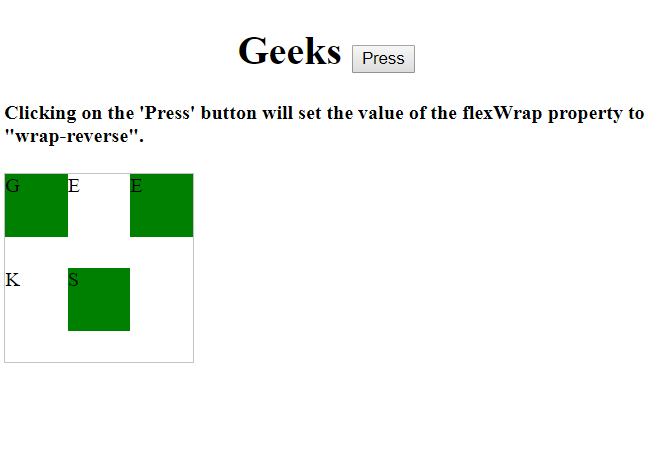
After clicking on the button:

Example-3: Showing initial property
<!DOCTYPE html>
<html>

<head>
    <title>
        HTML | DOM Style flexWrap Property
    </title>
</head>

<body>

    <center>
        <h1>Geeks <button onclick="wrap()">Press
        </button></h1>
    </center>

    <h4>Clicking on the 'Press' button will set the
    value of the flexWrap property to "initial".</h4>

    <style>
        #main {
            width: 150px;
            height: 150px;
            border: 1px solid #c3c3c3;
            display: -webkit-flex;
            -webkit-flex-wrap: wrap;
            display: flex;
            flex-wrap: wrap;
        }

        #main div {
            width: 50px;
            height: 50px;
        }
    </style>

    <div id="main">
        <div style="background-color:green;">G</div>
        <div style="background-color:white;">E</div>
        <div style="background-color:green;">E</div>
        <div style="background-color:white;">K</div>
        <div style="background-color:green;">S</div>

    </div>

    <script>
        function wrap() {

            // SAFARI
            document.getElementById(
                    "main").style.WebkitFlexWrap =
                "nowrap";

            // Other Standard Browsers
            document.getElementById(
                    "main").style.flexWrap =
                "initial";
        }
    </script>

</body>

</html>
Output:
Before clicking on the button:

After clicking on the button:

Example-4: Showing inherit property
<!DOCTYPE html>
<html>

<body>
    <h1>
      <center>
        Geeks <button onclick="wrap()">Press
        </button>
      </center>
      </h1>

       <h4>Clicking on the 'Press' button will set
     the value of the flexWrap property to "inherit".</h4>

    <style>
        #main {
            width: 150px;
            height: 150px;
            border: 1px solid #c3c3c3;
            display: -webkit-flex;
            -webkit-flex-wrap: wrap;
            display: flex;
            flex-wrap: wrap;
        }

        #main div {
            width: 50px;
            height: 50px;
        }
    </style>

    <div id="main">
        <div style="background-color:green;">G</div>
        <div style="background-color:white;">E</div>
        <div style="background-color:green;">E</div>
        <div style="background-color:white;">K</div>
        <div style="background-color:green;">S</div>

    </div>

    <script>
        function wrap() {

            // SAFARI
            document.getElementById(
              "main").style.WebkitFlexWrap =
              "nowrap";

            // Other Standard Browsers
            document.getElementById(
              "main").style.flexWrap =
              "inherit";
        }
    </script>

</body>

</html>
Output:
Before clicking on the button:

After clicking on the button:

Browser Support: The listed browsers support DOM flexWrap property:
- Google Chrome 29 and above
- Edge 12 and above
- Firefox 28 and above
- Internet Explorer 11.0 and above
- Opera 17 and above
- Safari 9 and above
