
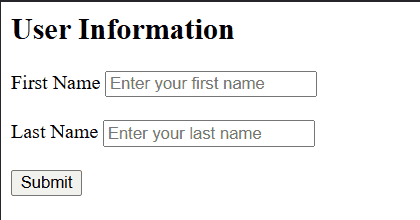
The <form> tag defines an HTML form used to collect user input and send it to a server or process it on the client side.
- Acts as a container for input elements like text fields, checkboxes, and buttons.
- Enables data submission using GET/POST and supports attributes like action, method, and enctype.
- Allows integration with client-side scripts for validation and processing.
<html>
    <body>
        <form action="/submit" method="POST">
            <h2>User Information</h2>
            <label for="fname">
                First Name
                        </label>
            <input id="fname" name="fname" placeholder="Enter your first name" required="" type="text"/>
            <br/>
            <br/>
            <label for="lname">
                Last Name
            </label>
            <input id="lname" name="lname" placeholder="Enter your last name" required="" type="text"/>
            <br/>
            <br/>
            <input type="submit" value="Submit"/>
        </form>
    </body>
</html>
Note: The
<form>tag supports the Global Attributes and Event Attributes in HTML.
Common Form Elements
Form elements provide the building blocks for collecting and managing user input in web forms, enabling structured and interactive data entry.
Attributes
Defines various properties that control form behavior, submission, and data handling.
- name : name provides a name for the form.
- target : target specifies where to display the response after form submission (like a new window or the current window).
- Action Attribute : Action Attribute sends form data to the server upon submission.
- accept-charset : accept-charset specifies the character encodings that is to be used for the form submission
- autocomplete : autocomplete specifies whether a form should have autocomplete on or off
- novalidate : novalidate specifies that the form should not be validated before submitting
- rel : rel specifies the relationship between a linked resource and the current document.
- Enctype Attribute : Enctype Attribute defines form data encoding, application/x-www-form-urlencoded for simple data and multipart/form-data for file uploads.
- Methods : Methods defines data transfer GET retrieves with URL limits, POST sends without size limits and isn’t bookmarkable.
Form with Radio button
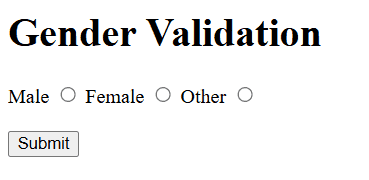
Creates a form with radio buttons for gender selection. It's properly structured with opening and closing <form> tags, labels, and radio input elements within a centered layout.
<html>
    <body>
        <h1>Gender Validation</h1>
        <form action="#" method="post">
            <label for="male">
                Male
            </label>
            <input id="male" name="gender" type="radio" value="male"/>
            <label for="female">
                Female
            </label>
            <input id="female" name="gender" type="radio" value="female"/>
            <label for="other">
                Other
            </label>
            <input id="other" name="gender" type="radio" value="other"/>
            <br/>
            <br/>
            <input type="submit" value="Submit"/>
        </form>
    </body>
</html>
Form with Checkbox
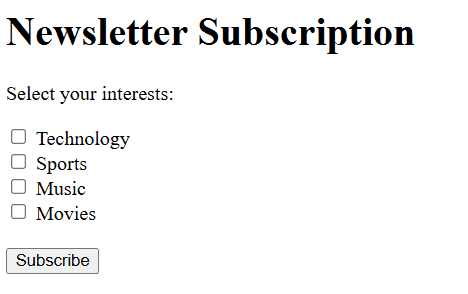
The form will display a list of checkboxes with labels. Users can select one or more options and click the Subscribe button to submit their choices.
<html>
    <body>
        <h1>Newsletter Subscription</h1>
        <form action="/submit" method="POST">
            <p>Select your interests:</p>
            <input id="tech" name="interests" type="checkbox" value="Technology"/>
            <label for="tech">
                Technology
            </label>
            <br/>
            <input id="sports" name="interests" type="checkbox" value="Sports"/>
            <label for="sports">
                Sports
            </label>
            <br/>
            <input id="music" name="interests" type="checkbox" value="Music"/>
            <label for="music">
                Music
            </label>
            <br/>
            <input id="movies" name="interests" type="checkbox" value="Movies"/>
            <label for="movies">
                Movies
            </label>
            <br/>
            <br/>
            <input type="submit" value="Subscribe"/>
        </form>
    </body>
</html>
Using CSS
CSS allows developers to style form elements with modern designs, creating visually appealing and responsive layouts that improve user interaction and overall experience.
- Build a stylish Survey Form using CSS
- Create a Fully Responsive Checkout Form with Modern CSS Design
- Design a Clean and Simple Stacked Form Layout Using CSS
- Design a Feedback Form using CSS
- Create a Multi-Column Form Layout Using Pure CSS Grid Techniques
Using JavaScript
With JavaScript, developers can add dynamic behavior to forms, validate input, create multi-step workflows, and enhance user engagement through interactive and intelligent features.
