
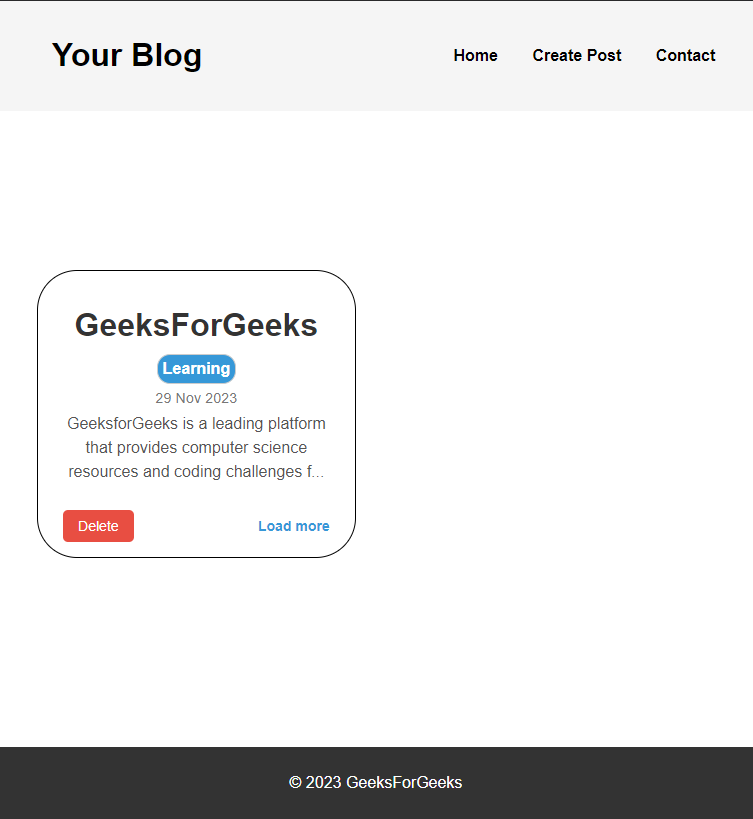
In this article, we will be creating a Blog website using JavaScript. The user can Create and Delete a post which will be displayed on the home page. The create Post modal has 3 input fields that are "Title", "Category" and "Description" of the Blog post with a Responsive Design. We will be using HTML to structure our project, CSS for designing purposes and JavaScript will be used to provide the required functionality.
Preview Image:
Prerequisites:
Approach:
- Start by creating the HTML structure for your blog website. Use semantic tags like
<header>,<main>,<section>, and<footer>for organizational clarity. Include elements such as<h1>for the blog title, navigation links, and a container (<div>) for displaying blog posts. - Style your website using CSS to enhance its visual appeal and responsiveness.
- In JavaScript, use
document.getElementByIdordocument.querySelectorto select HTML elements like buttons, forms, and modals. - Implement event listeners for interactive elements such as buttons to open and close modals.
- Handle the submission of the create post form, extracting input values, and dynamically generating new post elements.
- Add proper validations.
- Implement event listeners for post titles, allowing users to view detailed post information in a modal.
- Add a delete button functionality to remove specific posts, ensuring a smooth transition and adjustment of other posts.
Example: In this example, we have created blog website using above explained approach.
<!DOCTYPE html>
<html lang="en">
<head>
<meta name="viewport"
content="user-scalable=no, initial-scale=1,
maximum-scale=1, minimum-scale=1,
width=device-width">
<!-- CSS file linked -->
<link rel="stylesheet" href="styles.css">
<title>Blog Website</title>
</head>
<body>
<header>
<h1 class="logo"><a href="#">Your Blog</a></h1>
<nav>
<ul>
<li class="nav1"><a href="/">Home</a></li>
<li class="nav1">
<a href="#" id="createPostBtn">
Create Post
</a>
</li>
<li class="nav1"><a href="#">Contact</a></li>
</ul>
</nav>
</header>
<main class="post-container">
<div id="createPostModal" class="modal">
<div class="modal-content">
<span class="close" id="closeModal">×</span>
<h2>Create a New Post</h2>
<form id="postForm">
<div class="upper">
<div class="title">
<label class="postheading" for="postTitle">
Title
</label>
<input type="text" class="postTitle"
id="postTitle" name="postTitle"
autocomplete="off" required>
</div>
<div class="category1">
<label class="postheading" for="postCategory">
Category
</label>
<input type="text" class="postCategory"
id="postCategory" name="postCategory"
autocomplete="off" required>
</div>
</div>
<label class="postheading" for="postDescription">
Description
</label>
<textarea class="postDescription" id="postDescription"
name="postDescription" autocomplete="off"
required>
</textarea>
<button type="submit" id="postSubmitBtn"
class="postSubmitBtn">Post</button>
</form>
</div>
</div>
<!-- Detail Modal -->
<div id="postDetailModal" class="modal">
<div class="modal-content">
<span class="close" id="closeDetailModal">
×
</span>
<h1 id="detailTitle"></h1>
<span id="detailDate"></span>
<p id="detailDescription"></p>
</div>
</div>
<div id="postCreatedMessage" class="post-message">
Post created successfully!
</div>
</main>
<footer>
<p>© 2023 GeeksForGeeks</p>
</footer>
<!-- JavaScript file linked -->
<script src="script.js"></script>
</body>
</html>
body {
    font-family: 'Arial', sans-serif;
    margin: 0;
    padding: 0;
    min-height: 100vh;
    display: flex;
    flex-direction: column;
}

.logo {
    margin-left: 5%;
}

a {
    text-decoration: none;
    color: black;
    transition: transform .3s;
    display: inline-block;
    font-weight: 700;
}

a:hover {
    -ms-transform: scale(1.2, 1.2);
    -webkit-transform: scale(1.2, 1.2);
    transform: scale(1.2, 1.2);
}

nav {
    margin-right: 5%;
}

li {
    list-style: none;
    display: inline;
    padding: 15px;
}

main {
    flex-grow: 1;
    display: flex;
    justify-content: center;
    align-items: center;
    padding-top: 80px;
    padding-bottom: 50px;
    margin-top: 50px;
}

header {
    display: flex;
    justify-content: space-between;
    align-items: center;
    background-color: #f5f5f5;
    color: white;
    padding: 15px;
    position: fixed;
    width: 100%;
    z-index: 1000;
}

footer {
    background-color: #333;
    color: white;
    text-align: center;
    padding: 0.7rem;
}

.post-container {
    margin-left: 5%;
    margin-right: 5%;
    display: grid;
    grid-template-columns: repeat(auto-fill, minmax(280px, 1fr));
    justify-content: center;
    gap: 2.5rem;
}

.post-box {
    border: 1px solid black;
    border-radius: 40px;
    text-align: center;
    padding: 15px;
}

.category {
    background-color: #3498db;
    border: 1px solid #ccc;
    border-radius: 13px;
    font-size: 16px;
    color: white;
    padding: 5px;
    margin-top: 0px;
    margin-bottom: 5px;
    display: inline-block;
}

.post-title {
    color: #333;
    text-decoration: none;
    font-size: 2rem;
    font-weight: bold;
    display: inline-block;
    margin-bottom: 10px;
    cursor: pointer;
    transition: transform 0.3s;
}

.post-title:hover {
    -ms-transform: scale(1.1, 1.1);
    -webkit-transform: scale(1.1, 1.1);
    transform: scale(1.1, 1.1);
}

.post-date {
    color: #777;
    font-size: 0.9rem;
    margin-bottom: 10px;
}

.post-description {
    margin-top: 5px;
    color: #555;
    line-height: 1.5;
}

/* Styles for the modal */
.modal {
    z-index: 1000;
    display: none;
    position: fixed;
    top: 0;
    left: 0;
    width: 100%;
    height: 100%;
    background-color: rgba(0, 0, 0, 0.5);
    justify-content: center;
    align-items: center;
    animation: fadeIn 0.5s ease-in-out;
}

.modal-content {
    max-width: 50%;
    width: 100%;
    height: 75%;
    margin: auto;
    background: rgba(255, 255, 255, 0.67);
    border-radius: 16px;
    box-shadow: 0 4px 30px rgba(0, 0, 0, 0.1);
    backdrop-filter: blur(9.5px);
    -webkit-backdrop-filter: blur(9.5px);
    padding: 20px;
    padding-top: 5px;
    border-radius: 10px;
    overflow-y: auto;
    max-height: 80vh;
    text-align: center;
    animation: fadeIn 0.5s ease-in-out;
}

.modal.fadeOut {
    animation: fadeOut 0.5s ease-in-out;
    /* Apply fadeOut animation */
}

@keyframes fadeIn {
    from {
        opacity: 0;
    }

    to {
        opacity: 1;
    }
}

@keyframes fadeOut {
    from {
        opacity: 1;
    }

    to {
        opacity: 0;
    }
}


.close {
    cursor: pointer;
    font-size: 25px;
    color: #555;
    transition: transform .2s;
    display: inline-block;
}

.close:hover {
    -ms-transform: scale(1.7, 1.7);
    -webkit-transform: scale(1.7, 1.7);
    transform: scale(1.7, 1.7);
}


.title,
.category1 {
    font-weight: bold;
    margin-bottom: 8px;
}

.title input,
.category1 input,
.postDescription {
    width: 100%;
    max-width: 100%;
    padding: 12px;
    margin-bottom: 16px;
    border: 1px solid #ccc;
    border-radius: 8px;
    box-sizing: border-box;
    transition: border-color 0.3s, box-shadow 0.3s;
}

.postDescription {
    height: 200px;
}

.postheading {
    color: #333;
    font-weight: bold;
}

.postTitle:focus,
.postCategory:focus,
.postDescription:focus {
    outline: none;
    border-color: #3498db;
    box-shadow: 0 0 8px rgba(52, 152, 219, 0.6);
}

.postSubmitBtn {
    background-color: #3498db;
    color: white;
    padding: 10px 20px;
    border: none;
    border-radius: 5px;
    cursor: pointer;
    font-size: 16px;
    transition: background-color 0.3s;
}

.postSubmitBtn:hover {
    background-color: #2980b9;
}

.post-message {
    display: none;
    position: fixed;
    top: 0;
    left: 50%;
    transform: translateX(-50%);
    background-color: #4CAF50;
    color: white;
    text-align: center;
    padding: 10px;
    z-index: 1000;
}


.load-more {
    display: inline-block;
    color: #3498db;
    cursor: pointer;
    font-size: 14px;
    font-weight: bold;
    transition: transform 0.3s;
}

.load-more:hover {
    color: #2980b9;
    -ms-transform: scale(1.1, 1.1);
    -webkit-transform: scale(1.1, 1.1);
    transform: scale(1.1, 1.1);
}

#detailTitle {
    font-size: 50px;
    margin-bottom: 20px;
    margin-top: 10px;
}

.delete-post {
    background-color: #e74c3c;
    color: white;
    padding: 8px 15px;
    border: none;
    border-radius: 5px;
    cursor: pointer;
    font-size: 14px;
    margin-top: 10px;
    margin-right: 120px;
    transition: background-color 0.3s;
}

.delete-post:hover {
    background-color: #c0392b;
}

@media only screen and (max-width: 550px) {

    li {
        display: inline;
        padding: 5px;
    }

    .post-container {
        grid-template-columns: 1fr;
    }

    .modal-content {
        max-width: 90%;
    }
}

@media screen and (max-width : 480px) {
    h1 {
        font-size: 30px;
    }

    li {
        display: block;
    }

    ul {
        padding-right: 5%;
    }

    header {
        padding: 0px;
        display: flex;
        text-align: center;
    }

    .post-container {
        margin-top: 80px;
    }

}

@media screen and (max-width : 380px) {

    header {
        padding: 0px;
        display: flex;
        text-align: center;
    }

    .logo {
        margin-left: 5%;
    }

}
document.addEventListener('DOMContentLoaded', function () {
    const createPostBtn =
        document.getElementById('createPostBtn');
    const createPostModal =
        document.getElementById('createPostModal');
    const closeModal =
        document.getElementById('closeModal');
    const postForm =
        document.getElementById('postForm');
    const postSubmitBtn =
        document.getElementById('postSubmitBtn');
    const postContainer =
        document.querySelector('.post-container');
    const postDetailModal =
        document.getElementById('postDetailModal');
    const closeDetailModal =
        document.getElementById('closeDetailModal');
    const detailTitle =
        document.getElementById('detailTitle');
    const detailDate =
        document.getElementById('detailDate');
    const detailDescription =
        document.getElementById('detailDescription');

    createPostBtn.addEventListener('click', function () {
        createPostModal.style.display = 'flex';
    });

    closeModal.addEventListener('click', function () {
        // Add fadeOut class
        createPostModal.classList.add('fadeOut');
        setTimeout(() => {
            createPostModal.style.display = 'none';
            // Remove fadeOut class
            createPostModal.classList.remove('fadeOut');
        }, 500);
    });

    postForm.addEventListener('submit', function (event) {
        event.preventDefault();

        // Validation
        const postCategory =
            document.getElementById('postCategory').value;
        const postTitle =
            document.getElementById('postTitle').value;
        const postDescription =
            document.getElementById('postDescription').value;

        if (postCategory.trim() === '' ||
         postTitle.trim() === '' ||
         postDescription.trim() === '') {
            alert('Please fill out all fields.');
            return;
        }

        // Get the current date
        const currentDate = new Date();
        const day = currentDate.getDate();
        const month = currentDate.toLocaleString('default',
         { month: 'short' });
        const year = currentDate.getFullYear();
        const formattedDate = day + ' ' + month + ' ' + year;

        // Create a new post element
        const newPost = document.createElement('div');
        newPost.className = 'post-box';
        newPost.innerHTML = `
            <h1 class="post-title" data-title="${postTitle}"
         data-date="${formattedDate}"
          data-description="${postDescription}">
            ${postTitle}</h1><br>

        <h2 class="category">${postCategory}</h2><br>
        <span class="post-date">${formattedDate}</span>
        <p class="post-description">
        ${postDescription.substring(0, 100)}...</p>
        <button class="delete-post" data-title="${postTitle}">
        Delete</button>
        <span class="load-more" data-title="${postTitle}"
        data-date="${formattedDate}"
        data-description="${postDescription}">
        Load more</span>
        `;

        // Append the new post to the post container
        postContainer.insertBefore(newPost,
            postContainer.firstChild);

        const postCreatedMessage = document
        .getElementById('postCreatedMessage');
        postCreatedMessage.style.display = 'block';


        // Close the modal
        createPostModal.style.display = 'none';

        // Reset the form
        postForm.reset();

        setTimeout(() => {
            postCreatedMessage.style.display = 'none';
        }, 3000);
    });

    postContainer.addEventListener('click', function (event) {
        if (event.target.classList.contains('load-more') ||
         event.target.classList.contains('post-title')) {
            const title = event.target.getAttribute('data-title');
            const date = event.target.getAttribute('data-date');
            const description =
                event.target.getAttribute('data-description');

            // Set content in detail modal
            detailTitle.textContent = title;
            detailDate.textContent = date;
            detailDescription.textContent = description;

            // Display the detail modal
            postDetailModal.style.display = 'flex';
        }

        if (event.target.classList.contains('delete-post')) {
            const titleToDelete =
                event.target.getAttribute('data-title');
            const postToDelete =
                document.querySelector(`
            .post-title[data-title=
                "${titleToDelete}"]`).closest('.post-box');

            // Add fadeOut class to initiate the animation
            postToDelete.classList.add('fadeOut');

            // Remove the post after the animation completes
            setTimeout(() => {
                postContainer.removeChild(postToDelete);
            }, 500);

        }
    });

    closeDetailModal.addEventListener('click', function () {

        // Add fadeOut class
        postDetailModal.classList.add('fadeOut');
        setTimeout(() => {
           postDetailModal.style.display = 'none';

           // Remove fadeOut class
          postDetailModal.classList.remove('fadeOut');
        }, 500);
    });
});
Output:
