
Event Delegation is a pattern used to handle events efficiently by attaching a single event listener to a parent element instead of adding listeners to multiple similar child elements, and then identifying the actual source of the event using the event.target property.
- Reduces the number of event listeners.
- Improves performance and memory usage.
- Uses event bubbling to capture events.
- Ideal for dynamically added elements.
Examples:
const customUI = document.createElement('ul');

for (var i = 1; i <= 10; i++) {
    const newElement = document.createElement('li');
    newElement.textContent = "This is line " + i;
    newElement.addEventListener('click', () => {
        console.log('Responding')
    })
    customUI.appendChild(newElement);
}
The above code attaches the same responding function to every <li> element. Here, a <ul> element is created, multiple <li> elements are added, and an event listener is attached to each item individually as it is created.
- Each <li> has its own event listener.
- Creates many identical responding functions.
- Increases memory usage.
- Less efficient compared to event delegation.
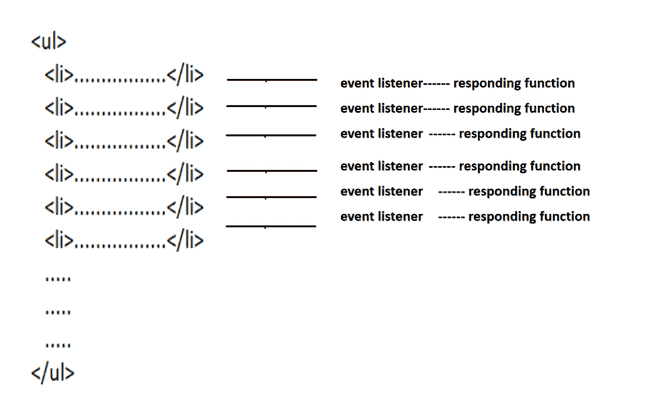
An Improved Approach Before Event Delegation
Instead of creating a separate callback functions for each element, we can define a single reusable function and attach it to multiple event listeners. This reduces redundant function creation and improves code readability.
- Uses one shared handler function for multiple elements.
- Reduces duplicate function creation.
- Improves code readability and maintainability.
const customUI = document.createElement('ul');

function responding() {
    console.log('Responding');
}

for (var i = 1; i <= 10; i++) {
    const newElement = document.createElement('li');
    newElement.textContent = "This is line " + i;
    newElement.addEventListener('click', responding);
    customUI.appendChild(newElement);
}
However, each <li> still has its own event listener, which can become inefficient when dealing with a large number of elements. Event Delegation improves this by attaching a single event listener to the parent element and handling child events using event.target.
The functionality of the above code is shown below -

Steps of Event Delegation
Event Delegation uses a single event listener on a parent element. When a child element is clicked, the event bubbles up to the parent, and event.target identifies the clicked element.
- User clicks a child element (<li>).
- The event reaches the target element.
- The event bubbles up to the parent (<ul>).
- The parent's event listener is triggered.
- event.target identifies the clicked child element.
The .nodeName property of event.target can be used to check the type of the clicked element, such as <li>.
const customUI = document.createElement('ul');

function responding(evt) {
    if (evt.target.nodeName === 'li')
        console.log('Responding')
}

for (var i = 1; i <= 10; i++) {
    const newElement = document.createElement('li');
    newElement.textContent = "This is line " + i;
    customUI.appendChild(newElement);
}

customUI.addEventListener('click', responding);
