
In this article, we are learning about how can we send data to a node server using Ajax without reloading the page from the client-side.
Approach: We are creating a button in HTML document on the client-side when the button is pressed a request is made on our node server and the object is received at our server without reloading the page. This can be done by Ajax request, we are sending data to our node server, and it also gives back data in response to our Ajax request.
Step 1: Initialize the node modules and create the package.json file using the following command.
npm initStep 2: Install express module locally into your system by using the following command.
npm i express Step 3: Create script.js, index.html file in js folder as shown below.
Project structure: It will look like the following.
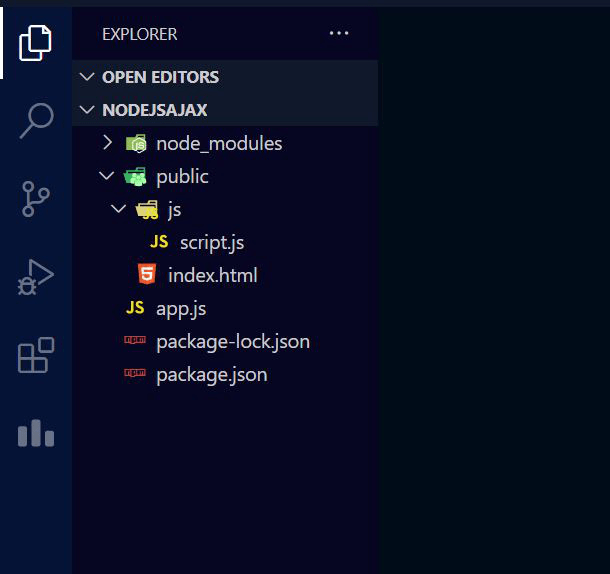
Step 4: Write down the following code in the given files.
<!DOCTYPE html>
<html lang="en">

<head>
    <meta charset="UTF-8">
    <meta http-equiv="X-UA-Compatible" content="IE=edge">
    <meta name="viewport" content=
        "width=device-width, initial-scale=1.0">
    <style>
        .container {
            width: 500px;
            margin: auto;
            text-align: center;
        }
    </style>
</head>

<body>
    <div class="container">
        <h1>
            Sending data to a node server using
            Ajax Request without Reloading Page
        </h1>

        <button id="submit">submit</button>
    </div>

    <script src="https://code.jquery.com/jquery-3.6.0.min.js"
        integrity=
        "sha256-/xUj+3OJU5yExlq6GSYGSHk7tPXikynS7ogEvDej/m4="
        crossorigin="anonymous">
    </script>
    <script src="js/script.js"></script>
</body>

</html>
$(document).ready(function () {
   $("#submit").click(function () {
      $.post("/request",
         {
            name: "viSion",
            designation: "Professional gamer"
         },
         function (data, status) {
            console.log(data);
         });
   });
});
const express = require("express")
const path = require("path");

const app = express();
const port = process.env.PORT || 3000;

// Setting path for public directory
const static_path = path.join(__dirname, "public");
app.use(express.static(static_path));
app.use(express.urlencoded({ extended: true }));

// Handling request
app.post("/request", (req, res) => {
   res.json([{
      name_recieved: req.body.name,
      designation_recieved: req.body.designation
   }])
})

// Server Setup
app.listen(port, () => {
   console.log(`server is running at ${port}`);
});
Step 5: Run the app.js file using the following command:
node app.js
Output:
