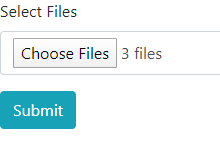
To transfer Files in jQuery using Ajax we follow the following steps and an example demonstrating the same:
- Using HTML5, we can upload files using a form. The content-type is specified as multipart/form-data.
- An input field is created for files to be uploaded with input type as file.
- We can use the multiple attribute to allow more than one file to be uploaded and can also filter out file types by using the accept attribute.
- On upload a listener appends the uploaded files to a file list iteratively.
- With the submit button an ajax request is created and the form data is sent across to the specified url.
- We have created an HTML5 form as below:
html <div> <form method="POST" enctype="multipart/form-data" action="" id="capt"> <div class="form-group"> <label>Select Files</label> <input type="file" id="file" name="file[]" accept="video/*" class="form-control" multiple="multiple" required> </div> <input type="submit" class="btn btn-info" value="Submit"> </form> </div>
- Using jQuery, we create appropriate methods for uploading and sending file asynchronously.
javascript var fileList = []; $('#file').on('change', function (event) { fileList = []; // Append files to fileList for (var i = 0; i < this.files.length; i++) { fileList.push(this.files[i]); } }); sendFile = function (file) { // Create Ajax Request $.ajax({ url: 'notify.php', type: 'POST', data: new FormData($('form')[0]), cache: false, contentType: false, processData: false }); } $('#capt').on('submit', function (event) { event.preventDefault(); //Asynchronous Transfer sendFile(file); });
- For the sake of demonstrating the output, we create a minimal PHP file as below:
php <?php $video = $_FILES['file']['name']; foreach($video as $vd){ echo $vd."<br>"; } ?>
- Output(notify.php):