The scope of this keyword changes according to the scope of the object. The $(this) keyword will refer to the selected element to which the event is attached when used in an event. In this article, we will see the implementation of $(this) with an event in different conditions.
Syntax:
$('element_selector').on('event_name', callback_function{
    $(this) // refers to the selected DOM element
});
Example 1: In the below code example, we will see the basic implementation of the $(this) keyword in an event.
<!DOCTYPE html>
<html lang="en">

<head>
    <meta charset="UTF-8">
    <meta name="viewport"
          content="width=device-width,
                   initial-scale=1.0">
    <title>
      Using $(this) with an event
    </title>
</head>
<body>
    <center>
        <h2 class="headings">GeeksforGeeks</h2>
        <h3 class="heading">
            Click the below button to
            style the whole document
            using the $(this) inside event.
        </h3>
        <button id="myBtn">
            Click to Style Document
        </button>
    </center>

    <!-- jQuery CDN Link -->
    <script src=
"https://cdnjs.cloudflare.com/ajax/libs/jquery/3.7.1/jquery.min.js"
            integrity=
"sha512-v2CJ7UaYy4JwqLDIrZUI/4hqeoQieOmAZNXBeQyjo21dadnwR+8ZaIJVT8EE2iyI61OV8e6M8PP2/4hpQINQ/g=="
            crossorigin="anonymous"
            referrerpolicy="no-referrer">
    </script>

    <!-- jQuery script -->
    <script>
        $(document).ready(()=>{
            $('#myBtn').on('click', function(){
                $(this).
                text('Document styled and text changed using $(this)')
                $(this).prevAll().css('color', 'green');
                $(this).css({
                    'background': 'green',
                    'color': '#fff',
                    'border': 'none',
                    'padding': '10px',
                    'border-radius': '8px'
                });
            });
        });
    </script>

</body>

</html>
Output:

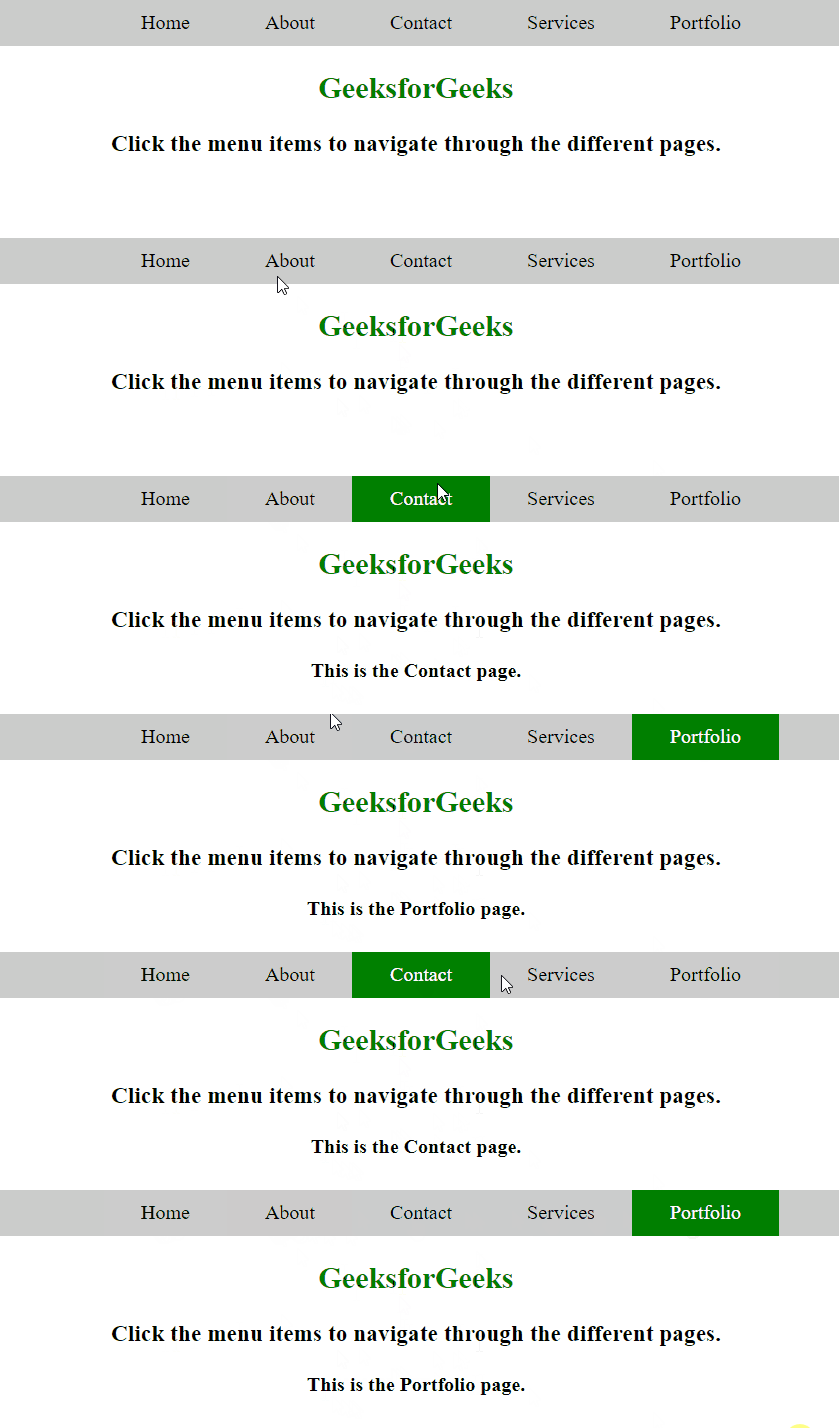
Example 2: The below example implements the $(this) inside a navbar to represent the active link on click to it and change text according to the current page using.
<!DOCTYPE html>
<html lang="en">
<head>
    <meta charset="UTF-8">
    <meta name="viewport"
          content="width=device-width,
                   initial-scale=1.0">
    <title>
      Using $(this) with an event
    </title>
    <style>
        .unorderedList{
            display: flex;
            align-items: center;
            justify-content: center;
            list-style: none;
            background-color: #ccc;
        }
        .listItem{
            padding: 10px 30px;
        }
        .heading{
            color: green;
        }
        .link{
            color: #000;
            text-decoration: none;
        }
        .activeLink{
            background-color: green;
            color: #fff;
        }
        .activeLink > a.link{
            color: #fff;
        }
    </style>
</head>
<body>
    <center>
        <ul class="unorderedList">
            <li class="listItem">
              <a class="link" href="#">
                Home
              </a>
            </li>
            <li class="listItem">
              <a class="link" href="#">
                About
              </a>
            </li>
            <li class="listItem">
              <a class="link" href="#">
                Contact
              </a>
            </li>
            <li class="listItem">
              <a class="link" href="#">
                Services
              </a>
            </li>
            <li class="listItem">
              <a class="link" href="#">
                Portfolio
              </a>
            </li>
        </ul>
        <h2 class="heading">
          GeeksforGeeks
        </h2>
        <h3>
            Click the menu items to navigate
            through the different pages.
        </h3>
        <h4 id="result"></h4>
    </center>

    <!-- jQuery CDN Link -->
    <script src=
"https://cdnjs.cloudflare.com/ajax/libs/jquery/3.7.1/jquery.min.js"
            integrity=
"sha512-v2CJ7UaYy4JwqLDIrZUI/4hqeoQieOmAZNXBeQyjo21dadnwR+8ZaIJVT8EE2iyI61OV8e6M8PP2/4hpQINQ/g=="
            crossorigin="anonymous"
            referrerpolicy="no-referrer">
    </script>

    <!-- jQuery script -->
    <script>
        $(document).ready(()=>{
            $('.listItem').on('click', function(){
                $('#result').
                text(`This is the ${$(this).text()} page.`);
                $('.listItem').removeClass('activeLink');
                $(this).addClass('activeLink');
            });
        });
    </script>

</body>
</html>
Output: