
The jQuery event.target is an inbuilt property that, is used to find which DOM element will start the event.
Syntax:
event.targetParameter: It does not accept any parameter because it is a property, not a function.
Example 1: This example shows the working of event.target Property.
<!DOCTYPE html>
<html>

<head>
    <style>
        span,
        strong,
        p {
            padding: 8px;
            display: block;
            border: 2px solid green;
            width: 50%;
            margin: 10px;
        }

        #output {
            margin: 10px;
            padding: 10px;
            width: 100px;
            border: 2px solid green;
            display: block;
        }
    </style>
    <script src=
"https://code.jquery.com/jquery-1.10.2.js">
    </script>
</head>

<body>
    <div>
        <p>
            <strong><span>click Here !</span></strong>
        </p>
    </div>
    <!-- output will show inside this block -->
    <div id="output"></div>
    <!-- jQuery code to show working of this property -->
    <script>
        $("body").click(function (event) {
            $("#output").html("clicked: "
                + event.target.nodeName);
        });
    </script>
</body>

</html>
Output:
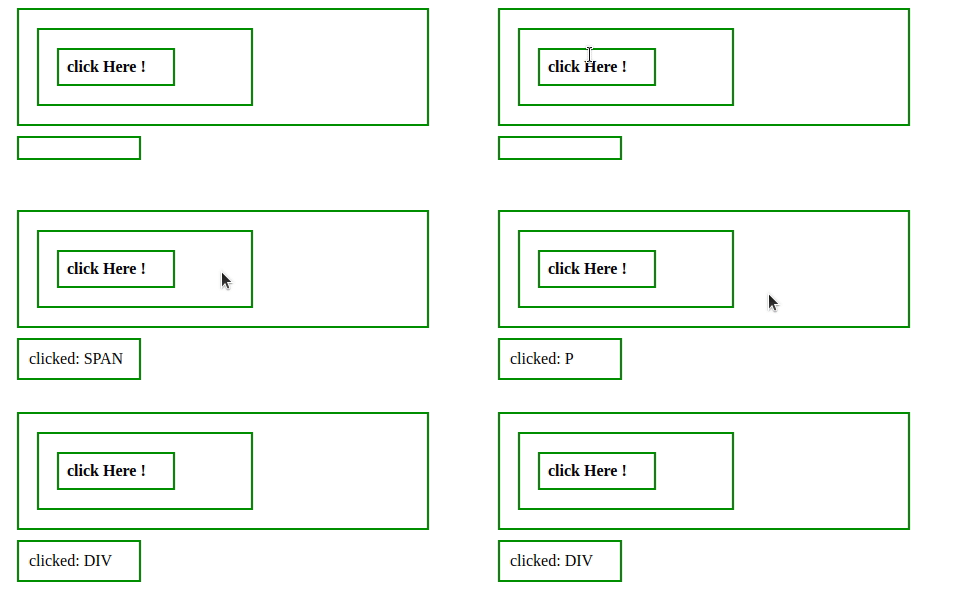
Example 2: In this example, a pop-up will come when any DOM element is clicked.
<!DOCTYPE html>
<html>

<head>
    <style>
        span,
        strong,
        p {
            padding: 8px;
            display: block;
            border: 2px solid green;
            width: 50%;
            margin: 10px;
        }
    </style>
    <script src=
"https://code.jquery.com/jquery-1.10.2.js">
    </script>
</head>

<body>
    <center>
        <div>
            <p>
                <strong><span>click Here !</span></strong>
            </p>
        </div>
        <!-- jQuery code to show working of this property -->
        <script>
            $("body").click(function (event) {
                $("").html("clicked: " + event.target.nodeName);
                alert(event.target.nodeName + " is clicked");

            });
        </script>
    </center>
</body>

</html>
Output:

