
The jQuery focus() method is used to set the focus on a specified element, such as an input field or textarea. It triggers the browser's focus event, enabling user interaction with the element, like typing or clicking.
Syntax:
$(selector).focus(function)Here selector is the selected element.
Parameter: It accepts an optional parameter in the form of a callback function which will be called once the focus event occurs.
Example 1: In this example we use jQuery's focus() method to display a hidden <span> element when an <input> field is focused, changing the <span>'s display style to inline.
<!DOCTYPE html>
<html>

<head>
    <title>
        jQuery focus() Method
    </title>
    <style>
        span {
            display: none;
        }

        body {
            width: 35%;
            height: 50px;
            border: 2px solid green;
            padding: 35px;
            margin: 10px;
        }
    </style>
    <script src="https://code.jquery.com/jquery-1.10.2.js">
    </script>
</head>

<body>
    <!-- this paragraph element get focused -->
    <p>
        <input type="text"> <span>focused</span>
    </p>

    <!-- jQuery code to show working of this method -->
    <script>
        $("input").focus(function () {
            $(this).next("span").css(
                "display", "inline");
        });
    </script>
</body>

</html>
Output:
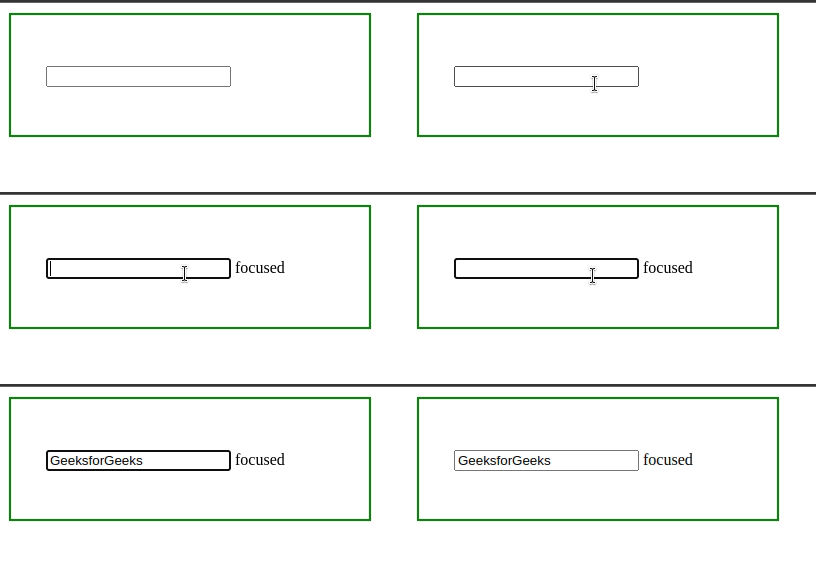
Example 2: In the below example, the focus() method is invoked without any parameters.
<!DOCTYPE html>
<html>

<head>
    <title>
        jQuery focus() Method
    </title>
    <style>
        span {
            display: none;
        }

        body {
            width: 30%;
            height: 50px;
            border: 2px solid green;
            padding: 35px;
            margin: 10px;
        }
    </style>
    <script src="https://code.jquery.com/jquery-1.10.2.js">
    </script>
</head>

<body>
    <!-- this paragraph element get focused -->
    <p>
        <input type="text"> <span>focused</span>
    </p>

    <!-- jQuery code to show working of this method -->
    <script>
        $("input").focus();
    </script>
</body>

</html>
Output:

