
A ListView is used to display items in a vertically scrollable format in Android applications. In Jetpack Compose, LazyColumn is used instead of the traditional XML-based ListView to efficiently render only visible items and improve performance.
- Displays data in a vertically scrollable list.
- LazyColumn is the modern alternative to ListView in Jetpack Compose.
- Improves performance by loading only visible items on the screen.
Note: We will be implementing LazyColumn which is alternative for traditional ListView in XML based layout. It functions similarly to RecyclerView, efficiently rendering only the visible items to optimize performance.
Important Attributes of LazyColumn
Attributes | Description |
|---|---|
| verticalArrangement | This attribute is used to specify vertical Arrangement |
| horizontalArrangement | This attribute is used to specify horizontal arrangement. |
| modifier | The modifier is used to add custom styling such as background color, padding, and border to our list view. |
| items | It is used to specify the UI for the individual item of the listview which we have to display |
Step by Step Implementation
Step 1 : Create a New Project
To create a new project in the Android Studio, please refer to How to Create a new Project in Android Studio with Jetpack Compose.
Note: Select Kotlin as the programming language.
Step 2 : Adding ListView in MainActivity.kt file
Navigate to the app > java > {package-name} > MainActivity.kt. Inside that file add the below code to it.
Note: DemoTheme is the custom theme automatically generated by the Jetpack Compose project template. The theme name may vary depending on your project name. If you do not have DemoTheme, you can replace it with MaterialTheme.
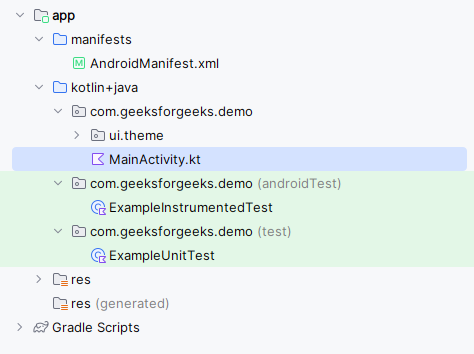
MainActivity.kt:
import com.geeksforgeeks.demo.ui.theme.DemoTheme

import android.os.Bundle
import androidx.activity.*
import androidx.activity.compose.*
import androidx.compose.foundation.layout.*
import androidx.compose.foundation.lazy.LazyColumn
import androidx.compose.foundation.lazy.items
import androidx.compose.material3.*
import androidx.compose.runtime.*
import androidx.compose.ui.*
import androidx.compose.ui.graphics.*
import androidx.compose.ui.text.TextStyle
import androidx.compose.ui.text.font.FontWeight
import androidx.compose.ui.unit.*
import com.geeksforgeeks.demo.ui.theme.DemoTheme

class MainActivity : ComponentActivity() {
    override fun onCreate(savedInstanceState: Bundle?) {
        super.onCreate(savedInstanceState)
        setContent {
            DemoTheme(dynamicColor = false, darkTheme = false) {
                Surface(color = Color.White) {
                    DisplayList()
                }
            }
        }
    }
}

@Composable
fun DisplayList() {

    val list = listOf(
        "C++", "C", "C#", "Java", "Kotlin", "Dart", "Python", "Javascript", "SpringBoot",
        "XML", "Dart", "Node JS", "Typescript", "Dot Net", "GoLang", "MongoDb",
    )
    Column(
        modifier = Modifier.fillMaxSize(),
        horizontalAlignment = Alignment.CenterHorizontally
    ) {
        Text(
            text = "LazyColumn",
            modifier = Modifier.padding(32.dp),
            style = TextStyle(
                color = Color.Black,
                fontSize = TextUnit(value = 24f, type = TextUnitType.Sp)
            ),
            fontWeight = FontWeight.ExtraBold
        )

        // lazy column for displaying listview.
        LazyColumn {
            // populating items for listview.
            items(list) { language ->
                Text(language, modifier = Modifier.padding(15.dp))
                HorizontalDivider()
            }
        }
    }
}
