
Jetpack Compose is a modern toolkit for building native Android UI. Jetpack Compose simplifies and accelerates UI development on Android with less code, powerful tools, and intuitive Kotlin APIs. Compose is built to support material design principles. Many of its UI elements implement material design out of the box. In this article, we will explain how you can create Material design buttons using Jetpack Compose.
Below is the sample picture to show what we are going to build.
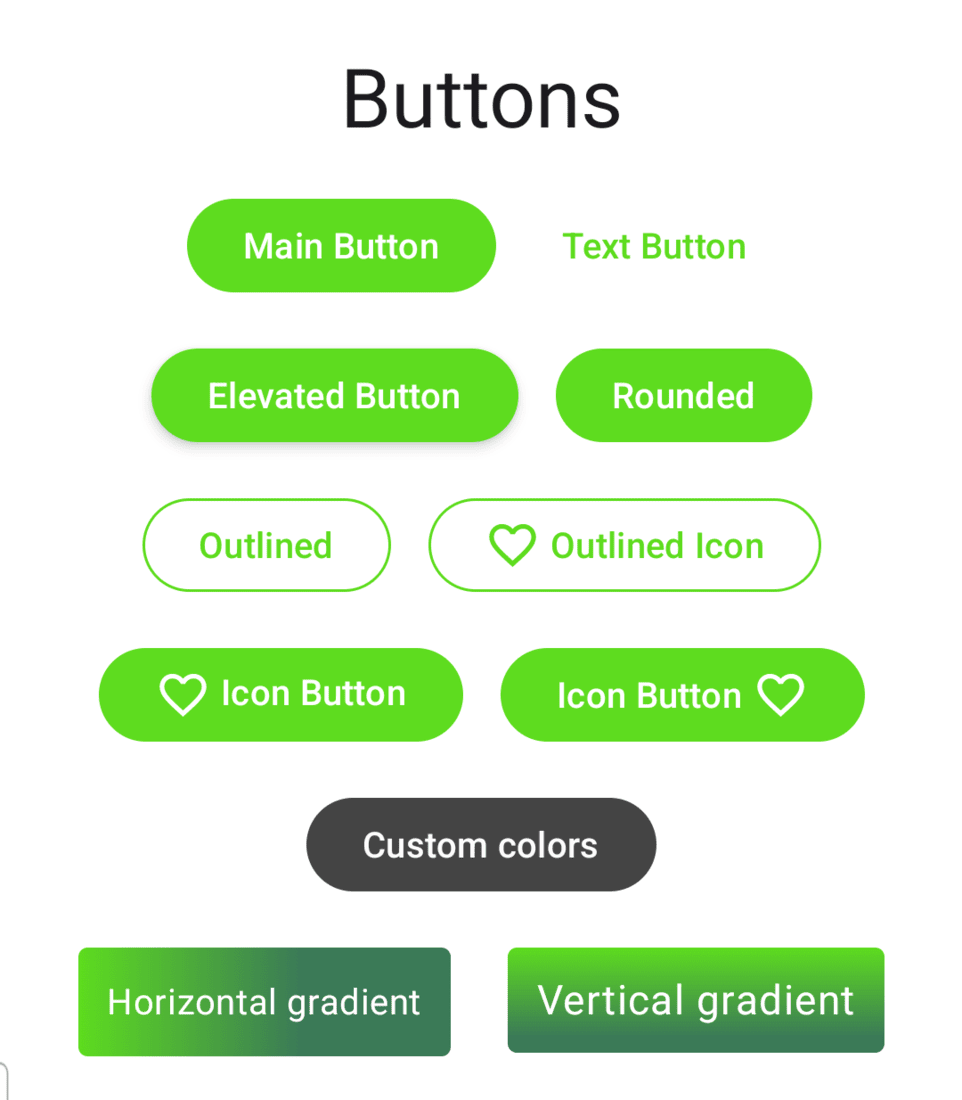
Step by Step Implementation
Step 1: Create a New Project
To create a new project in the Android Studio, please refer to How to Create a new Project in Android Studio with Jetpack Compose.
Step 2: Add custom colors in Colors.kt
Navigate to app > kotlin+java > {package-name} > ui.theme > Color.kt and add the following color codes at the end.
val Green40 = Color(0xFF5EDC1F)
val GreenGrey40 = Color(0xFF3B7A57)
val Olive40 = Color(0xFF708238)
Note :You may add your own colors. But you need to update that in the Themes.kt as well.
Step 3: Update Themes.kt
Navigate to app > kotlin+java > {package-name} > ui.theme > Theme.kt and add the following color code under lightColorScheme() and darkColorScheme().
private val DarkColorScheme = darkColorScheme(
    primary = Green40,
    secondary = GreenGrey40,
    tertiary = Olive40
)

private val LightColorScheme = lightColorScheme(
    primary = Green40,
    secondary = GreenGrey40,
    tertiary = Olive40
)
Step 3: Working with MainActivity.kt
Go to the MainActivity.kt file and refer to the following code. Below is the code for the MainActivity.kt file. Comments are added inside the code to understand the code in more detail.
package com.geeksforgeeks.demo

import android.os.Bundle
import androidx.activity.ComponentActivity
import androidx.activity.compose.setContent
import androidx.activity.enableEdgeToEdge
import androidx.compose.foundation.*
import androidx.compose.foundation.layout.*
import androidx.compose.foundation.shape.RoundedCornerShape
import androidx.compose.material.icons.Icons
import androidx.compose.material.icons.filled.FavoriteBorder
import androidx.compose.material3.*
import androidx.compose.material3.MaterialTheme.typography
import androidx.compose.runtime.Composable
import androidx.compose.ui.*
import androidx.compose.ui.draw.clip
import androidx.compose.ui.graphics.*
import androidx.compose.ui.tooling.preview.Preview
import androidx.compose.ui.unit.dp
import com.geeksforgeeks.demo.ui.theme.DemoTheme

class MainActivity : ComponentActivity() {
    override fun onCreate(savedInstanceState: Bundle?) {
        super.onCreate(savedInstanceState)
        enableEdgeToEdge()
        setContent {
            // force setting it to light theme and turning off dynamic theme
            DemoTheme(dynamicColor = false, darkTheme = false) {
                // A surface container using the 'background' color from the theme
                Surface(color = Color.White) {

                    // creating a box to center all the elements
                    Box(
                        modifier = Modifier
                            .fillMaxSize()
                            .padding(16.dp),
                        contentAlignment = Alignment.Center
                    ) {
                        Column(
                            horizontalAlignment = Alignment.CenterHorizontally,
                            verticalArrangement = Arrangement.Center
                        ) {
                            AllButtons()
                        }
                    }
                }
            }
        }
    }
}

@Composable
fun AllButtons() {
    Text(text = "Buttons", style = typography.headlineLarge, modifier = Modifier.padding(8.dp))

    Row {
        // Normal button
        Button(onClick = {}, modifier = Modifier.padding(8.dp)) {
            Text(text = "Main Button", color = MaterialTheme.colorScheme.onPrimary)
        }

        // Text Button
        TextButton(onClick = {}, modifier = Modifier.padding(8.dp)) {
            Text(text = "Text Button")
        }
    }
    Row {
        // Elevated Button
        Button(
            onClick = { /*TODO*/ },
            modifier = Modifier.padding(8.dp),
            elevation = ButtonDefaults.buttonElevation(defaultElevation = 4.dp)
        ) {
            Text(text = "Elevated Button", color = MaterialTheme.colorScheme.onPrimary)
        }

        // Rounded Button
        Button(
            onClick = { /*TODO*/ },
            modifier = Modifier.padding(8.dp),
            // add custom corner radius to button
            shape = RoundedCornerShape(20.dp)
        ) {
            Text(text = "Rounded", color = MaterialTheme.colorScheme.onPrimary)
        }

    }
    Row {
        // Outlined Button
        OutlinedButton(
            onClick = {},
            border = BorderStroke(1.dp, MaterialTheme.colorScheme.primary),
            modifier = Modifier.padding(8.dp)
        ) {
            Text(text = "Outlined")
        }

        // Outlined Button with icon
        OutlinedButton(
            onClick = { /*TODO*/ },
            border = BorderStroke(1.dp, MaterialTheme.colorScheme.primary),
            modifier = Modifier.padding(8.dp)
        ) {
            Icon(
                imageVector = Icons.Default.FavoriteBorder,
                contentDescription = null,
                modifier = Modifier.padding(end = 4.dp)
            )
            Text(text = "Outlined Icon")
        }

    }

    Row {
        // Left Icon Button
        Button(onClick = {}, modifier = Modifier.padding(8.dp)) {
            Row {
                Icon(
                    imageVector = Icons.Default.FavoriteBorder,
                    contentDescription = null,
                    modifier = Modifier.padding(end = 4.dp)
                )
                Text(text = "Icon Button", color = MaterialTheme.colorScheme.onPrimary)
            }
        }

        // Right Icon Button
        Button(onClick = {}, modifier = Modifier.padding(8.dp)) {
            Text(text = "Icon Button", color = MaterialTheme.colorScheme.onPrimary)
            Icon(
                imageVector = Icons.Default.FavoriteBorder,
                contentDescription = null,
                modifier = Modifier.padding(start = 4.dp)
            )
        }
    }

    // Set custom color
    val mainButtonColor = ButtonDefaults.buttonColors(
        containerColor = Color.DarkGray,
        contentColor = MaterialTheme.colorScheme.surface
    )

    Row {
        // Button with custom color
        Button(colors = mainButtonColor, onClick = {}, modifier = Modifier.padding(8.dp)) {
            Text(text = "Custom colors")
        }
    }

    Row {
        // Create horizontal Gradient
        val horizontalGradient = Brush.horizontalGradient(
            colors = listOf(MaterialTheme.colorScheme.primary, MaterialTheme.colorScheme.secondary),
            0f,
            250f
        )

        // Horizontal gradient Button
        Text(
            text = "Horizontal gradient",
            style = typography.bodyMedium.copy(color = MaterialTheme.colorScheme.onPrimary),
            modifier = Modifier
                .padding(12.dp)
                .clickable(onClick = {})
                .clip(RoundedCornerShape(4.dp))
                .background(brush = horizontalGradient)
                .padding(12.dp)
        )

        // Create vertical Gradient
        val verticalGradient = Brush.verticalGradient(
            colors = listOf(MaterialTheme.colorScheme.primary, MaterialTheme.colorScheme.secondary),
            startY = 0f,
            endY = 100f
        )

        // Vertical gradient Button
        Text(
            text = "Vertical gradient",
            style = typography.bodyLarge.copy(color = MaterialTheme.colorScheme.onPrimary),
            modifier = Modifier
                .padding(12.dp)
                .clickable(onClick = {})
                .clip(RoundedCornerShape(4.dp))
                .background(brush = verticalGradient)
                .padding(12.dp)
        )
    }


}

@Preview
@Composable
fun DefaultPreview() {
    DemoTheme {
        Column {
            AllButtons()
        }
    }
}
