
Reinforcement learning (RL) is a crucial area of machine learning where agents learn to make decisions by interacting with an environment. Visualization of these interactions is essential for understanding the behavior of agents and improving their learning algorithms. One of the popular tools for this purpose is the Python gym library, which provides a simple interface to a variety of environments.
In this tutorial, we'll explore how to use gym to interact with and visualize the "CartPole-v1" environment.
Getting Started with Gym
To begin, you need to have Python installed on your machine. Once Python is set up, you can install the gym library using pip:
pip install gym
pip install matplotlib
Setting Up the Environment
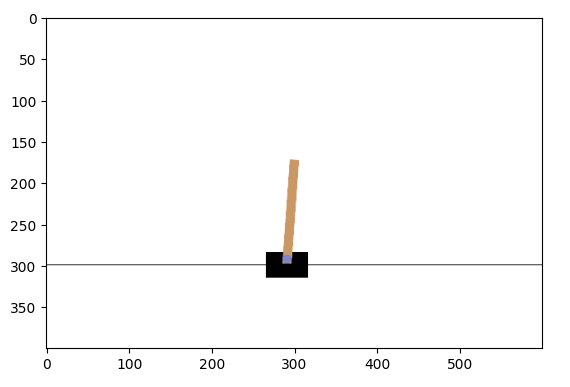
The gym library offers several predefined environments that mimic different physical and abstract scenarios. For our tutorial, we will use the "CartPole-v1" environment. This scenario involves a pole attached by an un-actuated joint to a cart, which moves along a frictionless track. The system is controlled by applying a force of +1 or -1 to the cart, and the goal is to prevent the pole from falling over.
Here's how to set up the environment:
import gym

# Create the environment
env = gym.make('CartPole-v1')
Visualizing the Environment
To visualize the environment, we use matplotlib to render the state of the environment at each time step. This allows us to observe how the position of the cart and the angle of the pole change over time in response to the agent's actions.
import matplotlib.pyplot as plt
from IPython import display

# Start the environment
state = env.reset()

img = plt.imshow(env.render(mode='rgb_array'))  # Only call this once

for _ in range(1000):
    img.set_data(env.render(mode='rgb_array'))  # Just update the data
    display.display(plt.gcf())
    display.clear_output(wait=True)

    # Take a random action
    action = env.action_space.sample()
    state, reward, done, _ = env.step(action)

    if done:
        state = env.reset()
In the code above, we initiate a loop where the environment is rendered at each step, and a random action is selected from the environment's action space. If the pole falls (i.e., the episode ends), we reset the environment.
Closing the Environment
After running your experiments, it is good practice to close the environment. This frees up system resources:
env.close()
Interact with Environments in Reinforcement Learning Using Python's Gym Library
import gym
import matplotlib.pyplot as plt
from IPython import display

# Create the environment
env = gym.make('CartPole-v1')

# Start the environment
state = env.reset()

img = plt.imshow(env.render(mode='rgb_array'))  # Only call this once
for _ in range(1000):
    img.set_data(env.render(mode='rgb_array'))  # Just update the data
    display.display(plt.gcf())
    display.clear_output(wait=True)
    action = env.action_space.sample()  # your agent here (this takes random actions)
    state, reward, done, _ = env.step(action)

    if done:
        state = env.reset()

env.close()
Output:
Conclusion
The gym library provides a powerful, yet simple, way to get started with reinforcement learning in Python. By visualizing the agent's interaction with the environment, we can gain insights into the learning process and make necessary adjustments to our algorithms. Experiment with different environments and configurations to explore the vast capabilities of reinforcement learning.
