
Morphology is known as the broad set of image processing operations that process images based on shapes. It is also known as a tool used for extracting image components that are useful in the representation and description of region shape.
The basic morphological operations are:
- Erosion
- Dilation
Dilation:
- Dilation expands the image pixels i.e. it is used for expanding an element A by using structuring element B.
- Dilation adds pixels to object boundaries.
- The value of the output pixel is the maximum value of all the pixels in the neighborhood. A pixel is set to 1 if any of the neighboring pixels have the value 1.
Approach:
- Read the RGB image.
- Using function im2bw(), convert the RGB image to a binary image.
- Create a structuring element or you can use any predefined mask eg. special('sobel').
- Store the number of rows and columns in an array and loop through it.
- Create a zero matrix of the size same as the size of our image.
- Leaving the boundary pixels start moving the structuring element on the image and start comparing the pixel with the pixels present in the neighborhood.
- If the value of the neighborhood pixel is 1, then change the value of that pixel to 1.
Example:
% MATLAB code for Dilation
% read image

I=imread('lenna.png');

% convert to binary
I=im2bw(I);

% create structuring element
se=ones(5, 5);

% store number of rows in P and
% number of columns in Q.
[P, Q]=size(se);

% create a zero matrix of size I.
In=zeros(size(I, 1), size(I, 2));

for i=ceil(P/2):size(I, 1)-floor(P/2)
    for j=ceil(Q/2):size(I, 2)-floor(Q/2)

        % take all the neighbourhoods.
        on=I(i-floor(P/2):i+floor(P/2), j-floor(Q/2):j+floor(Q/2));

        % take logical se
        nh=on(logical(se));

        % compare and take minimum value of the neighbor
        % and set the pixel value to that minimum value.
        In(i, j)=max(nh(:));
    end
end

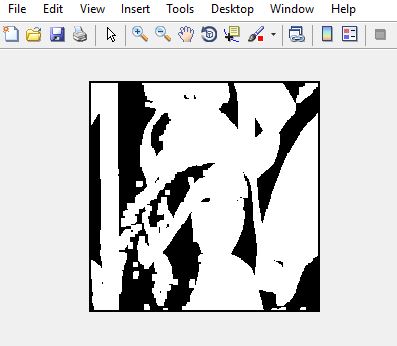
imshow(In);
Output:

Let's take another example for dilation.
Syntax:
- imread() function is used to read the image.
- strel() function is used to define the structuring element. We have chosen a disk-shaped SE, of radius 5.
- imdialate() function is used to perform the dilation operation.
- imtool() function is used to display the image.
Example:
%  MATLAB code for Dilation
% read the image.
k=imread("dilation.png");

% define the structuring element.
SE=strel('disk',5);

% apply the dilation operation.
d=imdilate(k,SE);

%display all the images.
imtool(k,[]);
imtool(d,[]);

%see the effective expansion
% in original image
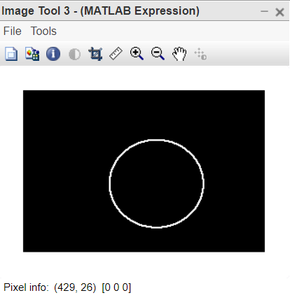
imtool(d-k,[]);
Output:
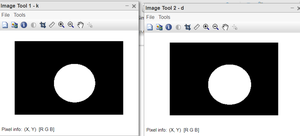
Code Explanation:
- k=imread("dilation_exmp.png"); this line reads the image.
- SE=strel('disk',5); this line defines the structuring element.
- d=imdilate(k,SE); this line applies the dilation operation.
- imtool(k,[]); this line displays the original image.
- imtool(e,[]); this line displays the dilated image.
- imtool(d-k,[]); this line shows the effective expansion in original image.
The last image shows the extent to which the original image got dilated. We have used the Structuring element of disk-shaped and the image we used is also circular in shape. This gives us the very desired output to understand erosion.
