
Evaluating the performance of machine learning models is a crucial step in the data science workflow. KNIME Analytics Platform provides a robust set of tools and nodes to help users test and evaluate their models effectively. This article will guide you through the process of testing and evaluating classification and regression models in KNIME, highlighting key nodes, techniques, and best practices.
Table of Content
Understanding Model Evaluation in KNIME
Model evaluation involves assessing the performance of a machine learning model using various metrics. In KNIME, this process is facilitated by a range of nodes and workflows designed to handle different aspects of model testing and validation. The primary goal is to ensure that the model generalizes well to new, unseen data, thereby providing accurate predictions.
KNIME is a data analytics low code or no code platform. The abbreviation for KNIME is Konstanz Information Miner. It helps users to manipulate, pre process, build and develop models with limited codes or no codes. Since KNIME is based on node interface it is also used to design workflows by simply drag and drop node feature.
KNIME is based on drag and drop feature, some features of KNIME are as follows:
- KNIME is supported on Windows, MAC and Linux.
- It can be integrated with popular Machine Learning Libraries like Keras, Scikit-Learning etc.
- Large number of nodes are available and each node is dedicated to a particular functionality.
Here we can drop the desired nodes and connect with one another to create an interactive workflow.
Integrating KNIME with Python
After downloading KNIME 5.3.2, we have to install Anaconda3 as well. Add Anaconda to the path as well. Now to integrate KNIME with Python follow the steps:
1. Click on the Menu Option Present on Right Side.

2. Click on Install Extensions Present in the Menu
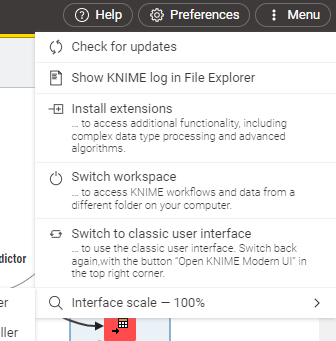
3. Add Python with Conda and Scripting Extension
Now a dialogue box will open. In the search bar, type Python and click on the checkboxes that include Conda. Add the Python Scripting Extension as well.

Setting Up a Model Evaluation Workflow in KNIME
Before diving into model evaluation, it's essential to set up your workflow correctly. A node is the smallest unit in KNIME. Each Node has some functionality. Some node functionalities are as follows:
- CSV Reader: used to read CSV files.
- Partitioning: Divide the data into train and test.
- X-Partitioner: Used to define the cross validation set.
- ML_Model Learner: Here ML_Model denotes any Machine Learning Model like Decision Tree, Random Forest, Logistic Regression etc. Learner means it learns from the training data.
- ML_model Predictor: As the name suggests, now the model performs prediction on testing data.
- Scorer: Calculate the metrics like precision, recall and Accuracy.
- CSV Writer: Write to CSV file.
- Model Writer: Store the model weights in the file.
Basic Algorithm that we will follow:
1. Import and split Data into Train and Test
2. Generate folds of the dataset
3. Train Model
4. Test Model.
5. Calculate Score
6. Save
1. Splitting Data into Train and Test Sets
Now we will use the Iris dataset and create a Machine Learning Model that will classify based on features whether it is setosa, virginica or versicolor. Download the Iris dataset. After downloading the csv file, in the left side of the node section on the search box click on CSV Reader.
Then use the Partitioning node, establish a connection between CSV Reader and Partitioning Node. Double click on the partition node and specify the relative percent as 80. This will divide the dataset in the ratio 80:20.
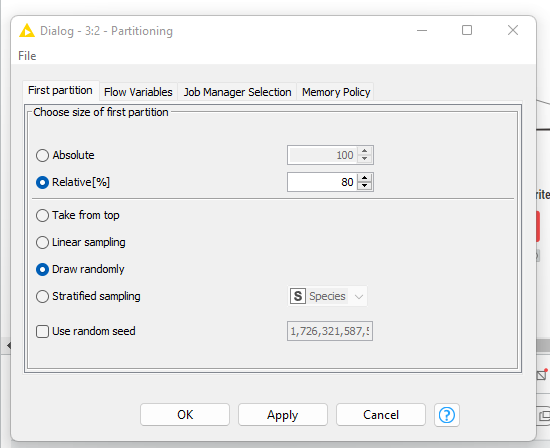
2. Cross Validation in KNIME
Cross Validation is a process in which we divide the data into folds so as to improve the predictive power of the model. In KNIME we can define the folds that are required for Cross Validation. Just drag and drop the X-Partitioner in the workspace, double click and specify the cross validation. Here we have used 5 folds.
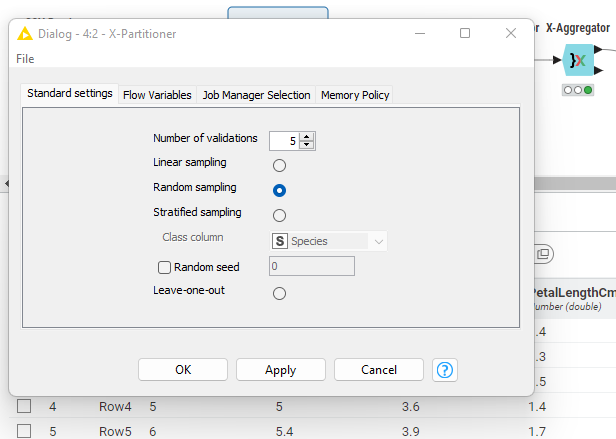
3. Training Model In Knime
Here we have used Decision Tree Learner Node. Decision Tree is a supervised learning algorithm. It is used for classification and regression as it divides the features into subsets and forms a tree. Then on the basis of condition it performs prediction. Double click on the Decision tree learner to tune the hyperparameters.
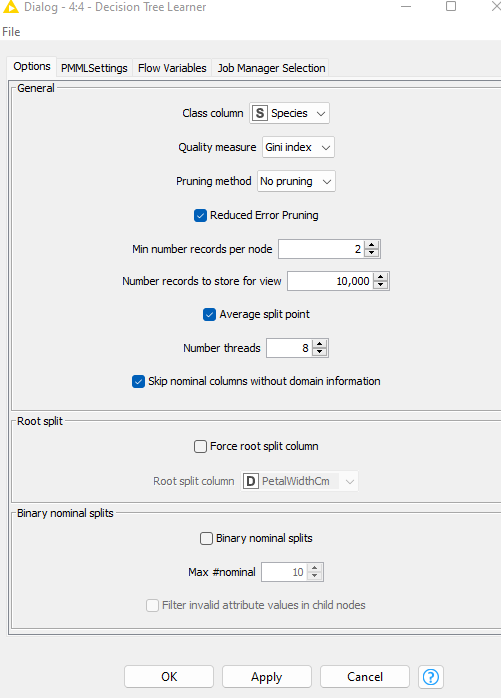
4. Testing the Model and Evaluation
Now we will use the predictor model and connect it with the Decision Learner model. Here the input is the output of the X-Aggregator that is the rest 20%. Now the output of the Predictor model is passed through X-Aggregator. Here we are combining the multiple predictions that has been generated from the folds and are passing to the Scorer model for ultimate prediction.
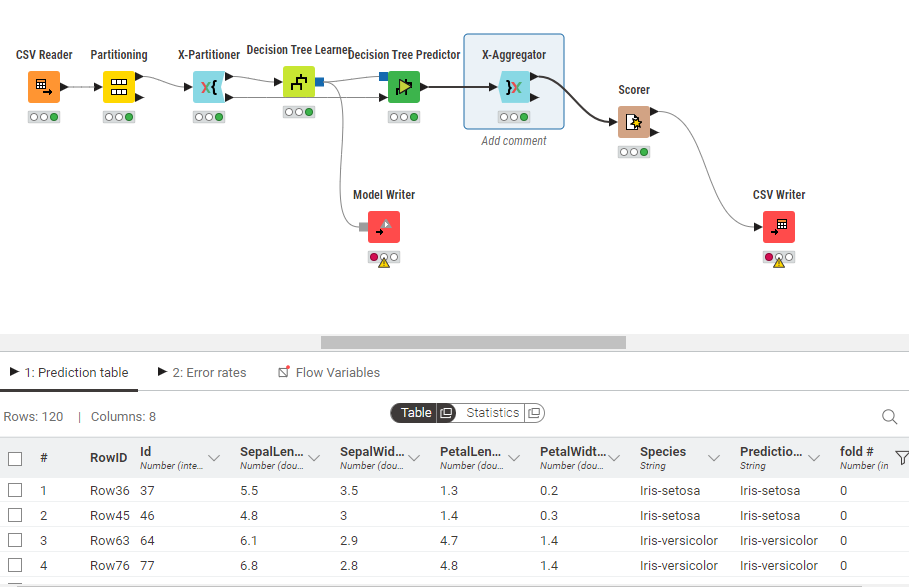
For evaluation, we use the Scorer node which generated Confusion matrix, precision, recall and the net accuracy. Here the net accuracy of the testing data is 99.2%. Finally we save the results using CSV Writer.
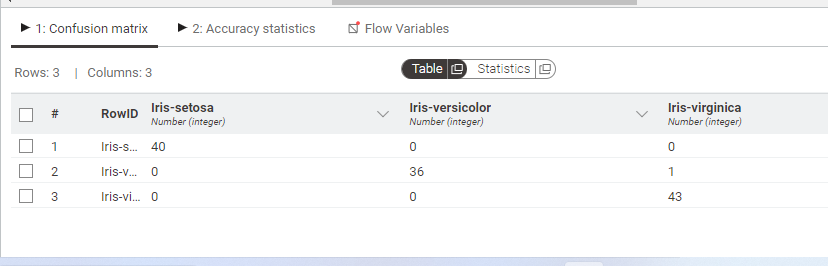
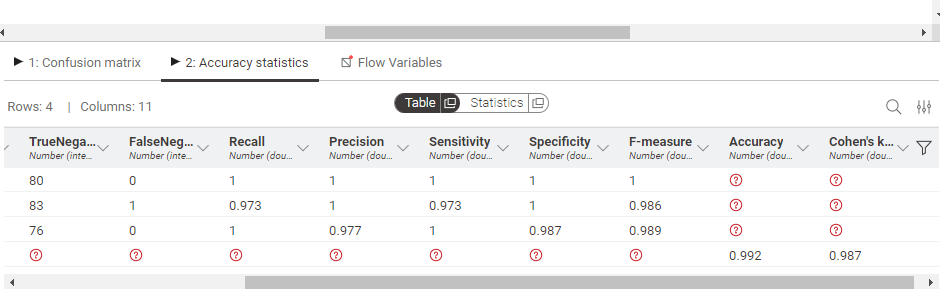
As we can see the accuracy of our model is 99.2%
5. Optimizing the Model in KNIME
In KNIME we can manually adjust the Hyperparameters. For instance in Decision tree Leaner by simply double clicking we can set the parameters like Pruning, minimum number of records per node etc. We can also set the iteration limit in the Flow variable section if required.
Saving and Exporting Model results
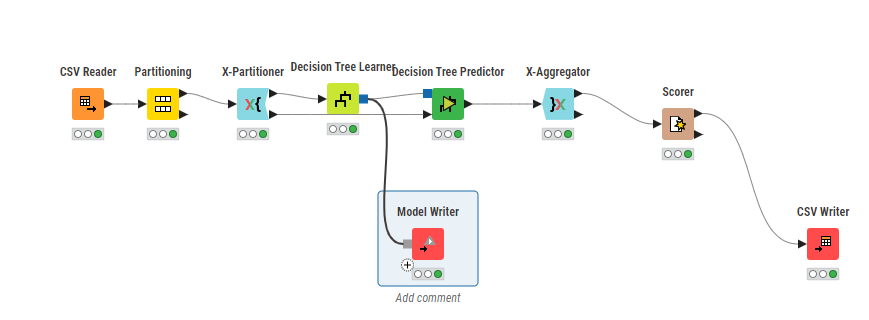
For saving the model weights which have been generated during model training, click on the node Model Writer. First it will show red because it needs the path where the model is to be stored. Double click on the node and specify the location where your file is to be saved. Click on Apply and the model will be saved with the extension .model.
For generating confusion matrix simply click on CSV Writer. Specify the location and click on apply. The CSV file will be saved. To export the KNIME workspace, switch to classic mode, click on File and click on export KNIME workflow.
Conclusion
Testing and evaluating models in KNIME is a comprehensive process that involves various steps and considerations. By leveraging KNIME's robust set of tools and best practices, data scientists can ensure that their models are not only accurate but also reliable and applicable to real-world scenarios.
Whether through manual workflows or automated processes, KNIME provides the flexibility and power needed for effective model evaluation.
