
Mongoose is an effective Object Data Modeling (ODM) library for Node.js and MongoDB. One of its key features is its ability to define schema types with various validations. Mongoose SchemaType.prototype.validators provides a means by which developers can access and interact with validators that have been used in defining particular paths in the schema. In this article, we will describe the use of this property, provide real-life examples, and discuss how it ensures data integrity.
What is the SchemaType.prototype.validators Property?
The validators property of a Mongoose schema type enables you to get all the validation functions used on a specific path in the schema. This can be handy for debugging, modifying validations, or learning the validation rules for every field in your Mongoose schema.
By visiting this property, you are able to examine and even change the in-built or user-defined validators used on fields. This ensures your data is up to the requirement before it is saved to the database, enhancing data integrity and diminishing errors within your application.
Syntax:
SchemaType.prototype.validators
How to Set Up Mongoose and Install Dependencies
Step 1: Create a Node.js Application
To begin with, create a new Node.js app using the following commands
mkdir folder_name
cd folder_name
npm init -y
touch main.js
Step 2: Install Mongoose
After completing the Node.js application, Install the required module using the following command:
npm install mongooseStep 3: Project Structure

Example 1: Using validators Property to Log Validators on a Path
In this example, we will use this method to log the validators applied on the "name" field in the Mongoose schema.
Filename: main.js
// Importing the module
const mongoose = require('mongoose')

// Creating the connection
mongoose.connect('mongodb://localhost:27017/query-helpers',
    {
        dbName: 'event_db',
        useNewUrlParser: true,
        useUnifiedTopology: true
    }, err => err ? console.log(err)
        : console.log('Connected to database'));

const personSchema = new mongoose.Schema({
    name: {
        type: String,
        required: true
    },
    age: {
        type: Number,
    }
});

const Person = mongoose.model('Person', personSchema);

(async () => {
    const validators = personSchema.path('name').validators
    console.log({ validators });
})()
Step to Run Application: Run the application using the following command from the root directory of the project:
node main.jsOutput:
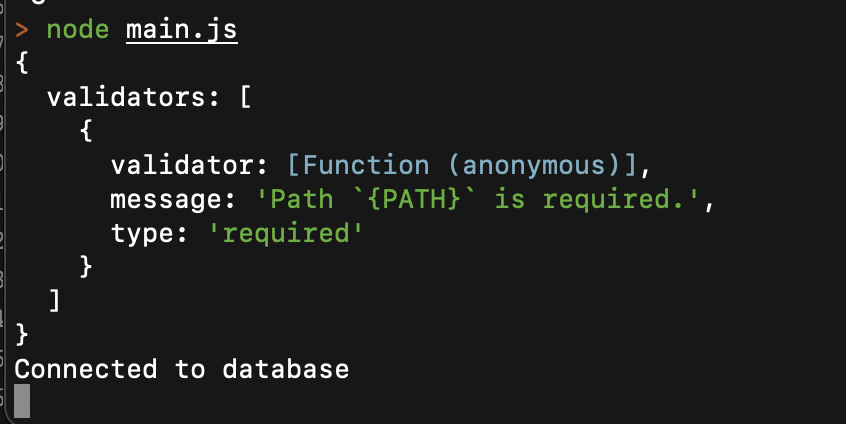
Explanation: In this example, we are defining a name field with a required validator. When we access the validators property on the name path, we can see the validation rule in the output.
Example 2: Using the Validators Property to Validate Age
In this example, we will use this method to validate a particular age using the validators applied on the "age" mongoose schema path.
Filename: main.js
// Importing the module
const mongoose = require('mongoose')

// Creating the connection
mongoose.connect('mongodb://localhost:27017/query-helpers',
    {
        dbName: 'event_db',
        useNewUrlParser: true,
        useUnifiedTopology: true
    }, err => err ? console.log(err)
        : console.log('Connected to database'));

const personSchema = new mongoose.Schema({
    name: {
        type: String,
    },
    age: {
        type: Number,
        min: 20
    }
});

const Person = mongoose.model('Person', personSchema);

(async () => {
    const validators = personSchema.path('age').validators
    const res = validators[0].validator(28)
    console.log({res});
})()
Step to Run Application: Run the application using the following command from the root directory of the project:
node main.jsOutput:

Explanation: In this case, we have used a min validator on the age field to make sure that the value is 20 or more. We manually test the validator using the value 28, which returns true, indicating the value passes the validation.
Conclusion
Mongoose SchemaType.prototype.validators property is a very handy function used for viewing and knowing the validation rules that are used for a schema path. It allows you to see all validators specified for a certain field, and it helps in debugging and personalizing the process of validation. By using this feature, you can enhance your understanding of Mongoose's validation system and ensure that you can easily manage and troubleshoot validation rules to meet specific requirements of the application.
