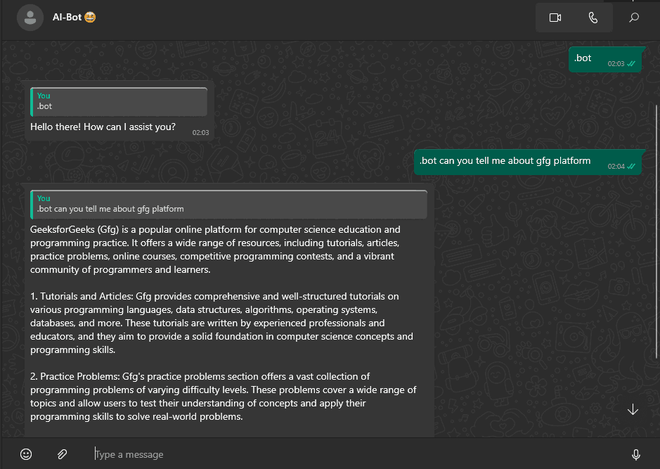
This WhatsApp bot is powered by Gemini AI API, where you can chat with this AI bot and get the desired result from the Gemini AI model. This bot can be used in groups or personal chats and only needs to be authenticated using the mobile WhatsApp app.
Prerequisites
- Node JS
- Whatsapp-web.js
- Gemini API KEY
Approach
This system implements a backend-only WhatsApp bot that integrates real-time messaging with AI-generated responses.
- Leverage WhatsApp Web protocol via whatsapp-web.js without building a frontend.
- Develop a Node.js server to handle sending and receiving messages.
- Authenticate users by scanning a QR code using their WhatsApp account.
- Integrate Gemini API to generate AI-based responses from user prompts.
- Process incoming messages, forward them to the API, and send the generated response back to the user.
Steps to build AI WhatsApp Bot
Follow these steps to set up and implement an AI-powered WhatsApp bot using Node.js.
Step 1: Initialize Node.js Application
Create a new Node.js project:
npm init -yStep 2: Install Required Packages
Install the core dependencies:
npm install whatsapp-web.js @google/generative-ai qrcode-terminal- whatsapp-web.js: Interface to interact with WhatsApp Web
- @google/generative-ai: Gemini API for AI responses
- qrcode-terminal: Displays QR code in terminal for authentication
Additional Setup (Non-Windows Systems)
For Linux/macOS, install Puppeteer and required system dependencies:
npm install puppeteerProject Structure:
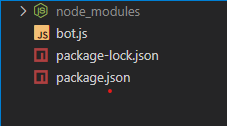
The updated dependencies in package.json file will look like:
"dependencies": {
    "@google/generative-ai": "^0.2.1",
    "qrcode-terminal": "^0.12.0",
    "whatsapp-web.js": "^1.23.0"
}
Step 3: Configure Gemini API & Create Bot
Obtain your Gemini API Key and integrate it into your Node.js application.
Create bot.js File (Windows Setup)
Add the following code:
//For Window User bot.js

//Importing All Necessary Packages
const { Client, LocalAuth } = require('whatsapp-web.js');
const qrcode = require('qrcode-terminal');
const { GoogleGenerativeAI } = require('@google/generative-ai');

//Creating instances
const genAI = new GoogleGenerativeAI('API-KEY');
const client = new Client({
    authStrategy: new LocalAuth(),
});

//Initializing GenAI model
const model = genAI.getGenerativeModel({ model: "gemini-pro" });


//Function to generate reponse from AI model and reply to user
async function generate(prompt, message) {

    const result = await model.generateContent(prompt);
    const response = await result.response;
    const text = response.text();

    await message.reply(text); //Reply to user
}


//All event listener to know client status
client.on('qr', (qr) => {
    qrcode.generate(qr, { small: true });
});

client.on('authenticated', () => {
    console.log('Client is authenticated!');
});

client.on('ready', () => {
    console.log('Client is ready!');
});

client.on('disconnected', () => {
    console.log('Client is disconnected!');
});

client.on('auth_failure', () => {
    console.log('Client is auth_failure!');
});


client.on('message', async (message) => {

    if (message.body.includes('.bot')) {

        var query;
        //Extracting text from message body using regular expression method
        const regxmatch = message.body.match(/.bot(.+)/);

        //If no text followed by .bot then we use "Hi" as text
        if (regxmatch) {
            query = regxmatch[1];
        }
        else {
            console.log("No regex match!");
            query = "Hi";
        }

        //Call the generate function
        generate(query, message);
    };

});

client.initialize();
//For Non-Window User Bot.js

const { Client, LocalAuth } = require('whatsapp-web.js');
const qrcode = require('qrcode-terminal');
const { GoogleGenerativeAI } = require('@google/generative-ai');

const genAI = new GoogleGenerativeAI(API_KEY);
const client = new Client({
    authStrategy: new LocalAuth(),
    puppeteer: {
        executablePath: '/usr/bin/google-chrome-stable',
        args: ['--no-sandbox', '--disable-setuid-sandbox'],
    },
});


const model = genAI.getGenerativeModel({ model: "gemini-pro" });


async function generate(prompt, message) {

    const result = await model.generateContent(prompt);
    const response = await result.response;
    const text = response.text();

    await message.reply(text);
}

client.on('qr', (qr) => {
    qrcode.generate(qr, { small: true });
});

client.on('authenticated', () => {
    console.log('Client is authenticated!');
});

client.on('ready', () => {
    console.log('Client is ready!');
});

client.on('disconnected', () => {
    console.log('Client is disconnected!');
});

client.on('auth_failure', () => {
    console.log('Client is auth_failure!');
});


client.on('message', async (message) => {

    if (message.body.includes('.bot')) {

        var query;

        const regxmatch = message.body.match(/.bot(.+)/);

        if (regxmatch) {
            query = regxmatch[1];
        }
        else {
            console.log("No regex match!");
            query = "Hi";
        }

        generate(query, message);
    };

});

client.initialize();
To start the application run the following command:
node bot.jsAuthenticate the server
- A QR code will appear in the terminal.
- Scan it using your WhatsApp mobile app.
- Your bot will be connected to that number.
Output: